

dtg is a date and time command line utility with a companion library.
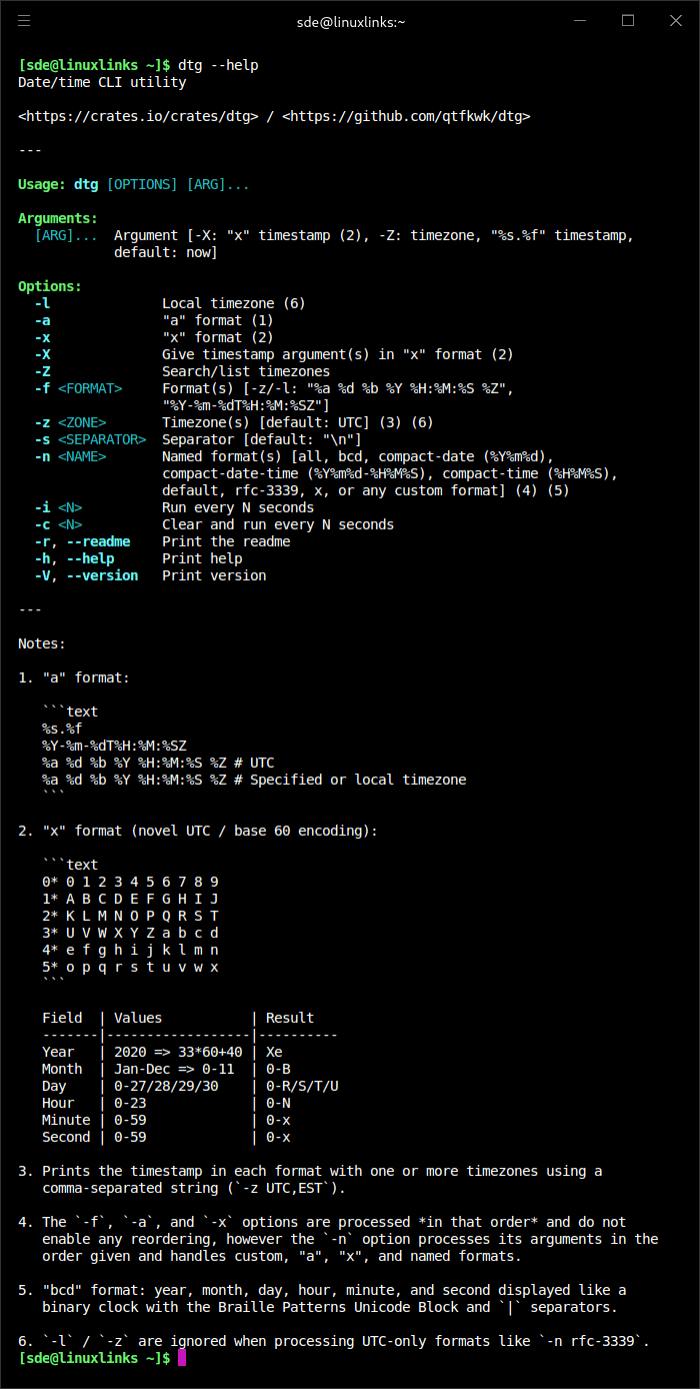
It lets you print the current time or supplied values in multiple output styles, work with UTC, local time, or explicitly selected time zones, and format results with RFC 3339, custom format strings, or named presets. It also includes timezone lookup support and a distinctive base-60 “x” timestamp format.
This is free and open source software.
Key Features
- Formats current or supplied date and time values from the command line.
- Supports UTC, local time, and explicitly selected time zones, including multiple zones at once.
- Offers RFC 3339 output, custom format strings, and named presets.
- Can search and list time zones from the command line.
- Includes continuously updating display modes, with optional screen clearing.
- Provides both a command line crate and a reusable library crate.
- Supports the project’s novel base-60 “x” timestamp format.
Website: github.com/qtfkwk/dtg
Support:
Developer: qtfkwk
License: MIT License
dtg is written in Rust. Learn Rust with our recommended free books and free tutorials.
Related Software
| Alternatives to date | |
|---|---|
| datemath | Date and time math utility |
| rdate | Retrieve date and time from other machines |
| qtime | Clock coded in Rust |
| hodie | The classic Latin replacement for date |
| bttf | datetime arithmetic, parsing, formatting |
| dateutils | Collection of command line utilities |
| dtg | date/time CLI utility and library |
 LinuxLinks helps you discover the best free and open source software for Linux. Explore our extensive collection of recommended applications, including alternatives to popular proprietary software. We also publish software reviews, Linux tutorials, hardware reviews, free programming books and articles covering the wider open source community. Browse our Linux resources to discover more. Know a useful free and open source Linux application we haven't covered? Suggest a program for inclusion. Has your software been featured on LinuxLinks? Display one of our Featured on LinuxLinks badges on your website or GitHub README. |
Please read our Comment Policy before commenting.