
Last Updated on July 10, 2021
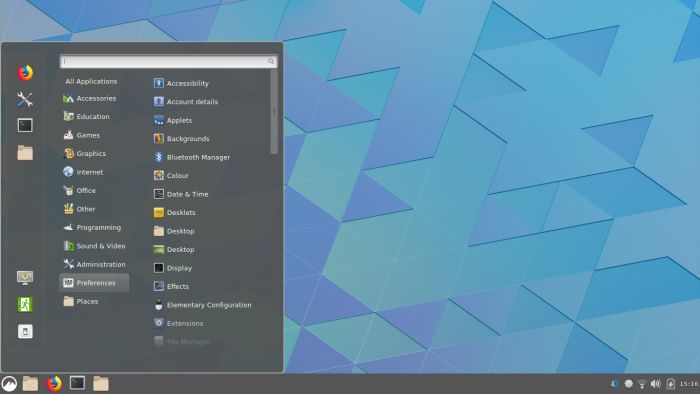
Cinnamon is a Linux desktop which provides advanced innovative features and a traditional user experience.
The desktop layout is similar to Gnome 2 with underlying technology forked from Gnome Shell.
Cinnamon makes users feel at home with an easy to use and comfortable desktop experience.
Features include:
- Desktop effects, including animations, transition effects and transparency using composition.
- Panels equipped with a main menu, launchers, a window list and the system tray can be adjusted on left, right, upper or lower edge of the screen.
- Various extensions.
- Applets that appear on the panel.
- Overview with functions similar to that in GNOME Shell.
- Settings editor for easy customization. It can customize:
- The panel.
- The calendar.
- Themes.
- Desktop effects.
- Applets.
- Extensions.
Website: github.com/linuxmint/Cinnamon
Support: Addons Repository
Developer: Linux Mint team
License: GNU General Public License, version 2 or later
Cinnamon is written in JavaScript and C. Learn JavaScript with our recommended free books and free tutorials. Learn C with our recommended free books and free tutorials.
Return to Desktop Environments Home Page
| Explore Linux | |
|---|---|
 | Best Free and Open Source Software - A huge collection of recommended free and open source software covering every major category. |
 | In-depth Linux Software Reviews - Detailed assessments of Linux software covering features, usability and overall quality. |
 | The Big List of Active Linux Distros - An extensive collection of actively developed Linux distributions. |
 | Open Source Alternatives - Alternatives to software and services from Google, Microsoft, Apple, Adobe, IBM, Autodesk, Oracle and others. |
 | Essential Linux System Tools - Indispensable utilities for monitoring, maintaining and managing Linux systems. |
 | Linux Productivity Tools - Useful utilities for improving productivity and streamlining everyday tasks. |
 | Alternatives to Popular CLI Tools - Modern alternatives to familiar command-line utilities supplied with Linux systems. |
 | Awesome Free Linux Game Tools - Tools, utilities and companion software that improve gaming on Linux. |
 | Machine Learning on Linux - Machine learning and deep learning software, self-hosted applications and practical tools. |
 | Saving Money with Linux - Practical ways to reduce electricity consumption and lower computing costs with Linux. |
 | Linux Candy - Fun, entertaining and sometimes delightfully quirky software from the lighter side of Linux. |
Please read our Comment Policy before commenting.
When I first started out in Linux, KDE was my DE of choice, then a few years ago KDE started having issues. I was having way too many “lost time” problems, so I started testing various DE’s and found Cinnamon. I fell in love with it. Everything about the Cinnamon DE is exactly as I like it. To me, it’s Gnome 3 as it SHOULD be. Now there is no turning back to anything else.