
Last Updated on November 13, 2022
ChessDB is a popular free chess database.
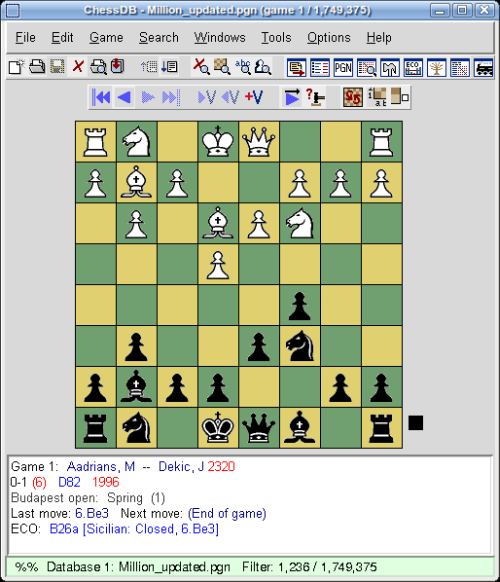
With ChessDB, you can maintain a database of chess games, search games by many criteria, view graphical trends and produce printable reports on players and openings. There are many more features (see below).
ChessDB is based on Scid, but has some bug fixes and other changes to improve upon it.
ChessDB uses a fast, compact and efficient three-file format for chess databases, with the file extensions .si3, .sg3 and .sn3.
Features include:
- Enter games by either:
- Moving the pieces with a mouse.
- Typing in the moves from a keyboard 1.e4 etc.
- Read games from a PGN file – the standard used for chess games. (In ChessDB 3.6.13 and later, it is possible to read all the PGN files in one directory, making it quick to import a lot of games).
- Download them directly into ChessDB from The Week in Chess (TWIC).
- Import games from the history of anyone on ICC and FICS – you can rapidly download the recent games played by people whose games you wish to study.
- A combination of the 6 above.
- Annotate the games by adding:
- Text comments.
- Add standard symbols such as !! (excellent move), ?? (blunder), =+ (black as a slight advantage) etc.
- Add coloured symbols to games, to indicate whatever you want. Lots of different symbols may be used, and lots of different colours.
- Variations showing different lines which may have been interesting.
- Analyse a position with GM strength chess engines such as Crafty and Toga.
- Create Tournament Crosstables.
- Play against many different chess engines from very weak ones to strong chess engines such as Crafty and Toga II.
- UCI engine support.
- Play two chess engines each other to find the strongest.
- Save games in either:
- Standard PGN format.
- HTML (for web pages).
- LaTeX (a high quality DTP/typesetting format).
- Set the pieces on the chessboard then use the Board Search tool to find games in a database which have either the
- Exact position – (all pieces on the same squares).
- Pawns – same material, all pawns in the same position.
- Same material, all pawns on the same files.
- Same material and pawns, but they can be anywhere on the board.
- Generate a rating graph showing the rating vs time of a player.
- Generate a player report, showing statistics of a single player with either the Black or White pieces.
- Classify games according to self defined criteria. (For example, rook endings, games with blunder, games with isolated queens pawn etc).
- Email games for correspondence chess, using the built in email client.
- Use the Header Search tool to find games with specific data in the header, such as:
- Player names.
- Player titles – GM, IM, FW, WGM, WFM, W.
- Event.
- Site.
- Round.
- Result.
- Date or range of dates.
- ECO code.
- and many other search criteria.
- Answer questions like: Is it worth spending much time to study the move 4.Bd2 in the Nimzo Indian defence? The answer is it depends since GMs play 4.Bd2 in less than 0.5% of games with the Nimzo Indian, but players on ICC of about 1400 play it 40% of the time. Such data is useful.
- Statistical significance of chess moves using hypothesis testing.
Website: chessdb.sourceforge.net
Support: FAQ
Developer: David Kirkby, Shane Hudson
License: GNU GPL v2
ChessDB is written in C++. Learn C++ with our recommended free books and free tutorials.
| Explore Linux | |
|---|---|
 | Best Free and Open Source Software - A huge collection of recommended free and open source software covering every major category. |
 | In-depth Linux Software Reviews - Detailed assessments of Linux software covering features, usability and overall quality. |
 | The Big List of Active Linux Distros - An extensive collection of actively developed Linux distributions. |
 | Open Source Alternatives - Alternatives to software and services from Google, Microsoft, Apple, Adobe, IBM, Autodesk, Oracle and others. |
 | Essential Linux System Tools - Indispensable utilities for monitoring, maintaining and managing Linux systems. |
 | Linux Productivity Tools - Useful utilities for improving productivity and streamlining everyday tasks. |
 | Alternatives to Popular CLI Tools - Modern alternatives to familiar command-line utilities supplied with Linux systems. |
 | Awesome Free Linux Game Tools - Tools, utilities and companion software that improve gaming on Linux. |
 | Machine Learning on Linux - Machine learning and deep learning software, self-hosted applications and practical tools. |
 | Saving Money with Linux - Practical ways to reduce electricity consumption and lower computing costs with Linux. |
 | Linux Candy - Fun, entertaining and sometimes delightfully quirky software from the lighter side of Linux. |
Please read our Comment Policy before commenting.