
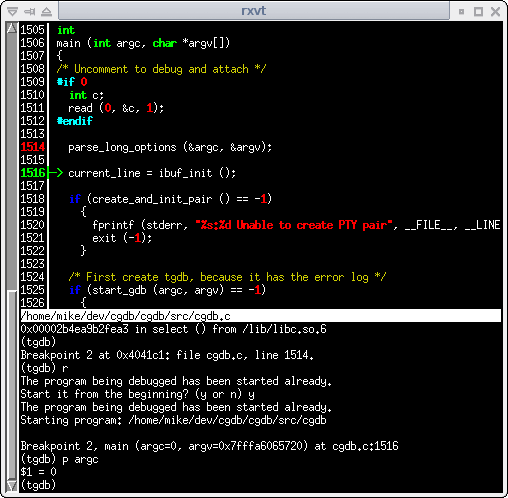
CGDB is a lightweight terminal-based interface to the GNU Debugger (GDB). It makes source-level debugging more convenient by combining a visual source-code display with access to the traditional GDB command interface.
The screen is divided into separate areas, with source code displayed above the debugger console. As a program executes, developers can follow its progress through the source while retaining access to GDB’s debugging facilities.
CGDB takes inspiration from the Vim text editor, making its keyboard-driven interface particularly familiar to developers who regularly work in terminal environments. It provides a visual alternative to using GDB alone without requiring a complete graphical development environment.
This is free and open source software.
Key Features
- Provides a split-screen terminal interface displaying source code alongside the GDB command console.
- Uses syntax highlighting to make program source easier to read during debugging sessions.
- Offers a dedicated assembly view for examining machine instructions.
- Allows breakpoints to be set visually while navigating the source-code window.
- Provides keyboard shortcuts for common debugging operations, reducing reliance on repeatedly entering commands.
- Supports Vim-inspired navigation for moving through source files and controlling the interface.
- Search source code using regular expressions to locate relevant functions and statements.
- Maintains a scrollable history of GDB commands and output throughout the debugging session.
- Supports command completion to simplify interaction with the underlying debugger.
- Allows users to define custom key mappings and macros to suit their debugging workflow.
- Retains the standard GDB console for commands and operations that are not exposed through the visual interface.
- Combines source navigation and command-driven debugging within a single terminal session.
Website: github.com/cgdb/cgdb
Support:
Developer: Bob Rossi, Mike Mueller, Michael Sartain
License: GNU General Public License v2.0
CGDB is written in C and C++. Learn C with our recommended free books and free tutorials. Learn C++ with our recommended free books and free tutorials.
Related Software
| Debuggers | |
|---|---|
| LLDB | Next generation, high-performance debugger |
| Ghidra | Software reverse engineering framework |
| Delve | Source level debugger for the Go programming language |
| GDB | The GNU Debugger |
| Valgrind | A memory debugger and profiler |
| Radare2 | Portable reversing framework |
| BugStalker | Rust debugger |
| Xdebug | Extension for PHP to aid debugging and development |
| Seer | GUI frontend to GDB |
| iaito | Graphical interface for radare2 |
| KDbg | Graphical user interface to GDB |
| strace | Diagnostic, debugging and instructional userspace utility |
| rr | Record-and-replay debugger |
| gf | Lightweight GDB interface with source, stack and memory views |
| drgn | Programmable debugger that puts scripting at the centre |
| cgdb | Lightweight console frontend to the GNU debugger |
| PuDB | Console-based visual debugger for Python |
| nnd | Partially inspired by RemedyBG |
| bashdb | Source-code debugger for bash; follows the GDB command syntax |
| PINCE | Memory scanning, process manipulation and reverse engineering |
| edb | Low-level debugging with disassembly and register inspection |
| Sysprof | Profile an application or entire system |
| crash | Linux kernel crash analysis utility |
Read our verdict in the software roundup.
 LinuxLinks helps you discover the best free and open source software for Linux. Explore our extensive collection of recommended applications, including alternatives to popular proprietary software. We also publish software reviews, Linux tutorials, hardware reviews, free programming books and articles covering the wider open source community. Browse our Linux resources to discover more. Know a useful free and open source Linux application we haven't covered? Suggest a program for inclusion. Has your software been featured on LinuxLinks? Display one of our Featured on LinuxLinks badges on your website or GitHub README. |
Please read our Comment Policy before commenting.