
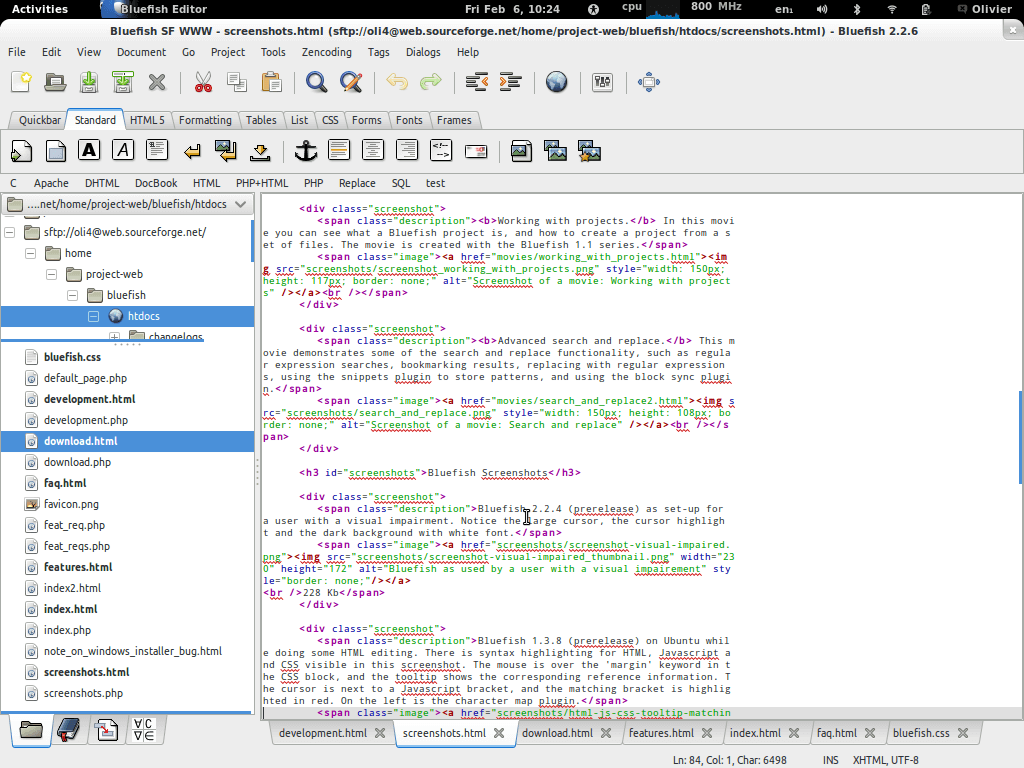
Bluefish is a powerful editor aimed at programmers and web designers, with many options to write websites, scripts and programming code.
Bluefish supports many programming and markup languages, and focuses on editing dynamic and interactive websites.
Bluefish is not a WYSIWYG text editor. Syntax highlighting, advanced search/replace functionality, scalability and language function references help to make Bluefish a useful tool for development.
The software has been in development since 1997, and was originally called Thtml editor.
What makes Bluefish particularly attractive is that it is very easy to learn.
Key Features
- Lightweight – Bluefish tries to be lean and clean.
- Fast – Bluefish loads tens of files within seconds.
- Multiple document interface, easily opens 500+ documents.
- Open files recursively based on filename patterns and/or content.
- Wizards for startup, tables, frames, and others.
- Project support, enabling you to work efficiently on multiple projects.
- Support for remote files using gnome-vfs.
- Powerful search and replace, allowing POSIX and Perl. Compatible regular expressions and sub-pattern replacing.
- Unlimited undo/redo functionality.
- Customizable syntax highlighting based on Perl
- Compatible regular expressions, with subpattern support and default patterns for Python,
HTML, PHP, C, Java, JavaScript, JSP, SQL, XML, Perl, CSS, ColdFusion, Pascal, R, and Octave/MATLAB. - Anti aliased text window.
- Multiple encodings support. Bluefish works internally with UTF8, but can save your documents in any desired encoding.
- Line numbers along the document, bookmarks in documents and a search function.
- HTML toolbar and tearable menus.
- Compliance with the GNOME and KDE user interface guidelines where possible.
- User customizable integration of many programs, including make, lint, weblint, xmllint, tidy, javac, or your own program.
- User customizable integration of many external filters, pipe your document (or just the current selected text) through sort, sed, awk or any custom script.
- Function reference browser, including reference files for PHP, CSS, Python and HTML.
- Complete translations in Brazilian Portuguese, Bulgarian, Chinese, Danish, Finnish, French, German, Hungarian, Italian, Norwegian, Polish, Portuguese, Russian, Spanish, Swedish and Tamil. Some other languages are partially supported.
Website: bluefish.openoffice.nl
Support: Wiki, Manual
Developer: Bluefish Development Team
License: GNU General Public License v3.0
Bluefish is written in C. Learn C with our recommended free books and free tutorials.
Related Software
| HTML Editors | |
|---|---|
| Zed | Fast, multiplayer code editor built for serious development |
| VSCodium | VS Code binaries without Microsoft branding or telemetry |
| Bluefish | Powerful editor for writing websites, scripts and programming code |
| NetBeans | Java based integrated development environment |
| Pulsar | Community-led Atom continuation for highly customizable editing |
| SeaMonkey | All-in-one internet application suite |
| Phoenix Code | Browser-based editor with live preview and collaborative coding |
| Webstudio | Visual website builder aimed at open, code-friendly design |
| Geany | Lightweight IDE offering speed, simplicity, and broad language support |
| Kate | KDE’s powerful text editor with sessions, projects, and plugins |
Read our verdict in the software roundup.
 Explore our carefully curated directory of recommended free and open source software, covering every major software category. Explore our carefully curated directory of recommended free and open source software, covering every major software category.The directory forms part of our extensive collection of articles for Linux enthusiasts. It includes hundreds of detailed reviews, together with free and open source alternatives to proprietary software from companies such as Google, Microsoft, Apple, Adobe, IBM, Cisco, Oracle, and Autodesk. LinuxLinks also covers interesting projects worth exploring, Linux-compatible hardware, free programming books and tutorials, and much more. Know a useful free and open source Linux application that we haven’t covered? Tell us about it using our submission form. |
Please read our Comment Policy before commenting.