
Last Updated on March 23, 2023
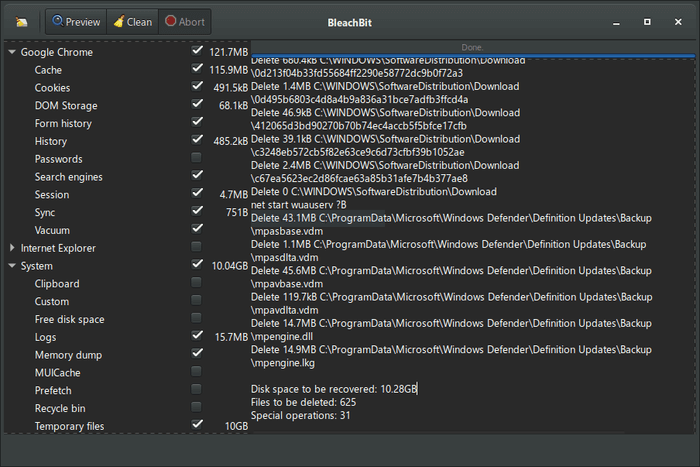
BleachBit deletes unnecessary files from the system to free valuable disk space, protect privacy, and remove junk. This software removes cache, Internet history, temporary files, cookies, and broken shortcuts.
BleachBit handles cleaning of Adobe Reader, Bash, Beagle, Epiphany, Firefox, Flash, GIMP, Google Earth, Java, KDE, OpenOffice.org, Opera, RealPlayer, rpmbuild, Second Life Viewer, Vim, XChat, and more (see below).
Beyond simply erasing junk files, BleachBit also wipes free disk space (to hide previously deleted files for privacy and to improve compression of images), vacuums Firefox databases (to improve performance without deleting data), and securely shreds arbitrary files.
Features include:
- Simple operation: read the descriptions, check the boxes
you want, click preview, and click delete - Shred files to hide their contents and prevent data recovery
- Shred any file (such as a spreadsheet on your desktop)
- Overwrite free disk space to hide previously deleted files
- Command line interface for scripting and automation
- CleanerML allows anyone to write a new cleaner using XML
- Frequent software updates with new features
- System:
- Cache: Delete the cache
- Clipboard: The desktop environment’s clipboard used for copy and paste operations
- Broken desktop files: Delete broken application menu entries and file associations
- Free disk space: Overwrite free disk space to hide deleted files
- Localizations: Delete files for unwanted languages
- Memory: Wipe the swap and free memory
- Recent documents list: Delete the list of recently used documents
- Rotated logs: Delete old system logs
- Temporary files: Delete the temporary files
- Trash: Empty the trash
- Full list of cleaners: Adanaxis, Adobe Reader, aMSN, aMule, APT, Audacious,
Bash, Beagle,Chromium, Downloader for X, Deep scan, EasyTAG, ELinks, emesene, Epiphany, Evolution, Exaile, Filezilla,Firefox, Flash, gedit, gFTP, GIMP, GL-117, GNOME, GNOME Art, Google Chrome, Google Earth, Google Toolbar, gPodder, Gwenview, Hippo OpenSim Viewer, Internet Explorer, Java, KDE, Konqueror, Liferea, Links 2, LiVES, Metacity, Microsoft Office, Midnight Commander, Miro, MySQL, Nautilus, Nexuiz, Notify OSD, OpenOffice.org, Opera, Paint, PDFedit, Phatch, Pidgin, PlayOnLinux, RealPlayer, Recoll, Rhythmbox, Safari, Screenlets, SeaMonkey, Second Life Viewer, Skype, SQLite, System logs, System, TeamViewer, Thumbnails, Thunderbird, TortoiseSVN, TortoiseSVN, Tremulous, Vim, Virt-Manager, VLC media player, Vuze / Azureus, The Battle for Wesnoth, Winamp, Windows Defender, Windows Explorer, Silverlight, WINE, winetricks, WinRAR, WinZip, WordPad, X11, XBMC Media Center, XChat, Xfce,Xine, X-Moto, Yahoo! Messenger, yum, and Zsh (some of the applications which are ‘unhyperlinked’ do not run natively in Linux) - Advanced cleaners:
- Delete broken shortcuts
- Delete the Firefox version 3 URL history without deleting the whole file, with optional shredding
- Delete localizations: delete languages you don’t
use - Clean APT for Debian, Ubuntu, Kubuntu, Xubuntu, and Linux Mint
- Find widely-scatted junk such as Thumbs.db and .DS_Store files
- Execute yum clean for CentOS, Fedora, and Red Hat to remove cached package data
- Delete Windows registry keys—often where MRU (most recently used) lists are stored
- Delete the OpenOffice.org recent documents list without deleting the whole Common.xcu file
- Overwrite free disk space to hide previously files
- Vacuum Firefox, Google, Liferea,Thunderbird, and Yum databases: shrink files without removing data to save space and improve speed
- Surgically remove private information from .ini and JSON configuration files with deleting the whole file
- Whitelisting which ensures that certain files and folders are not changed
- Translated to 41 languages: Arabic, Asturian, Belarusian, Brazilian Portuguese, Bulgarian, Catalan, Chinese (Simplified and Traditional), Croatian, Czech, Danish, Dutch, Faroese, Finnish, French, Galician, German, Hebrew, Hindi, Hungarian, Indonesian, Italian, Japanese, Korean, Kurdish, Low German, Malay, Norwegian, Polish, Portuguese, Romanian, Russian, Serbian, Slovak, Slovenian, Spanish, Tamil, Thai and Turkish
Website: www.bleachbit.org
Support: Documentation
Developer: Andrew Ziem
License: GNU General Public License v3.0
BleachBit is written in Python. Learn Python with our recommended free books and free tutorials.
Return to System Cleaning Home Page
| Explore Linux | |
|---|---|
 | Best Free and Open Source Software - A huge collection of recommended free and open source software covering every major category. |
 | In-depth Linux Software Reviews - Detailed assessments of Linux software covering features, usability and overall quality. |
 | The Big List of Active Linux Distros - An extensive collection of actively developed Linux distributions. |
 | Open Source Alternatives - Alternatives to software and services from Google, Microsoft, Apple, Adobe, IBM, Autodesk, Oracle and others. |
 | Essential Linux System Tools - Indispensable utilities for monitoring, maintaining and managing Linux systems. |
 | Linux Productivity Tools - Useful utilities for improving productivity and streamlining everyday tasks. |
 | Alternatives to Popular CLI Tools - Modern alternatives to familiar command-line utilities supplied with Linux systems. |
 | Awesome Free Linux Game Tools - Tools, utilities and companion software that improve gaming on Linux. |
 | Machine Learning on Linux - Machine learning and deep learning software, self-hosted applications and practical tools. |
 | Saving Money with Linux - Practical ways to reduce electricity consumption and lower computing costs with Linux. |
 | Linux Candy - Fun, entertaining and sometimes delightfully quirky software from the lighter side of Linux. |
Please read our Comment Policy before commenting.