

The software utility cron also known as cron job is a time-based job scheduler in Unix-like computer operating systems.
Users who set up and maintain software environments use cron to schedule jobs (commands or shell scripts) to run periodically at fixed times, dates, or intervals.
This software typically automates system maintenance or administration such as automating backups, cleaning disk space and other system maintenance tasks. It’s general purpose too making it good for things like downloading files from the Internet and downloading email at regular intervals.
Cron is most suitable for scheduling repetitive tasks. Scheduling one-time tasks can be accomplished using the associated at utility. For commands that need to be executed repeatedly (e.g., hourly, daily, or weekly), you can use the crontab command. The crontab command creates a crontab file containing commands and instructions for the cron daemon to execute.
Cron is a command line utility. Many users like using a graphical front-end. The chart below provides our recommendations. They are all free and open source goodness.
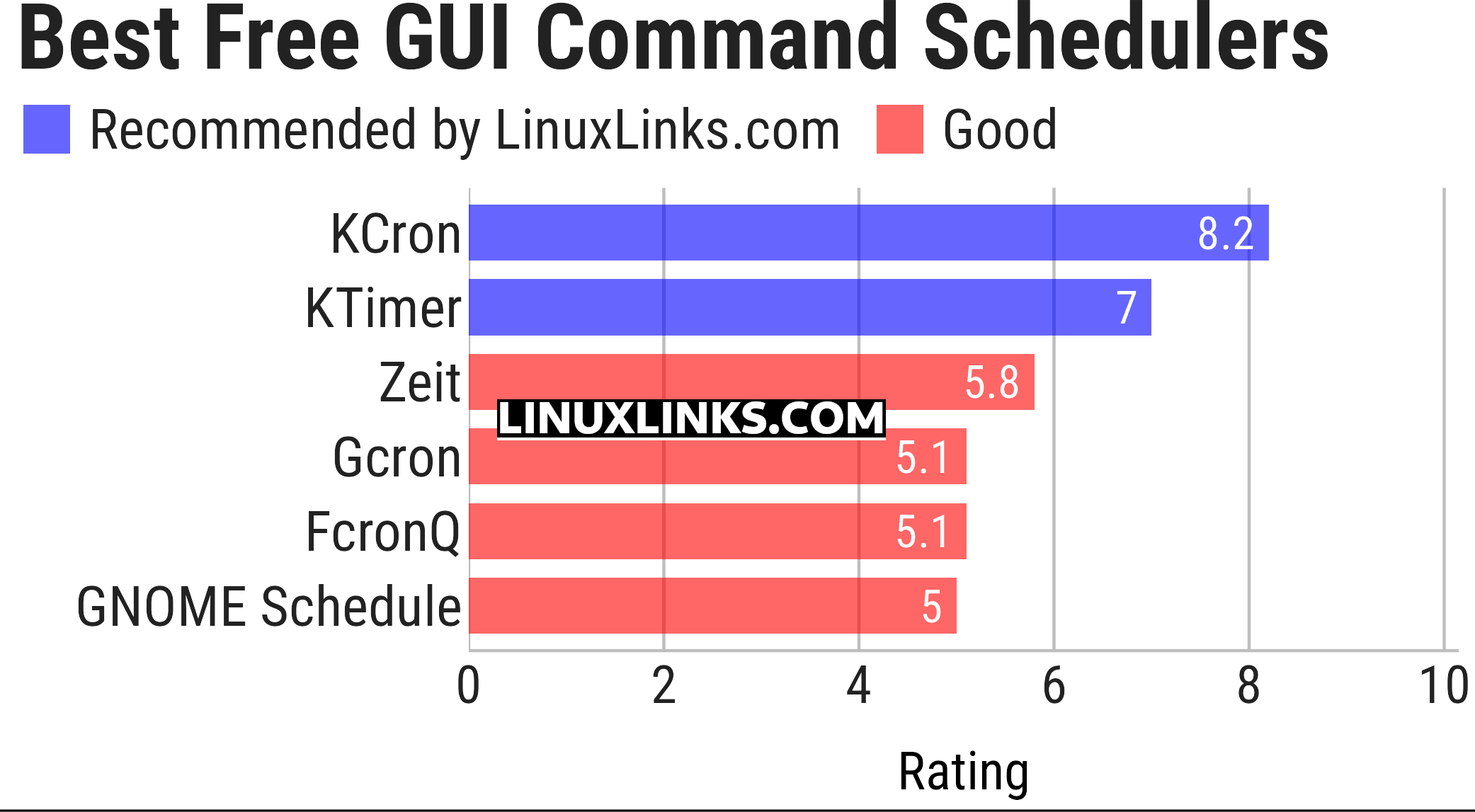
Let’s explore the GUI command schedulers at hand. Click the links in the table below to learn about each program.
| GUI Command Schedulers | |
|---|---|
| KCron | Configure and schedule tasks |
| KTimer | Little tool to execute programs after some time |
| Zeit | Qt frontend to crontab and at |
| Gcron | Graphical frontend for cron |
| FcronQ | Fcron GUI which uses the Python v3, Qt v4, and PyQt v4 frameworks |
| GNOME Schedule | Graphical front end for the ‘crontab’ and ‘at’ tools |
This article has been updated to reflect the changes outlined in our recent announcement.
 Explore our comprehensive directory of recommended free and open source software. Our carefully curated collection spans every major software category. Explore our comprehensive directory of recommended free and open source software. Our carefully curated collection spans every major software category.This directory is part of our ongoing series of informative articles for Linux enthusiasts. It features hundreds of detailed reviews, along with open source alternatives to proprietary solutions from major corporations such as Google, Microsoft, Apple, Adobe, IBM, Cisco, Oracle, and Autodesk. You’ll also find interesting projects to try, hardware coverage, free programming books and tutorials, and much more. Know a useful open source Linux program that we haven’t covered yet? Let us know by completing this form. |
You did miss KAlarm from the list – I use this for quite a few tasks, including waking up my PC in the morning to play music increasing in volume over a few minutes to wake up.
Well, you can say they didn’t include KAlarm. That’s not necessarily the same as missed.