

Digital asset management (DAM) allows organization to obtain greater value from creative digital assets like images and videos by making them easy to organize, access, catalogue, find, retrieve and distribute. Quick to deploy and easy-to-use, a centralized DAM system provides peers, employees, clients, contractors and other key stakeholders controlled access to their entire digital content library—including images, photos, creative files, video, audio, presentations, documents, and more. A DAM system streamlines and manages the content lifecycle — from creation to preservation.
This software adds metadata to each content and searches for digital files easy. It can deliver content on multiple devices in various formats. It can integrate with other external tools and platforms to provide services like sending bulk data to external partners in a secure way.
Digital asset management systems come in all shapes and sizes depending on the needs and specific use cases of the organization. Most digital asset management solutions don’t only focus on file storage, but also provide add-on modules such as brand guidelines and project workflow management tools to drive efficiencies across the entire digital content lifecycle.
Here’s a few reasons why DAM software is useful.
 Fast and easy file access – with always on access over an internet connection, all stakeholders can access the digital content from a single location. With access rights and permissions defined for each user, the right people can access the files they need. Control how different user groups can interact with assets.
- Reduce operational costs – time spent for searching for files costs valuable resources. The DAM offers faster creation, retrieval, storage, and distribution of digital content. It helps to eliminate the cost of lost or misplaced work.
- Ensures that everyone is using up-to-date content – this helps to minimise the risk of outdated files being used by users. Maintain brand consistency and brand integrity.
- Keep important assets safe and secure – this is an important factor in favour of a DAM. The software reduces the risk of losing important and confidential files by ensuring safe and secure storage in one location.
- Reduce workflow redundancies – extend the value of assets through reuse and repurposing.
- Seamless integration with the tech stack – integrates with a range of tech tools to enable a more efficient flow of digital assets across the content lifecycle.
- Seamless integration with the tech stack – integrates with a range of tech tools to enable a more efficient flow of digital assets across the content lifecycle.
Here’s our verdict captured in a LinuxLinks ratings chart. Only free and open source software is included (proprietary editions are available).
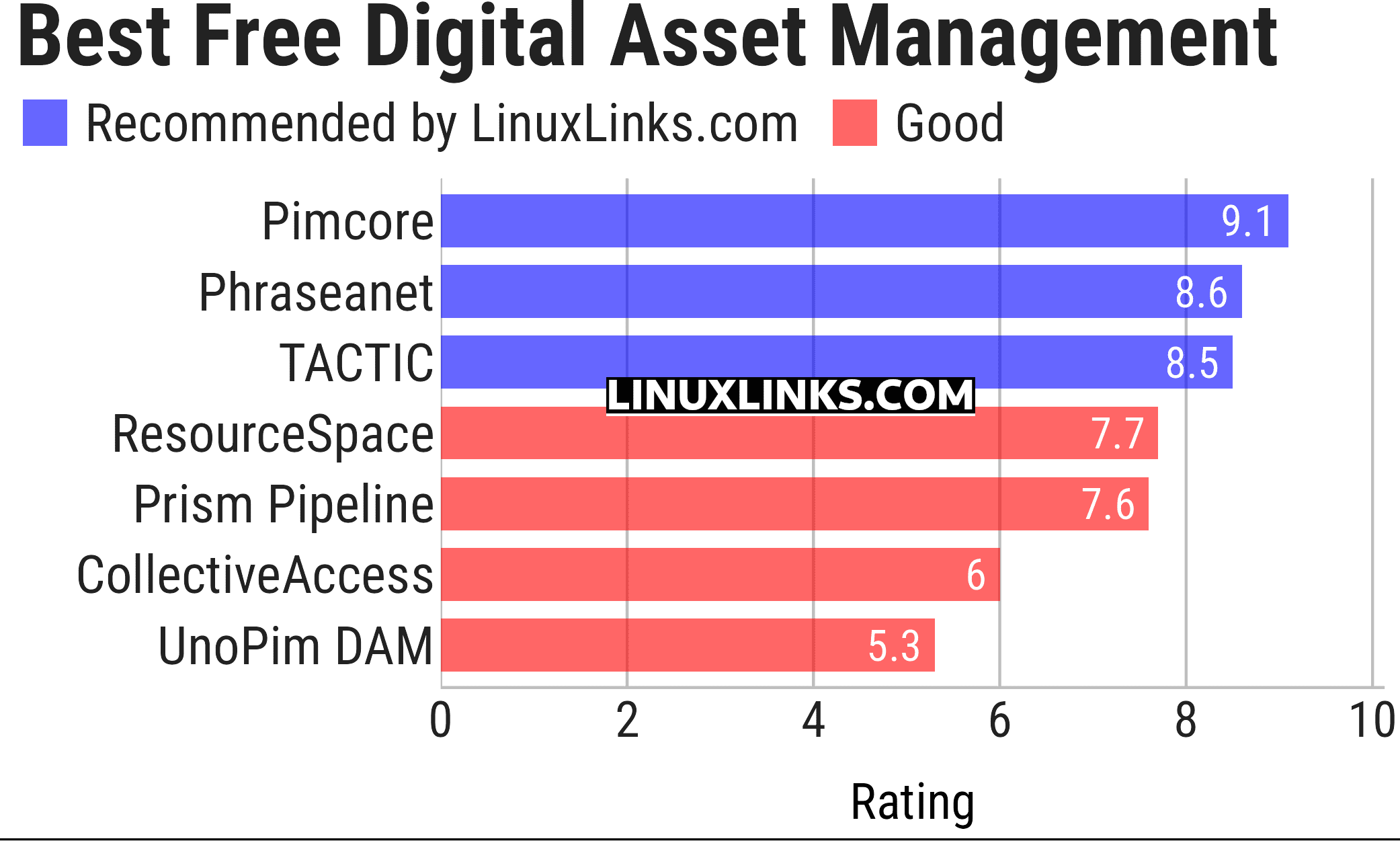
Let’s explore the 7 digital asset management software. For each program we have compiled its own portal page, a full description with an in-depth analysis of its features, screenshot of the program in action, together with links to relevant resources.
| Digital Asset Management | |
|---|---|
| Pimcore | Places asset management at the core of digital experience management |
| Phraseanet | Web-based, cross-platform digital asset management |
| TACTIC | Remote collaboration platform used for enterprise workflow solutions |
| ResourceSpace | Simple and fast way to organise your digital assets |
| Prism Pipeline | Pipeline focused on VFX and animation projects with Shotgun integration |
| CollectiveAccess | Cataloguing and collections management component of CollectiveAccess. |
| UnoPim DAM | Laravel-based extension for UnoPim product information management |
This article has been updated to reflect the changes outlined in our recent announcement.
| Explore Linux | |
|---|---|
 | Best Free and Open Source Software - A huge collection of recommended free and open source software covering every major category. |
 | In-depth Linux Software Reviews - Detailed assessments of Linux software covering features, usability and overall quality. |
 | The Big List of Active Linux Distros - An extensive collection of actively developed Linux distributions. |
 | Open Source Alternatives - Alternatives to software and services from Google, Microsoft, Apple, Adobe, IBM, Autodesk, Oracle and others. |
 | Essential Linux System Tools - Indispensable utilities for monitoring, maintaining and managing Linux systems. |
 | Linux Productivity Tools - Useful utilities for improving productivity and streamlining everyday tasks. |
 | Alternatives to Popular CLI Tools - Modern alternatives to familiar command-line utilities supplied with Linux systems. |
 | Awesome Free Linux Game Tools - Tools, utilities and companion software that improve gaming on Linux. |
 | Machine Learning on Linux - Machine learning and deep learning software, self-hosted applications and practical tools. |
 | Saving Money with Linux - Practical ways to reduce electricity consumption and lower computing costs with Linux. |
 | Linux Candy - Fun, entertaining and sometimes delightfully quirky software from the lighter side of Linux. |
Please read our Comment Policy before commenting.