

Hashing is the process of passing data through a formula that produces a condensed fixed-value representation, called a hash value. That hash is typically a string of characters and the hashes generated by a formula are always the same length, regardless of how much data fed into it. For example, the MD5 formula produces 128-bit checksums. It converts data into blocks of specific sizes and manipulates that data a number of times.
For data security applications this requires that the hash function is collision-resistant, which means that it is very hard to find data that will generate the same hash value. Hashing is an important method used for creating a digital signature and for encrypting data.
When you download a file from the internet, it is a good safety practice to check whether you received the original version. Comparing checksums you received from the file creator with the ones you obtain by checking the file yourself is a reliable way to confirm your download’s integrity.
This article represents the best CLI tools for data hashing. We only feature free and open source software. Here’s our verdict.
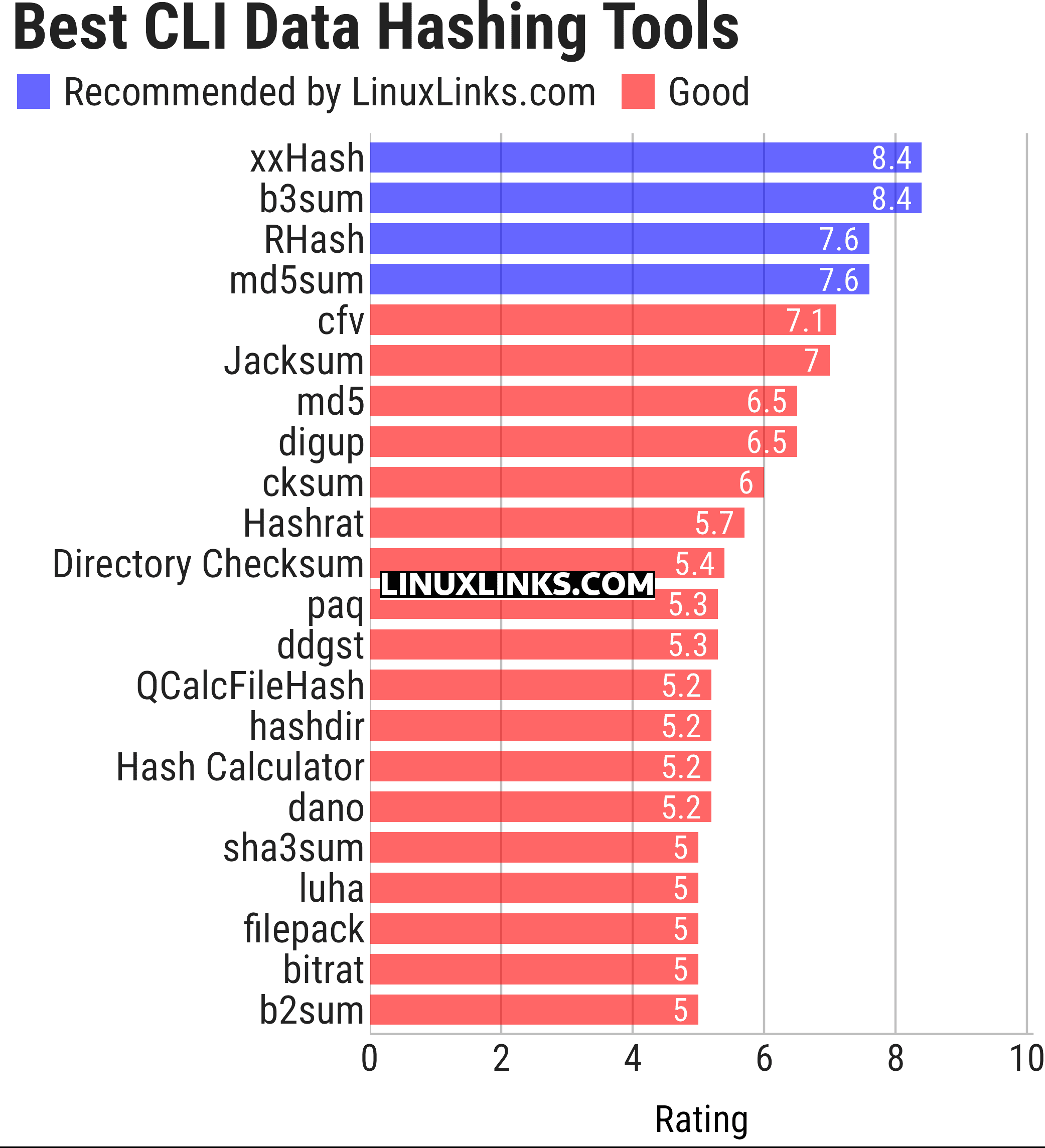
Let’s explore the data hashing tools. For each program we have compiled its own portal page, a full description with an in-depth analysis of its features, together with links to relevant resources.
| CLI Data Hashing Tools | |
|---|---|
| xxHash | Non-cryptographic hash algorithm |
| b3sum | Implementation of the BLAKE3 hash function |
| RHash | Calculate and verify magnet links and various message digests |
| md5sum | Compute and check MD5 message digest; part of GNU Coreutils |
| cfv | Test and create checksum files |
| Jacksum | Work with checksums, CRCs, and message digests |
| md5 | Generate / check MD5 message digest |
| digup | Update md5sum or shasum digest files |
| cksum | Compute and verify file checksums |
| Hashrat | Hash-generation utility |
| Directory Checksum | Recursively calculate checksums for directory contents |
| paq | Fast BLAKE3 hashing tool for files and directories |
| ddgst | Hashing and checksum utility |
| QCalcFileHash | Hash calculator |
| hashdir | Checksum directories and files |
| Hash Calculator | Calculates around 50 cryptographic hashes of strings and files |
| dano | Hashdeep/md5tree for media files |
| sha3sum | Keccak, SHA-3, SHAKE, and RawSHAKE checksum utilities |
| luha | Simple file checksum tool |
| filepack | File hashing and verification |
| bitrat | Fast file checksum tool supporting multiple hash algorithms |
| b2sum | Calculate BLAKE2 checksums |
| Additional tools: | |
| hashit | Generate file hashes quickly |
| hashdeep | Generate and verify file hashes |
| cksfv | Create and check sfv listings using CRC32 checksums |
| cksfv.rs | Reimplements the classic cksfv tool |
This article has been updated to reflect the changes outlined in our recent announcement.
 Explore our carefully curated directory of recommended free and open source software, covering every major software category. Explore our carefully curated directory of recommended free and open source software, covering every major software category.The directory forms part of our extensive collection of articles for Linux enthusiasts. It includes hundreds of detailed reviews, together with free and open source alternatives to proprietary software from companies such as Google, Microsoft, Apple, Adobe, IBM, Cisco, Oracle, and Autodesk. LinuxLinks also covers interesting projects worth exploring, Linux-compatible hardware, free programming books and tutorials, and much more. Know a useful free and open source Linux application that we haven’t covered? Tell us about it using our submission form. |
Please read our Comment Policy before commenting.
Thanks for featuring paq (I’m the author)! Version 2 was just released, and in my own benchmarks it did well against the other directory hashers I compared it with. One thought: the ranking mixes cryptographic hashers, non-cryptographic ones like xxHash, and directory hashers on one scale, so grouping them by category might make the list easier to compare.
Agreed, there is a real difference between cryptographic hashes and things like xxHash and CRC, which are more about checksumming and detecting changes.
Many of our roundups get too big over time, so I’m actively spliting them where appropriate.
I’m not sure splitting the roundup would actually help in this instance. Quite a few of the tools cover both areas. cksum, for example, supports CRC as well as MD5, SHA, BLAKE2 and others, and several of the other tools are similarly broad. We’d probably end up with quite a bit of overlap between roundups.
For now, I think it makes more sense to keep them together. For the next update we could make the distinction clearer in the introduction, and perhaps rename the roundup to “CLI Hashing and Checksum Tools”. Thanks for raising it.