

A window manager is software that manages the windows that applications bring up. For example, when you start an application, there will be a window manager running in the background, responsible for the placement and appearance of windows.
It is important not to confuse a window manager with a desktop environment. A desktop environment typically consists of icons, windows, toolbars, folders, wallpapers, and desktop widgets. They provide a collection of libraries and applications made to operate cohesively together. A desktop environment contains its own window manager.
There are a few different types of window managers. This article focuses on dynamic window managers. A dynamic window manager is a tiling window manager where windows are tiled based on preset layouts between which the user can switch. Layouts typically have a main area and a secondary area. The main area usually shows one window, but one can also change the number of windows in this area. Its purpose is to reserve more space for the more important window(s). The secondary area shows the other windows.
The ratings chart below captures our recommendations. Only free and open source software is eligible for inclusion here.
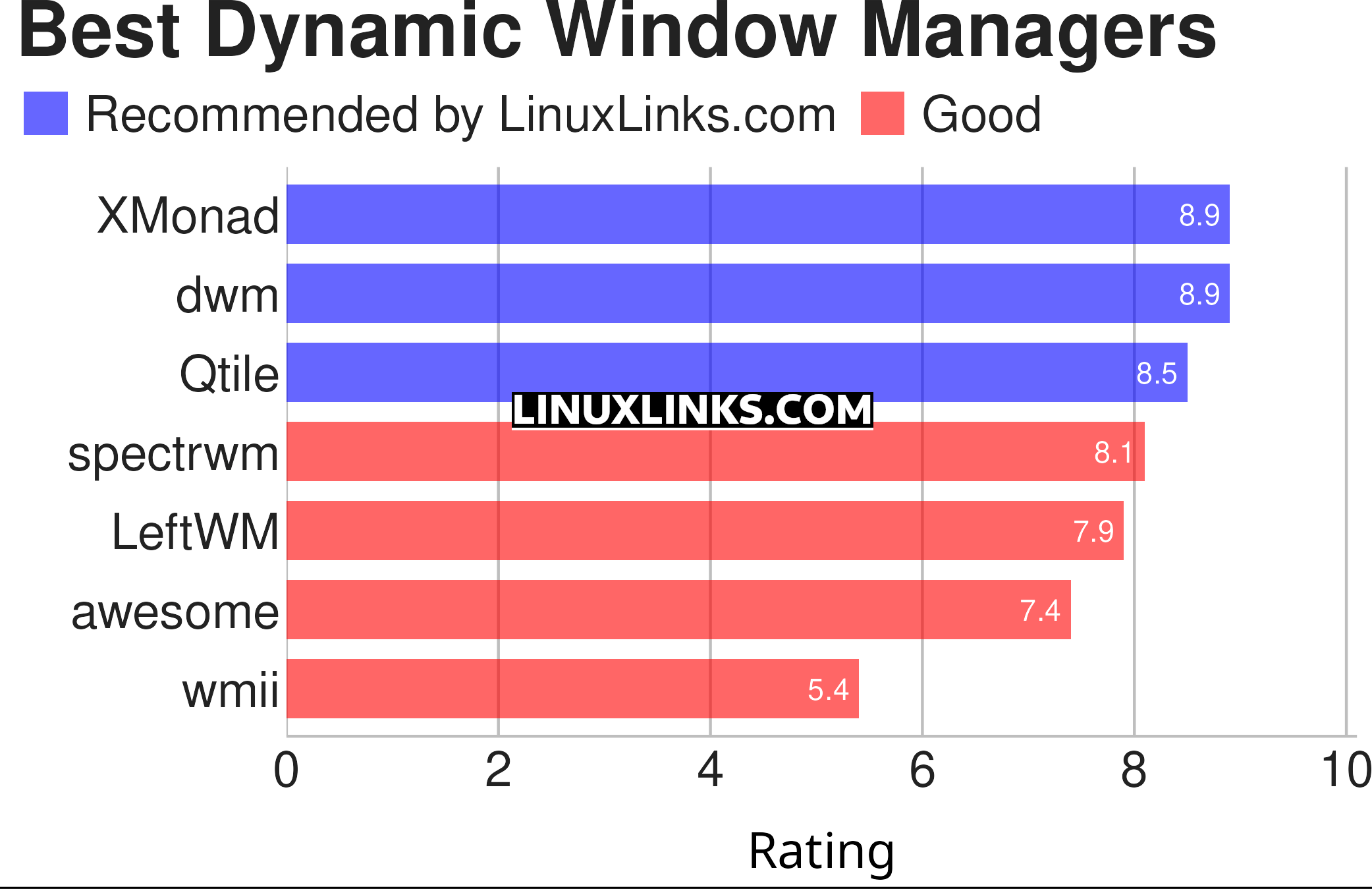
| Dynamic Window Managers | |
|---|---|
| Xmonad | Minimalist, tiling window manager written in Haskell |
| dwm | Manages windows in tiled, monocle and floating layouts |
| Qtile | Full-featured, hackable tiling window manager |
| spectrwm | Small dynamic tiling and reparenting window manager |
| LeftWM | Window manager for adventurers |
| awesome | Highly configurable, tiling window manager initially based on dwm code |
| wmii | Lightweight tabbed and tiled |
This article has been revamped in line with our recent announcement.
 Explore our comprehensive directory of recommended free and open source software. Our carefully curated collection spans every major software category. Explore our comprehensive directory of recommended free and open source software. Our carefully curated collection spans every major software category.This directory is part of our ongoing series of informative articles for Linux enthusiasts. It features hundreds of detailed reviews, along with open source alternatives to proprietary solutions from major corporations such as Google, Microsoft, Apple, Adobe, IBM, Cisco, Oracle, and Autodesk. You’ll also find interesting projects to try, hardware coverage, free programming books and tutorials, and much more. Know a useful open source Linux program that we haven’t covered yet? Let us know by completing this form. |