
Last Updated on July 10, 2021
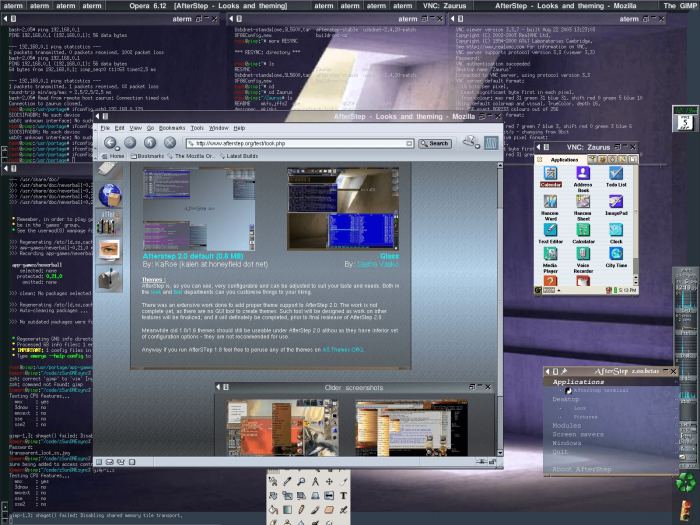
AfterStep is a window manager based on FVWM which attempts to emulate the NEXTSTEP look and feel, while retaining the configurability of its predecessor. This window manager makes extensive use of the color palette. If you have only an 8-bit color display, it will run as packaged, but you may want to modify the configuration to use fewer colors.
AfterStep is a continuation of the BowMan window manager project, but the name was changed to reflect the desire that it does more than simply emulate and has become a valuable window manager in its own right.
It provides end users with a consistent, clean, and elegant desktop. AfterStep’s goal is to provide for flexibility of desktop configuration, improving aesthetics, and efficient use of system resources.
Features include:
- Fast startup.
- Pager – a visual tool for managing and cycling between multiple desktops.
- WinList – a simple Taskbar displaying active applications.
- Wharf – docking tool that manages Applets/Dockapps and launches applications
- A powerful, high-performance, and high-quality built-in image engine.
- Highly configurable with lots of themes, colors, and icons.
- SVG support.
- ToolTips for individual menu entries.
- Internationalization of menu entries.
Website: www.afterstep.org
Support: Documentation
Developer: Sasha Vassko and other developers
License: GNU GPL v2
AfterStep is written in C. Learn C with our recommended free books and free tutorials.
Return to Window Managers Home Page
| Explore Linux | |
|---|---|
 | Best Free and Open Source Software - A huge collection of recommended free and open source software covering every major category. |
 | In-depth Linux Software Reviews - Detailed assessments of Linux software covering features, usability and overall quality. |
 | The Big List of Active Linux Distros - An extensive collection of actively developed Linux distributions. |
 | Open Source Alternatives - Alternatives to software and services from Google, Microsoft, Apple, Adobe, IBM, Autodesk, Oracle and others. |
 | Essential Linux System Tools - Indispensable utilities for monitoring, maintaining and managing Linux systems. |
 | Linux Productivity Tools - Useful utilities for improving productivity and streamlining everyday tasks. |
 | Alternatives to Popular CLI Tools - Modern alternatives to familiar command-line utilities supplied with Linux systems. |
 | Awesome Free Linux Game Tools - Tools, utilities and companion software that improve gaming on Linux. |
 | Machine Learning on Linux - Machine learning and deep learning software, self-hosted applications and practical tools. |
 | Saving Money with Linux - Practical ways to reduce electricity consumption and lower computing costs with Linux. |
 | Linux Candy - Fun, entertaining and sometimes delightfully quirky software from the lighter side of Linux. |
Please read our Comment Policy before commenting.