
Last Updated on October 18, 2022
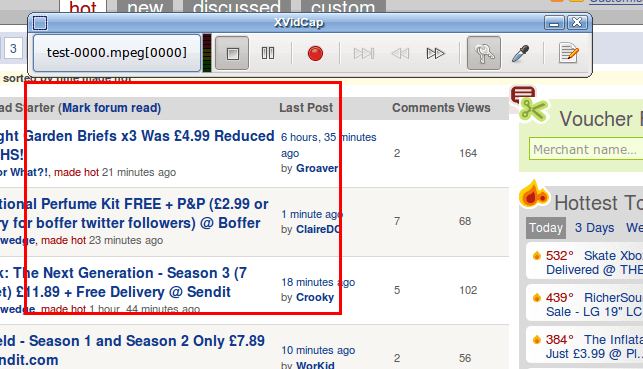
xvidcap is a tool that captures movement on an X11 display for illustration or documentation purposes.
It works in two distinct modes: In single-frame capture mode xvidcap takes a configurable number of screenshots per second and saves them to individual files. In multi-frame capture mode xvidcap also takes a number of screenshots per second, but encodes them to a single video in real time. Audio capture is only available with multi-frame formats.
This software is intended to be a standards-based alternative to tools like Lotus ScreenCam and Camtasia.
On-line encoding is done through FFMPEG and also allows for audio grabbing on OSS compatible systems.
Features include:
- Save videos in MPEG or AVI format.
- Support for direct VOB creation, Flash Screen Video.
- Capture single frames, or encode captured frames to a video.
- Capture the mouse pointer.
- Record audio and video.
- Capture OpenGL accelerated graphics.
- Capture a running video (hardware acceleration on the graphics adapter needs to be disabled).
- On-line encoding with FFmpeg libavcodec / libavformat.
- On-the-fly frame size reduction.
- Choose the number of frames to be captured per second.
- Specify the geometry.
- Dbus remote control application.
Website: xvidcap.sourceforge.net
Support:
Developer: Karl Beckers
License: GNU GPL
xvidcap is written in C. Learn C with our recommended free books and free tutorials.
Return to Screencasting Home Page
| Explore Linux | |
|---|---|
 | Best Free and Open Source Software - A huge collection of recommended free and open source software covering every major category. |
 | In-depth Linux Software Reviews - Detailed assessments of Linux software covering features, usability and overall quality. |
 | The Big List of Active Linux Distros - An extensive collection of actively developed Linux distributions. |
 | Open Source Alternatives - Alternatives to software and services from Google, Microsoft, Apple, Adobe, IBM, Autodesk, Oracle and others. |
 | Essential Linux System Tools - Indispensable utilities for monitoring, maintaining and managing Linux systems. |
 | Linux Productivity Tools - Useful utilities for improving productivity and streamlining everyday tasks. |
 | Alternatives to Popular CLI Tools - Modern alternatives to familiar command-line utilities supplied with Linux systems. |
 | Awesome Free Linux Game Tools - Tools, utilities and companion software that improve gaming on Linux. |
 | Machine Learning on Linux - Machine learning and deep learning software, self-hosted applications and practical tools. |
 | Saving Money with Linux - Practical ways to reduce electricity consumption and lower computing costs with Linux. |
 | Linux Candy - Fun, entertaining and sometimes delightfully quirky software from the lighter side of Linux. |
Please read our Comment Policy before commenting.