

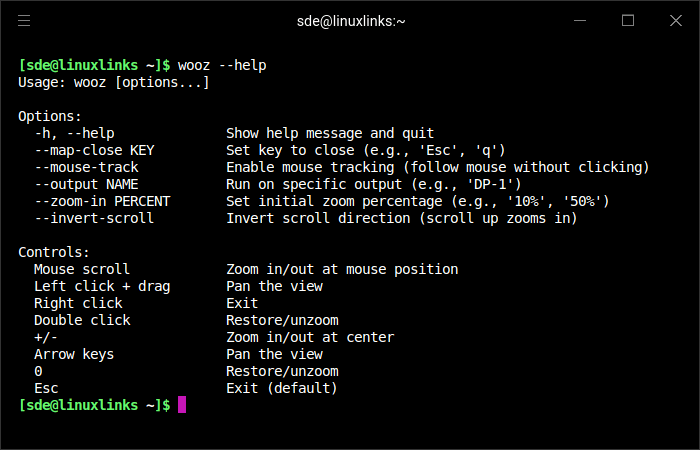
wooz is a Wayland magnifier utility that provides a zoomed view of the screen with mouse and keyboard controls. It is designed for Wayland compositors and offers features such as zooming at the mouse position, panning, mouse tracking, output selection, and customizable close key bindings.
This is free and open source software.
Key Features
- Magnifies the screen on Wayland compositors.
- Supports zooming in and out with the mouse scroll wheel.
- Lets you pan the view with mouse drag or keyboard arrow keys.
- Offers optional mouse tracking so the viewport follows the pointer.
- Can be restricted to a specific display output.
- Includes configurable key bindings for closing the application.
- Provides a restore option to return to the original unzoomed view.
Website: github.com/negrel/wooz
Support:
Developer: Alexandre Negrel
License: MIT License
wooz is written in C. Learn C with our recommended free books and free tutorials.
Related Software
| Magnifying Tools | |
|---|---|
| KMagnifier | Screen magnifier for KDE Plasma |
| magnifiqus | Qt based screen magnifier |
| wooz | Zoom / magnifier utility for Wayland compositors |
| shmooz | Wayland presentation tool with zoom, annotation and screenshots |
| hyprmag | Screen magnifier for wlroots-compatible Wayland compositors |
| Magnus | Very simple screen magnifier. It’s designed for Ubuntu |
Read our verdict in the software roundup.
 LinuxLinks helps you discover the best free and open source software for Linux. Explore our extensive collection of recommended applications, including alternatives to popular proprietary software. LinuxLinks helps you discover the best free and open source software for Linux. Explore our extensive collection of recommended applications, including alternatives to popular proprietary software.We also publish software reviews, Linux tutorials, hardware reviews, free programming books and articles covering the wider open source community. Browse our Linux resources to discover more. Know a useful free and open source Linux application we haven't covered? Suggest a program for inclusion. Has your software been featured on LinuxLinks? Display one of our Featured on LinuxLinks badges on your website or GitHub README. |
Please read our Comment Policy before commenting.