
Syncspirit is a continuous file synchronisation application that keeps files up to date across multiple computers. It’s an interesting alternative to Syncthing, particularly for people who prefer a traditional desktop application rather than managing everything through a web browser.
Written in C++ using the rotor actor framework, Syncspirit implements the Block Exchange Protocol (BEP) used by Syncthing. This means it can communicate with existing Syncthing devices, using the same infrastructure for device discovery and relay connections. It isn’t simply another frontend for Syncthing. The synchronisation engine is an independent implementation.
The application offers a graphical interface built with FLTK, alongside a headless daemon for systems where a GUI isn’t needed. The developer has placed considerable emphasis on keeping memory consumption and background CPU activity low, although Syncspirit remains less feature-rich than Syncthing.
This is free and open source software.
Installation
The easiest way to install Syncspirit is to use the precompiled AppImage provided by the developer. There’s no need to compile the C++ source code or install a collection of development libraries.
Download the latest graphical release from the project’s GitHub repository (see end of this article for the link). For version 0.4.7, the commands are:
$ wget https://github.com/basiliscos/syncspirit/releases/download/v0.4.7/syncspirit-fltk-v0.4.7-x86_64.AppImage
$ chmod +x syncspirit-fltk-v0.4.7-x86_64.AppImage
Start the software:
<code.$ ./syncspirit-fltk-v0.4.7-x86_64.AppImage
On Ubuntu 24.04 and later, you may need to install the FUSE 2 compatibility library if the AppImage refuses to launch:
$ sudo apt install libfuse2t64
For CachyOS (or other Arch-related distros)
$ sudo pacman -S fuse2
The AppImage includes the graphical frontend. A separate headless AppImage is available for users who want to run Syncspirit without a desktop interface.
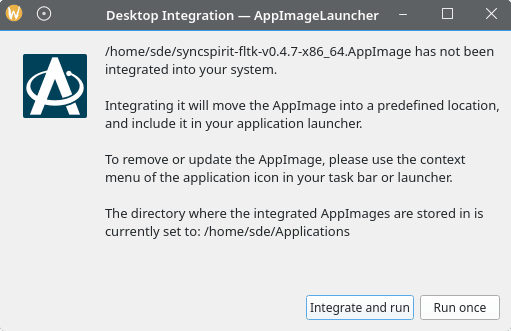
To help with integration, I have AppImageLauncher installed on my test system. It detects when I launch an AppImage that hasn’t previously been integrated into my desktop environment. It offers to move the AppImage into ~/Applications and create an entry in KDE Plasma’s application menu, or simply run the application without integration.
In operation
On first launch, Syncspirit generates a unique device ID and cryptographic keys. These identify the computer to other devices. The application also creates its local database and configuration.
The easiest way to try Syncspirit is to connect it to a computer already running Syncthing.
1. Find the device IDs. In Syncthing’s web interface, select Actions → Show ID. In Syncspirit, the local device ID can be copied to the clipboard or displayed as a QR code.
2. Add the remote computer. In Syncspirit, select the devices node and enter the Syncthing computer’s device ID and a descriptive label.
3. Authorise the connection. In Syncthing, add Syncspirit as a remote device using its device ID. Both applications must recognise one another before they can exchange files.
4. Share a folder. In Syncthing, select a folder and share it with the Syncspirit device. Once the computers connect, the shared folder appears under pending folders in Syncspirit.
5. Choose the destination. Select the pending folder in Syncspirit, give it a label and specify the local directory where the files should be stored.
Once configured, Syncspirit begins synchronising files. Changes are detected using filesystem monitoring and propagated to connected devices.
Syncspirit takes a rather different approach to Syncthing’s web-based management interface. Its FLTK frontend is a conventional desktop application, with a tree-based layout for navigating devices, shared folders, files and settings.
The interface is functional rather than particularly attractive. It has something of an old-fashioned appearance, which won’t appeal to everyone. On the other hand, there’s no browser interface to open and no separate web service to administer.
When Syncspirit starts for the first time, it creates its configuration database, generates cryptographic keys and assigns the local machine a unique device ID. This identifier can be copied to the clipboard or shared using a QR code.
To establish a connection with another computer, add its device ID and a descriptive label. The remote device must also authorise the connection. Once the two devices trust each other, shared folders become available for synchronisation.
The interface lets you inspect folders and their contents, including files that have not yet been downloaded. It also provides information about synchronisation progress and individual file states. Some settings are accessible through the GUI, while the configuration file can be edited directly if necessary.
**Features include:**
– **Syncthing interoperability.** Communicates with existing Syncthing devices through an independent implementation of the BEP protocol.
– **Continuous synchronisation.** Monitors filesystem changes using Linux’s inotify facility, allowing changes to propagate without waiting for a periodic full scan.
– **Flexible folder modes.** Supports send-only, receive-only and bidirectional synchronisation, giving users control over how files move between devices.
– **Device discovery.** Supports local network discovery and global discovery, with relay connections available when direct communication isn’t possible.
– **Detailed file information.** Browse local and remote file metadata, inspect synchronisation progress and identify deleted or outdated files. File history can also indicate which device deleted a file.
– **File filtering.** Recent releases introduced Perl-compatible regular expression patterns for accepting or ignoring local files when adding them to the synchronisation cluster.
– **Conflict handling.** Includes mechanisms for resolving synchronisation conflicts, together with LZ4 compression for protocol messages.
– **Selective download behaviour.** A scheduled folder mode allows remote file metadata to be inspected without downloading the files themselves.
– **Headless operation.** A separate daemon is available for unattended systems, sharing configuration and database information with the graphical frontend.
– **Network controls.** Networking services can be stopped and restarted, and the application can be started in offline mode.
One particularly interesting aspect is the attention given to resource consumption. The developer has made several improvements to reduce memory usage and eliminate unnecessary CPU activity when the application is idle. These are worthwhile goals for software intended to run continuously in the background, although comparative benchmarks against Syncthing would be needed to establish the actual savings.
There are limitations. Syncspirit doesn’t currently support QUIC transport or Syncthing’s untrusted-device encryption. Its configuration options are also less comprehensive than those of Syncthing. The developer openly describes the software as being under heavy development, which is worth bearing in mind before entrusting it with important data.
Summary
Syncspirit is an intriguing project. Reimplementing Syncthing’s synchronisation protocol in C++ is quite an undertaking, and the decision to provide a lightweight, traditional desktop interface gives the application an identity of its own.
There is plenty to like here. Interoperability with Syncthing is its strongest selling point, while the native GUI, headless operation and emphasis on low resource consumption make it an attractive proposition for Linux users.
It’s not quite ready to displace Syncthing for everyone. Some important features remain missing, and the interface could do with a little polish. Nevertheless, development is continuing at a healthy pace, with several useful improvements appearing during 2026.
For users who want Syncthing-compatible synchronisation without Syncthing’s web-based architecture, Syncspirit deserves a closer look.
**Website:** [github.com/basiliscos/syncspirit](https://github.com/basiliscos/syncspirit)
**Support:**
**Developer:** Ivan Baidakou
**License:** GNU General Public License v3.0
Please read our Comment Policy before commenting.