
Last Updated on August 22, 2023
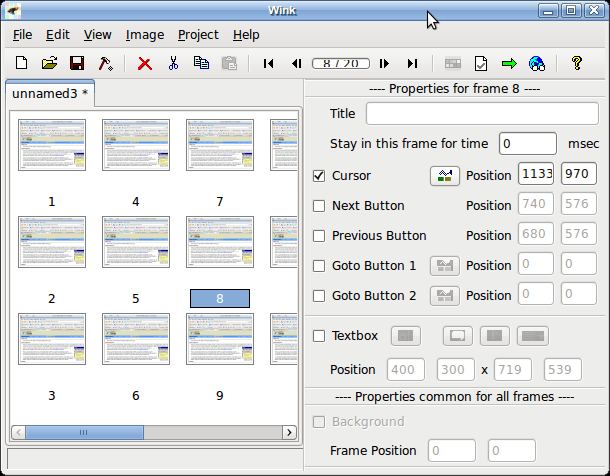
Wink is a software tool to make presentations and tutorials about using software programs. A Wink presentation will resemble a live walkthrough about how to use the software. The author of the presentation can also add comments and explanations to parts of the presentation to better explain the concepts and usage to the end user.
This software enables users to capture screenshots, add explanations boxes, buttons, titles etc and generate a highly effective tutorial.
The basic output format of Wink is Flash.
Features include:
- Creates highly compressed Flash presentations ideal for using on the web.
- Record voice as you create the tutorial for explaining better.
- Input formats: Capture screenshots from your PC, or use images in BMP/JPG/PNG/TIFF/GIF formats.
- Output formats: Macromedia Flash, Standalone EXE, PDF, PostScript, HTML or any of the above image formats.
- Automatic input-driven capture of screenshots.
- Navigation buttons to move to next/previous/random frames in the presentation, you can use custom bitmaps for these buttons (full transparency/alpha channel support).
- Callouts and shapes for displaying text explanations. The inbuilt Callout Editor is used to create custom shaped callouts.
- Intuitive drag-n-drop editing of the frame, callout, cursor, navigation buttons and the title elements.
- Advanced features like templates, cursor editing, palettes, background images, control bars & preloaders for the flash output etc.
- Completely PC and Web ready with exports to PDF, HTML, SWF and formats.
- Innovative compression techniques applied to reduce the filesize of output Flash file. Generated flash file plays in Flash players from version 3 and above.
- Uncompressed output to allow you import the output of Wink into other Flash editors.
- Resize frames.
- Export/import the content of all textboxes and titles in a project.
- Export a Wink project as a PostScript (*.ps) file.
- Play audio tone when capturing screenshots.
- Customize screen capture hotkeys.
- Multilingual support: Works in English, French, German, Italian, Danish, Spanish, Serbian, Japanese, Brazilian Portuguese and Simplified/Traditional Chinese.
Website: www.debugmode.com/wink
Support: Forums
Developer: Satish Kumar S
License: Freeware
Return to Screencasting Home Page
| Explore Linux | |
|---|---|
 | Best Free and Open Source Software - A huge collection of recommended free and open source software covering every major category. |
 | In-depth Linux Software Reviews - Detailed assessments of Linux software covering features, usability and overall quality. |
 | The Big List of Active Linux Distros - An extensive collection of actively developed Linux distributions. |
 | Open Source Alternatives - Alternatives to software and services from Google, Microsoft, Apple, Adobe, IBM, Autodesk, Oracle and others. |
 | Essential Linux System Tools - Indispensable utilities for monitoring, maintaining and managing Linux systems. |
 | Linux Productivity Tools - Useful utilities for improving productivity and streamlining everyday tasks. |
 | Alternatives to Popular CLI Tools - Modern alternatives to familiar command-line utilities supplied with Linux systems. |
 | Awesome Free Linux Game Tools - Tools, utilities and companion software that improve gaming on Linux. |
 | Machine Learning on Linux - Machine learning and deep learning software, self-hosted applications and practical tools. |
 | Saving Money with Linux - Practical ways to reduce electricity consumption and lower computing costs with Linux. |
 | Linux Candy - Fun, entertaining and sometimes delightfully quirky software from the lighter side of Linux. |