
Last Updated on July 13, 2021
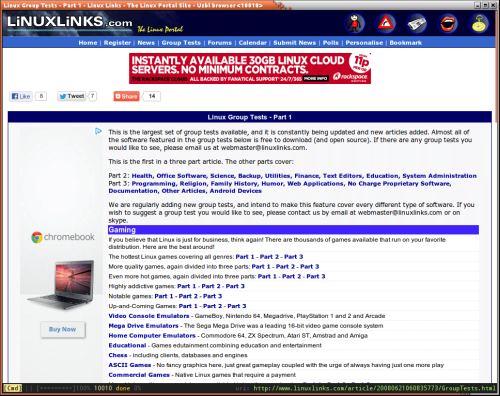
Uzbl (pronounced “usable”) is a free and open source minimalist web browser designed for simplicity and adherence to the Unix philosophy – “Write programs that do one thing and do it well. Write programs to work together. Write programs to handle text streams, because that is a universal interface.”
“Uzbl” is an umbrella project consisting of different flavors. It consists of uzbl-core, the main component meant for integration with other tools and scripts, and uzbl-browser, a complete browser experience based on uzbl-core. The third part is uzbl-tabbed, which wraps around uzbl-browser and multiplexes it.
The general idea is that Uzbl by default is very bare bones. You can send it commands to update settings and perform actions, through various interfaces. There is a limited default configuration. Uzbl does not have any widgets to clutter up the interface.
Features include:
- Very minimal graphical interface.
- Keeps it simple.
- Uses the WebKit layout engine – therefore supports HTML, XML, XPath, CSS, ECMAScript (JavaScript), DOM, and SVG, and passing the Acid3 browser test.
- Adobe Flash Player and MPlayer supported.
- Actions such as changing URL, loading/saving bookmarks, saving history, downloads are handled by external scripts.
- Controllable through various means such as fifo and socket files, stdin, keyboard and more.
- Advanced, customizable keyboard interface with support for hotkeys, modes, modkeys, multichars, variables (keywords) etc. This enables users to tweak the interface to be like vim, emacs, or another program.
- Focus on plaintext storage for your data and configs in simple, parseable formats.
- Auto form filling and editing with an external editor.
- Spawns one window containing multiple tabs, each tab containing a full embedded uzbl-browser.
Website: www.uzbl.org
Support: FAQ
Developer: Dieter Plaetinck and others
License: GNU GPL v3
Uzbl is written in C. Learn C with our recommended free books and free tutorials. Learn Python with our recommended free books and free tutorials.
Return to Small Footprint Web Browsers Home Page
| Explore Linux | |
|---|---|
 | Best Free and Open Source Software - A huge collection of recommended free and open source software covering every major category. |
 | In-depth Linux Software Reviews - Detailed assessments of Linux software covering features, usability and overall quality. |
 | The Big List of Active Linux Distros - An extensive collection of actively developed Linux distributions. |
 | Open Source Alternatives - Alternatives to software and services from Google, Microsoft, Apple, Adobe, IBM, Autodesk, Oracle and others. |
 | Essential Linux System Tools - Indispensable utilities for monitoring, maintaining and managing Linux systems. |
 | Linux Productivity Tools - Useful utilities for improving productivity and streamlining everyday tasks. |
 | Alternatives to Popular CLI Tools - Modern alternatives to familiar command-line utilities supplied with Linux systems. |
 | Awesome Free Linux Game Tools - Tools, utilities and companion software that improve gaming on Linux. |
 | Machine Learning on Linux - Machine learning and deep learning software, self-hosted applications and practical tools. |
 | Saving Money with Linux - Practical ways to reduce electricity consumption and lower computing costs with Linux. |
 | Linux Candy - Fun, entertaining and sometimes delightfully quirky software from the lighter side of Linux. |
Please read our Comment Policy before commenting.