

Touchégg is a program that runs in the background and transform the gestures you make on your touchpad or touchscreen into visible actions in your desktop. The program recognizes gestures, translates them to more conventional types of events and/or performs custom actions in response to them.
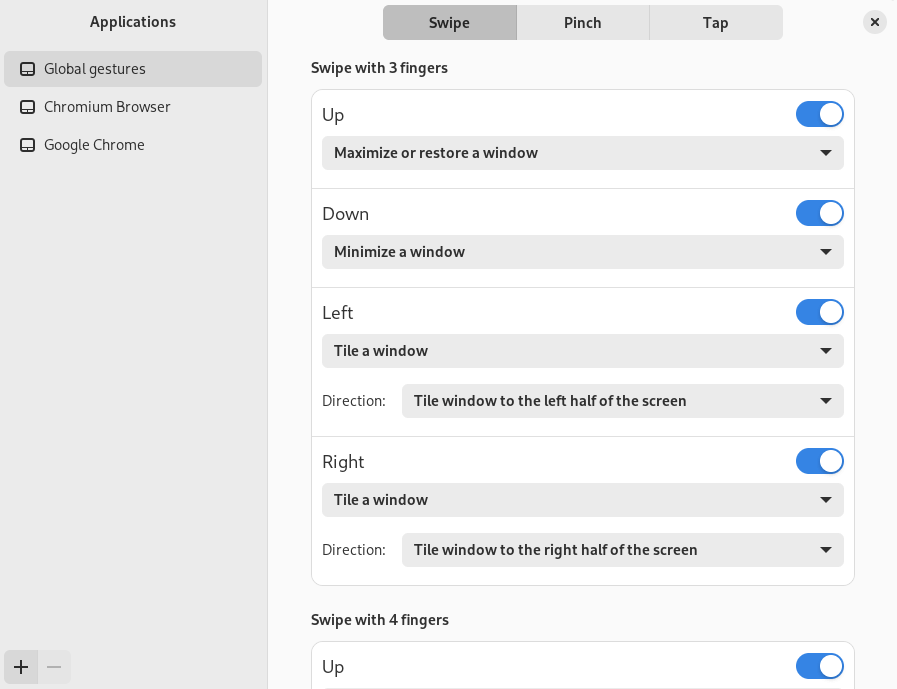
For example, you can swipe up with 3 fingers to maximize a window or swipe left with 4 finger to switch to the next desktop.
Many more actions and gestures are available and everything is easily configurable.
The program relies on libinput, a library that provides a full input stack for display servers and other applications that need to handle input devices provided by the kernel. libinput provides device detection, event handling and abstraction so minimize the amount of custom input code the user of libinput need to provide the common set of functionality that users expect. Input event processing includes scaling touch coordinates, generating relative pointer events from touchpads, pointer acceleration, etc.
Note that Touchégg only works with X11; there is no support for Wayland.
This is free and open source software.
Website: github.com/JoseExposito/touchegg
Support:
Developer: José Expósito
License: GNU General Public License v3.0
Here’s an image of Touché, the desktop application to configure Touchégg. Touché is the recommended way of configuring your gestures. However, you can also manually configure Touchégg by editing an XML file.
Touchégg is written in C++. Learn C++ with our recommended free books and free tutorials.
| Explore Linux | |
|---|---|
 | Best Free and Open Source Software - A huge collection of recommended free and open source software covering every major category. |
 | In-depth Linux Software Reviews - Detailed assessments of Linux software covering features, usability and overall quality. |
 | The Big List of Active Linux Distros - An extensive collection of actively developed Linux distributions. |
 | Open Source Alternatives - Alternatives to software and services from Google, Microsoft, Apple, Adobe, IBM, Autodesk, Oracle and others. |
 | Essential Linux System Tools - Indispensable utilities for monitoring, maintaining and managing Linux systems. |
 | Linux Productivity Tools - Useful utilities for improving productivity and streamlining everyday tasks. |
 | Alternatives to Popular CLI Tools - Modern alternatives to familiar command-line utilities supplied with Linux systems. |
 | Awesome Free Linux Game Tools - Tools, utilities and companion software that improve gaming on Linux. |
 | Machine Learning on Linux - Machine learning and deep learning software, self-hosted applications and practical tools. |
 | Saving Money with Linux - Practical ways to reduce electricity consumption and lower computing costs with Linux. |
 | Linux Candy - Fun, entertaining and sometimes delightfully quirky software from the lighter side of Linux. |
Please read our Comment Policy before commenting.
Maybe you could do a roundup of other good software designed primarily for laptops?