

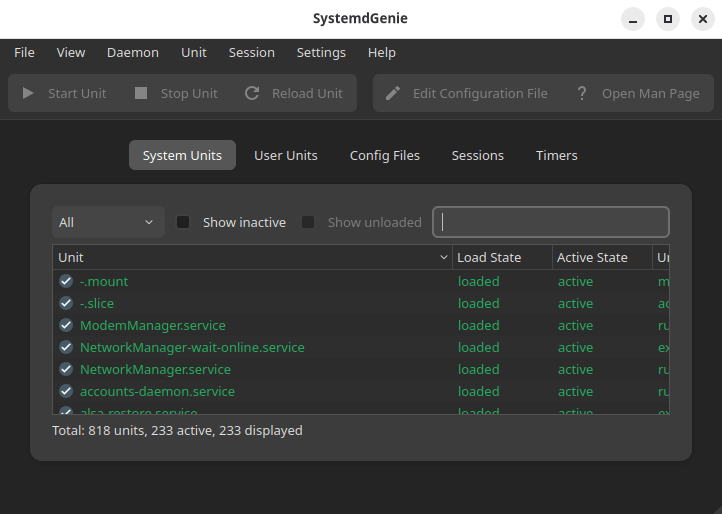
SystemdGenie is a systemd management utility based on KDE technologies. It provides a graphical frontend for the systemd daemon, which allows for viewing and controlling systemd units, logind sessions as well as easy modification of configuration and unit files.
SystemdGenie can be accessed through the application menu or by issuing the command systemdgenie from a terminal.
This is free and open source software.
systemd is a suite of basic building blocks for a Linux system. It provides a system and service manager that runs as PID 1 and starts the rest of the system.
systemd provides aggressive parallelization capabilities, uses socket and D-Bus activation for starting services, offers on-demand starting of daemons, keeps track of processes using Linux control groups, maintains mount and automount points, and implements an elaborate transactional dependency-based service control logic. systemd supports SysV and LSB init scripts and works as a replacement for sysvinit.
systemd uses two distinct unit types: timers and services. Systemd timers enable you to manage dependencies separate from your imperative code. To create a timer with systemd, use the systemd-run command.
Website: invent.kde.org/system/systemdgenie
Support:
Developer: Ragnar Thomsen
License: GNU General Public License v3.0
SystemdGenie is written in C++. Learn C++ with our recommended free books and free tutorials.
Related Software
| systemd GUI Configuration Tools | |
|---|---|
| SystemdGenie | Systemd management utility based on KDE technologie |
| SysD Manager | GUI tool to manage systemd units |
| systemd Pilot | GUI tool for managing systemd services |
| gnome-logs | View and search logs with this graphical utility |
Read our verdict in the software roundup.
 Explore our carefully curated directory of recommended free and open source software, covering every major software category. Explore our carefully curated directory of recommended free and open source software, covering every major software category.The directory forms part of our extensive collection of articles for Linux enthusiasts. It includes hundreds of detailed reviews, together with free and open source alternatives to proprietary software from companies such as Google, Microsoft, Apple, Adobe, IBM, Cisco, Oracle, and Autodesk. LinuxLinks also covers interesting projects worth exploring, Linux-compatible hardware, free programming books and tutorials, and much more. Know a useful free and open source Linux application that we haven’t covered? Tell us about it using our submission form. |
Please read our Comment Policy before commenting.