

SwayBG+ is a powerful, feature-rich background manager specifically designed for Sway window manager.
It provides both GUI and CLI interfaces for managing backgrounds across multiple monitors with advanced positioning, scaling, and persistence features.
Features include:
- Advanced Background Management:
- Multiple Background Modes: Stretched, Fill, Fit, Center, Tile.
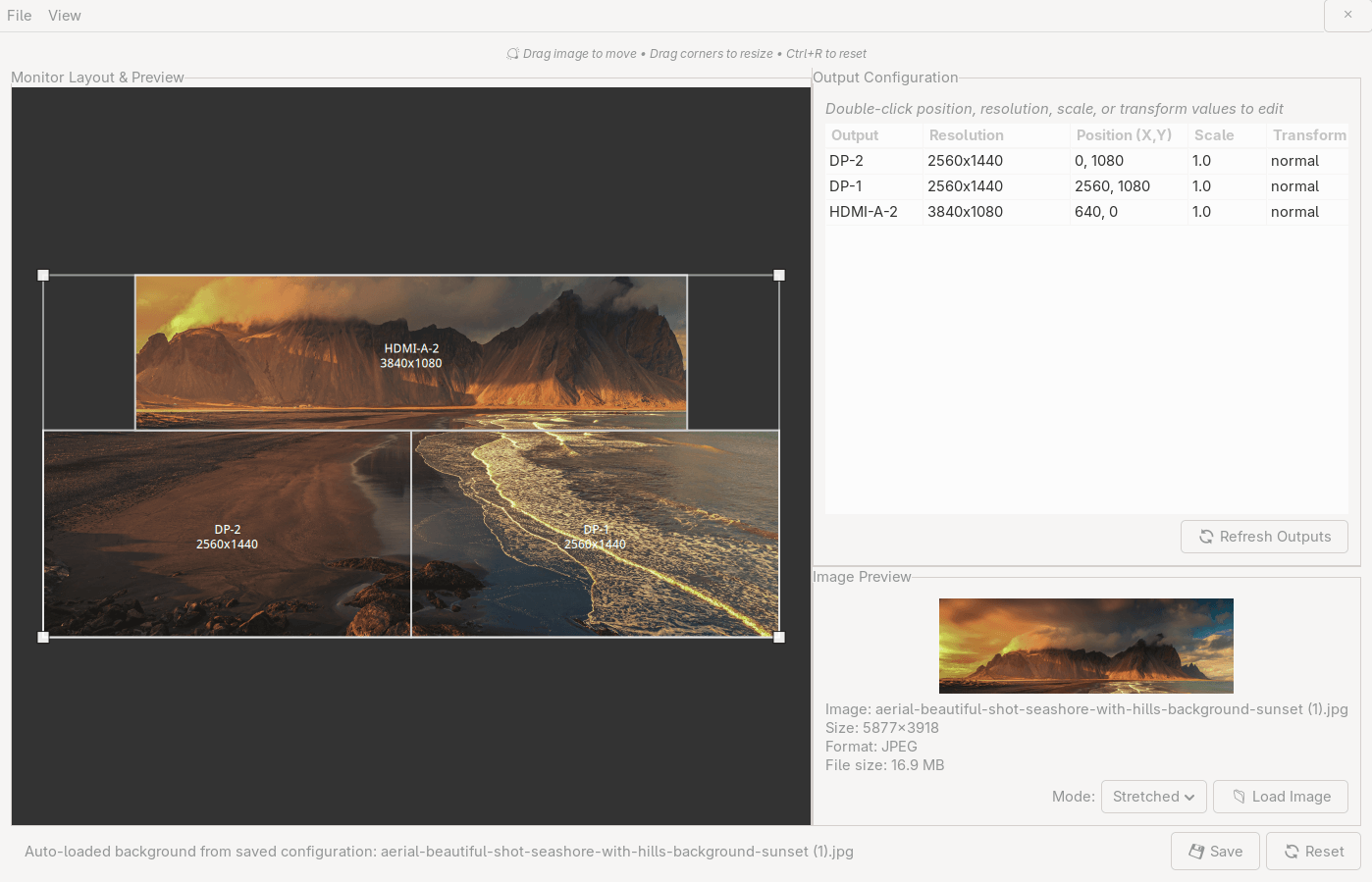
- Visual Image Positioning: Drag and drop image positioning with real-time preview.
- Corner Resize Controls: Visual resize handles for precise image scaling.
- Multi-Monitor Support: Seamless background management across multiple displays.
- Real-Time Preview: See exactly how your background will look before applying.
- Monitor Configuration:
- Visual Monitor Layout: Drag and drop monitor positioning.
- Inline Editing: Double-click to edit resolution, position, and scale.
- Real Resolution Detection: Automatically detects available resolutions for each monitor.
- Live Configuration: Apply changes immediately or save to config file.
- Screen Orientation Support: Full support for vertical monitors and rotated displays.
- Screen Orientation Features:
- Transform Support: Normal, 90°, 180°, 270° rotations plus flipped variants.
- Visual Indicators: GUI shows effective resolution and orientation status.
- CLI Control: Set orientations via command line with –orientation flag.
- Smart Background Handling: Automatically adjusts backgrounds for rotated monitors.
- Portrait Monitor Support: Perfect for vertical coding displays and reading monitors.
- Persistence & Startup:
- Automatic Persistence: Backgrounds survive reboots and sway restarts.
- Startup Integration: Automatically adds restoration script to sway config.
- Configuration Backup: Automatic backup of sway config before changes.
- Smart Detection: Automatically detects and restores previous backgrounds.
- User Interface:
- Intuitive GUI: Clean, modern interface with visual controls.
- Powerful CLI: Full command-line interface for automation and scripting.
- Smart Workflows: Simplified button layout eliminates confusion.
Website: github.com/alephpt/swaybgplus
Support:
Developer: Ancillary, Inc.
License: Freeware. Its license doesn’t meet the OSI definition of open source
SwayBG+ is written in Python. Learn Python with our recommended free books and free tutorials.
| Explore Linux | |
|---|---|
 | Best Free and Open Source Software - A huge collection of recommended free and open source software covering every major category. |
 | In-depth Linux Software Reviews - Detailed assessments of Linux software covering features, usability and overall quality. |
 | The Big List of Active Linux Distros - An extensive collection of actively developed Linux distributions. |
 | Open Source Alternatives - Alternatives to software and services from Google, Microsoft, Apple, Adobe, IBM, Autodesk, Oracle and others. |
 | Essential Linux System Tools - Indispensable utilities for monitoring, maintaining and managing Linux systems. |
 | Linux Productivity Tools - Useful utilities for improving productivity and streamlining everyday tasks. |
 | Alternatives to Popular CLI Tools - Modern alternatives to familiar command-line utilities supplied with Linux systems. |
 | Awesome Free Linux Game Tools - Tools, utilities and companion software that improve gaming on Linux. |
 | Machine Learning on Linux - Machine learning and deep learning software, self-hosted applications and practical tools. |
 | Saving Money with Linux - Practical ways to reduce electricity consumption and lower computing costs with Linux. |
 | Linux Candy - Fun, entertaining and sometimes delightfully quirky software from the lighter side of Linux. |
Please read our Comment Policy before commenting.