

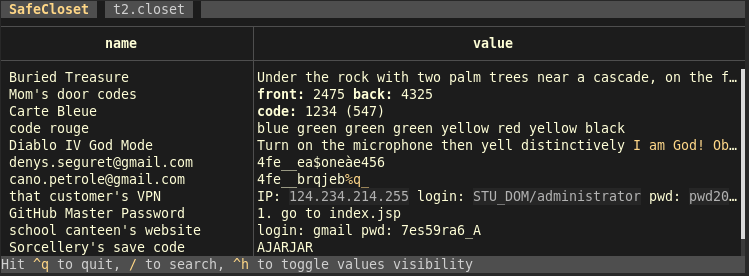
SafeCloset keeps your secrets in password protected files. SafeCloset is designed to be convenient and avoid common weaknesses like external editing or temporary files written on disk.
A closet is stored in a file that you can backup, keep with you on an USB key, etc. A closet contains drawers, each one is found and open with its own password. A drawer contains a list of (key, value). Values are texts in which you can store a code, a password, comments, a poem, some data, etc. A drawer can also contain deeper crypted drawers.
This is free and open source software.
Features include:
- The closet contains several drawers, some of them automatically created with an unknown password so that nobody can determine which drawers you’re able to open, or even how many.
- Each drawer is separately crypted with AES-GCM-SIV, with a random one-use nonce and the password/key of your choice. This gives an inherently long to test decrypt algorithm (but you should still use long passphrases for your drawers).
- You can have one or several drawers with real content. You can be forced to open a drawer and still keep other drawers secret without any trace, either at the top level or deeper in the drawer you opened.
- When you open a drawer, with its password, you can read it, search it, edit it, close it.
- In an open drawer you can create new drawers, or open deeper drawers if you know their password.
- Automatically quits on inactivity.
- The size of the drawer’s content isn’t observable.
- No clear file is ever created, edition is done directly in the TUI (external editors are usually the weakest point).
- No clear data is ever given to any external library, widget, etc.
- All data is viewed and edited in the TUI application.
- You can compile SafeCloset yourself. Its code is small and auditable.
- The format of the closet file is described so that another application could be written to decode your closet files in the future (assuming you have the password).
- SafeCloset can’t be queried by other applications, like browsers. This is a feature.
- You may have all your secrets in one file easy to keep with you and backup.
- No company can die and lose your secrets: you keep everything, with as many copies as necessary, where you want.
- No company can be forced to add some secret stealing code: SafeCloset is small, open-source and replaceable.
- Fast and convenient to use.
- Cross-platform support.
- “I’m being watched” mode in which unselected values are hidden. This mode is kept per drawer, always activated when you launch SafeCloset with the
--hideoption, and toggled withctrl-h.
Website: github.com/Canop/safecloset
Support:
Developer: Denys Séguret
License: GNU Affero General Public License v3.0
SafeCloset is written in Rust. Learn Rust with our recommended free books and free tutorials
| Explore Linux | |
|---|---|
 | Best Free and Open Source Software - A huge collection of recommended free and open source software covering every major category. |
 | In-depth Linux Software Reviews - Detailed assessments of Linux software covering features, usability and overall quality. |
 | The Big List of Active Linux Distros - An extensive collection of actively developed Linux distributions. |
 | Open Source Alternatives - Alternatives to software and services from Google, Microsoft, Apple, Adobe, IBM, Autodesk, Oracle and others. |
 | Essential Linux System Tools - Indispensable utilities for monitoring, maintaining and managing Linux systems. |
 | Linux Productivity Tools - Useful utilities for improving productivity and streamlining everyday tasks. |
 | Alternatives to Popular CLI Tools - Modern alternatives to familiar command-line utilities supplied with Linux systems. |
 | Awesome Free Linux Game Tools - Tools, utilities and companion software that improve gaming on Linux. |
 | Machine Learning on Linux - Machine learning and deep learning software, self-hosted applications and practical tools. |
 | Saving Money with Linux - Practical ways to reduce electricity consumption and lower computing costs with Linux. |
 | Linux Candy - Fun, entertaining and sometimes delightfully quirky software from the lighter side of Linux. |
Please read our Comment Policy before commenting.