

pacbro is a terminal based package browser for Arch Linux with extensive filtering capabilities.
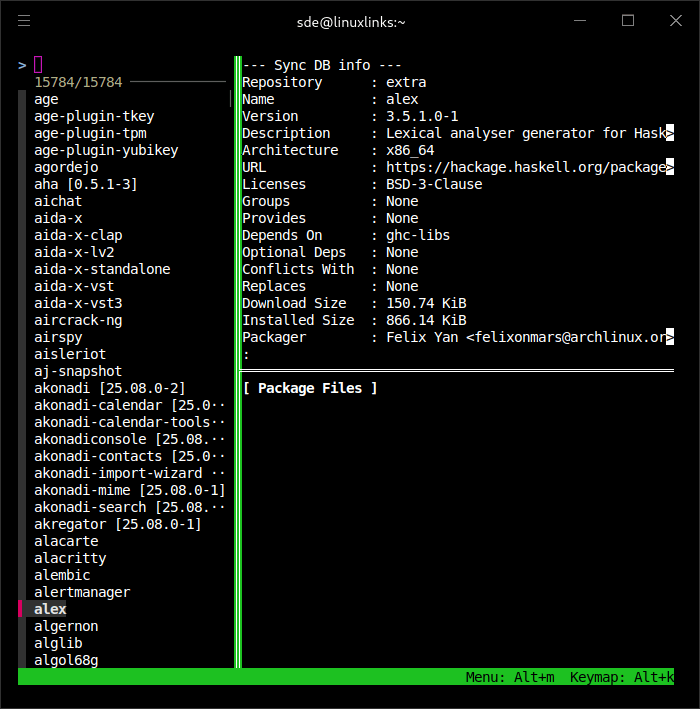
The main list on the left displays the loaded list of packages. It can be filtered by either package name typed into the search box on the top of the list, or with one of canned filters described below. The list is assembled with the help of “pacman”; AUR web API is used to get package information from AUR repo if launched with the "--aur" option.
The top panel displays package information.
The bottom panels displays:
- related package lists: dependencies, dependents, conflicts etc; package navigation within those lists is supported.
- list of files installed from the package; file preview is supported
- The contents of these panels can be chosen via main menu or key bindings
The following common single/multiple choice filters available:
- By repository
- By installation type (Explicit/As Dependency)
- By “outdated” status
- By file path provided by the installed package (RegEx)
- By package details (RegEx)
This program does not have package management capabilities (not yet) and can run as any unprivileged user.
This program extensively relies upon “tmux” multi-panel layout and “fzf” list management. A small subset of keybindings were redefined, but the rest of tmux keys should work as locally configured; those having experience working in tmux should find themselves in a familiar environment.
Website: github.com/cherio/pacbro
Support:
Developer: Neil Mitchell
License: MIT License
pacbro is written in Perl. Learn Perl with our recommended free books and free tutorials.
| Explore Linux | |
|---|---|
 | Best Free and Open Source Software - A huge collection of recommended free and open source software covering every major category. |
 | In-depth Linux Software Reviews - Detailed assessments of Linux software covering features, usability and overall quality. |
 | The Big List of Active Linux Distros - An extensive collection of actively developed Linux distributions. |
 | Open Source Alternatives - Alternatives to software and services from Google, Microsoft, Apple, Adobe, IBM, Autodesk, Oracle and others. |
 | Essential Linux System Tools - Indispensable utilities for monitoring, maintaining and managing Linux systems. |
 | Linux Productivity Tools - Useful utilities for improving productivity and streamlining everyday tasks. |
 | Alternatives to Popular CLI Tools - Modern alternatives to familiar command-line utilities supplied with Linux systems. |
 | Awesome Free Linux Game Tools - Tools, utilities and companion software that improve gaming on Linux. |
 | Machine Learning on Linux - Machine learning and deep learning software, self-hosted applications and practical tools. |
 | Saving Money with Linux - Practical ways to reduce electricity consumption and lower computing costs with Linux. |
 | Linux Candy - Fun, entertaining and sometimes delightfully quirky software from the lighter side of Linux. |
Please read our Comment Policy before commenting.