

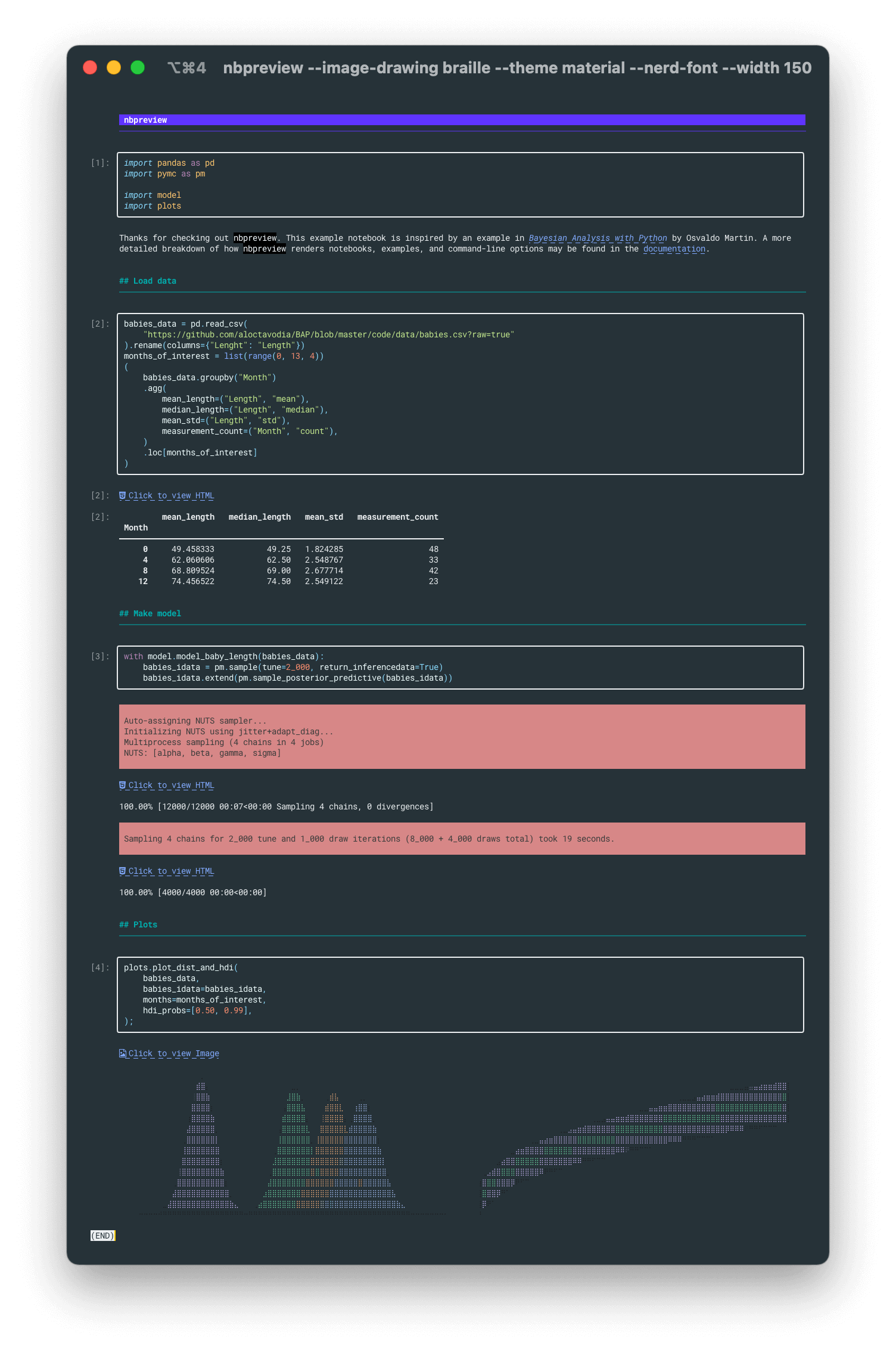
nbpreview is a terminal viewer for Jupyter notebooks. It’s like cat for ipynb files.
nbpreview has only one required argument—FILE—which expects a Jupyter notebook (.ipynb) file path. FILE is a flexible argument. It can take:
- A Jupyter notebook (ipynb) file path.
- Multiple notebook paths.
- Take in input from stdin.
This is free and open source software.
Features include:
- Flexible FILE argument.
- Smart output – by default it will strip out decorations—such as boxes, execution counts, and extra spacing—when its output is piped to stdout. This makes nbpreview usable as a preprocessor for other command-line tools.
- Automatic paging – automatically view the output in a pager if the output is longer than the terminal—which is often. Similar to the automatic plain output, this will be automatically disabled when piping to other commands.
- Syntax highlighting:
- Themes – comes with many different syntax highlighting themes.
- Cell magic – certain cell magics may be used to run other languages in a Jupyter Notebook cell. nbpreview detects the use of these magic commands and adjusts its syntax highlighting to match it.
- Wrapping and line numbers – by default, nbpreview truncates long code. But if
--code-wrap(or-q) is used, nbpreview will wrap the code around so that it’s all visible.
- Markdown rendering – renders markdown content with some extensions. In addition to typical CommonMark, nbpreview will also render markdown tables, create clickable hyperlinks (if it’s supported by the terminal), syntax highlight code blocks (which respect
--theme), and render block math equations. - Image rendering support.
- DataFrame rendering – renders Pandas DataFrame as a table.
- Renders static previews of Vega and VegaLite charts along with a link to an interactive version.
- Renders LaTeX as Unicode characters.
- Renders basic HTML.
- Display hyperlinks to images and HTML in the render.
- Supports icons from Nerd Fonts.
- Stderr – stderr text is highlighted in a bright red box.
- Tracebacks – rendered with syntax highlighting.
Website: github.com/paw-lu/nbpreview
Support:
Developer: Paulo S. Costa
License: MIT License
nbpreview is written in Python. Learn Python with our recommended free books and free tutorials. It uses Textual, along with Pyperclip, argcomplete and unidiff.
| Explore Linux | |
|---|---|
 | Best Free and Open Source Software - A huge collection of recommended free and open source software covering every major category. |
 | In-depth Linux Software Reviews - Detailed assessments of Linux software covering features, usability and overall quality. |
 | The Big List of Active Linux Distros - An extensive collection of actively developed Linux distributions. |
 | Open Source Alternatives - Alternatives to software and services from Google, Microsoft, Apple, Adobe, IBM, Autodesk, Oracle and others. |
 | Essential Linux System Tools - Indispensable utilities for monitoring, maintaining and managing Linux systems. |
 | Linux Productivity Tools - Useful utilities for improving productivity and streamlining everyday tasks. |
 | Alternatives to Popular CLI Tools - Modern alternatives to familiar command-line utilities supplied with Linux systems. |
 | Awesome Free Linux Game Tools - Tools, utilities and companion software that improve gaming on Linux. |
 | Machine Learning on Linux - Machine learning and deep learning software, self-hosted applications and practical tools. |
 | Saving Money with Linux - Practical ways to reduce electricity consumption and lower computing costs with Linux. |
 | Linux Candy - Fun, entertaining and sometimes delightfully quirky software from the lighter side of Linux. |
Please read our Comment Policy before commenting.