

gnome-screenshot is a utility used in the GNOME Desktop Environment which takes a picture of the desktop or of a window and saves it into a file.
gnome-screenshot is part of the GNOME Utilities package.
This is free and open source software.
Key Features
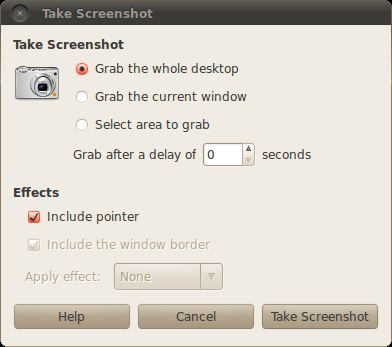
- Makes screen capturing very simple.
- Select the area of the screenshot.
- Select the window to be captured.
- Take a screenshot after a specified number of seconds.
- Take a screenshot including the border of the screen.
- Add a shadow bevel effect around the screenshot.
- Add a border effect to a screenshot.
- Take a screenshot without window decorations.
Website: gitlab.gnome.org/GNOME/gnome-screenshot
Support:
Developer: Cosimo Cecchi, Emmanuele Bassi
License: GNU General Public License
gnome-screenshot is written in C. Learn C with our recommended free books and free tutorials.
Related Software
| Screen Capture Tools | |
|---|---|
| Spectacle | Simple KDE application for capturing desktop screenshots |
| Ksnip | Qt-based cross-platform tool that provides many annotation features |
| flameshot | Complete screen capture and snipping tool with unique features |
| Shutter | Feature-rich screenshot program |
| ScreenGrab | Competent Qt-based tool |
| Satty | Modern screenshot annotation utility with a clean interface |
| swappy | Wayland native snapshot editing tool |
| CoreShot | Simple lightweight screen capture utility for C-Suite |
| gscreenshot | Graphical interface and command line frontend for multiple backends |
| GIMP | The GNU Image Manipulation Program |
| shotman | Lightweight screenshot tool designed for Wayland desktops |
| GNOME Screenshot | Screen capture tool for GNOME |
| xfce4-screenshooter | Flexible screenshot utility for the Xfce desktop environment |
| wayscrollshot | Scrolling screenshot tool for Wayland |
| SnipText | Screen capture OCR tool |
| Perl Screenshot Tool | Works best on X11. It also supports Gnome Wayland |
Read our verdict in the software roundup.
 Explore our carefully curated directory of recommended free and open source software, covering every major software category. Explore our carefully curated directory of recommended free and open source software, covering every major software category.The directory forms part of our extensive collection of articles for Linux enthusiasts. It includes hundreds of detailed reviews, together with free and open source alternatives to proprietary software from companies such as Google, Microsoft, Apple, Adobe, IBM, Cisco, Oracle, and Autodesk. LinuxLinks also covers interesting projects worth exploring, Linux-compatible hardware, free programming books and tutorials, and much more. Know a useful free and open source Linux application that we haven’t covered? Tell us about it using our submission form. |
Please read our Comment Policy before commenting.
Don’t grab contextual menus when “Grab the current window” is previously selected. Obviously, the option “Select area to grab” doesn’t work.
To grab contextual menus you have to select “Grab the whole desktop”.
An option to select the display screen (multiple monitors) is not available.