
Last Updated on August 25, 2020
 Being able to take a screenshot comes in handy so many times. Linux is blessed with a good range of competent screenshot software. One which has recently caught our attention is Flameshot, an easy to use, open source, Qt-based screenshot utility which is adept at capturing custom areas of a desktop.
It’s a complete screen capture and snipping tool with some unique and interesting features. We didn’t think a screenshot tool could capture (no pun intended) our attention this much!
Installation
Besides the source code, there are packages available for various Linux distributions including Fedora, Debian, Ubuntu, Arch, openSUSE, and Void Linux. I installed the software using the package in the Arch User Repository on Manjaro, a distribution which is based on Arch.
For other distributions, there’s the convenience of an AppImage package. AppImage is a format for distributing portable software on Linux without requiring superuser permissions to install the application.
In operation
You can run flameshot from the command-line or invoke a screen grab from the systray icon. The command-line gives you ultimate flexibility for scripting or automating screen captures. But there’s plenty of functionality from the desktop too.
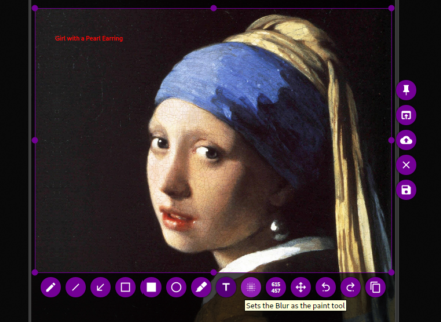
There’s a wide range of annotating tools available including freehand drawing, lines, arrows, boxes, circles, and highlighting. The colour can be customized, together with the size and/or thickness of many of the annotation tools. The latest code also adds a text tool, as well as a pin tool.
If you need to hide any sensitive information from a screen grab, there’s a blur function too. It’s handy to know the size of a screenshot before capturing the image. Fortunately, there’s a selection size indicator included.
You can also move the capture area, undo/redo an action, as well as the essential copy and save functions (with a variety of image formats). There’s even an option to save a capture to the cloud. The choice is limited to Imgur.
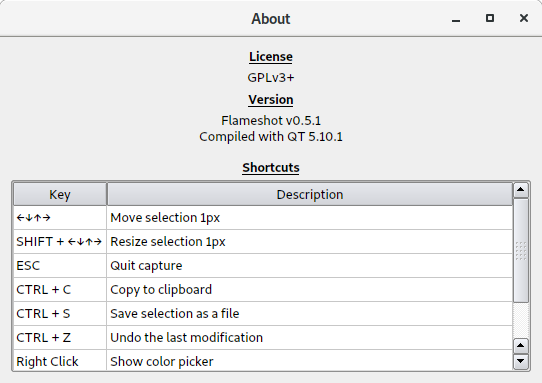
GUI keyboard shortcuts are implemented in the software.
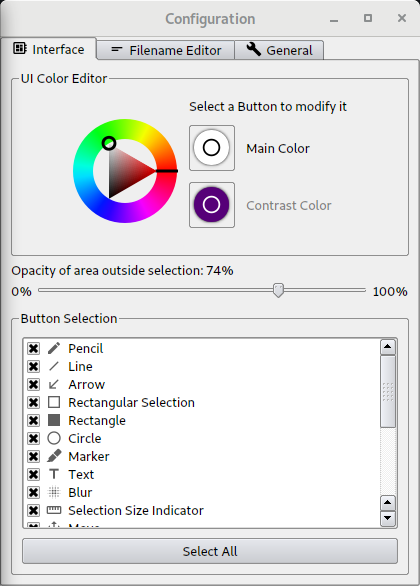
There’s a good range of configuration options available including including the ability to set the opacity of the area outside the selection, and hide/show the various buttons.. I also like the option to set the file naming template using common variables (full date, day of month, day name, month, week, time and so on).
Other features:
- Use at the terminal.
- Full screen capture with custom save path (no GUI) with a delay option.
- Easy to use.
- For command-line users, there Bash completion which lets you complete a command with the tab key.
- In-app screenshot edition.
- Undo/Redo with Ctrl+z and Ctrl+Shift+z.
- DBus interface.
- Option to start the software automatically on boot.
- Sidebar with color selector.
- Delete Imgur image button after uploading it from the preview window.
- “Take Screenshot” option as menu item in the systray.
- Unification of the desktop file with actions.
- Allows systray customization with themes.
- Multiple monitor support.
- Internationalization support – there are very good translations for Catalan, Chinese (Simplified), Chinese (Traditional), French, Georgian, Hungarian, Polish, Russian, Spanish, and Turkish.
Summary
flameshot is an excellent utility for capturing custom areas of a desktop. It’s really easy to use, has a good range of annotation tools which have recently been expanded, and is sleek. There’s even experimental support for Wayland (Gnome and Plasma 5).
The project’s roadmap whets our appetite for more goodness.
Website: github.com/lupoDharkael/flameshot
Support:
Developer: Alejandro Sirgo Rica & contributors
License: GNU General Public License v3.0
flameshot is written in C++. Learn C++ with our recommended free books and free tutorials.
Related Software
| Screen Capture Tools | |
|---|---|
| Spectacle | Simple KDE application for capturing desktop screenshots |
| Ksnip | Qt-based cross-platform tool that provides many annotation features |
| Shutter | Feature-rich screenshot program |
| flameshot | Complete screen capture and snipping tool with unique features |
| ScreenGrab | Competent Qt-based tool |
| swappy | Wayland native snapshot editing tool |
| CoreShot | Simple lightweight screen capture utility for C-Suite |
| gscreenshot | Graphical interface and command line frontend for multiple backends |
| GIMP | The GNU Image Manipulation Program |
| GNOME Screenshot | Screen capture tool for GNOME |
| wayscrollshot | Scrolling screenshot tool for Wayland |
| SnipText | Screen capture OCR tool |
| Perl Screenshot Tool | Works best on X11. It also supports Gnome Wayland |
Read our verdict in the software roundup.
 Explore our comprehensive directory of recommended free and open source software. Our carefully curated collection spans every major software category. Explore our comprehensive directory of recommended free and open source software. Our carefully curated collection spans every major software category.This directory is part of our ongoing series of informative articles for Linux enthusiasts. It features hundreds of detailed reviews, along with open source alternatives to proprietary solutions from major corporations such as Google, Microsoft, Apple, Adobe, IBM, Cisco, Oracle, and Autodesk. You’ll also find interesting projects to try, hardware coverage, free programming books and tutorials, and much more. Discovered a useful open source Linux program that we haven’t covered yet? Let us know by completing this form. |
Please read our Comment Policy before commenting.
What does this do that the standard screenshot utility shipped with most Linux DEs doesn’t? Why reinventing the wheel (again) rather than doing something original?
Maybe if you read the article, you’ll see the delights that flameshot offers over basic screengrabbing software?
Almost all software isn’t ‘original’. It’s not reinventing the wheel, it’s creating the best wheel.
You cannot even begin to compare this with everything else out there. For a power user requiring capture of portions of the screen for everyday work with annotation capabilities there is simply nothing that competes with this tool. Check out windows sniping tool. It’s a power-user-tool. Simple, efficient. perfect. Same as this flameshot.
And to answer your question: before discovering this tool I was contemplating starting to write my own screen capture app because I was frustrated with the limited features and in-the-way interface of every other tool out there.
It’s a great tool, just wish it offers the ability to capture the active window. Development of this feature has been on the cards for ages, but still no progress?