

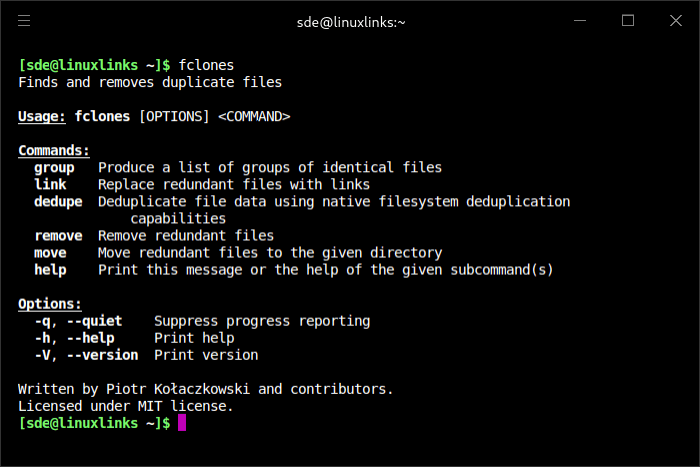
fclones is an efficient duplicate file finder and remover.
This is a command line utility that identifies groups of identical files and gets rid of the file copies you no longer need. It comes with plenty of configuration options for controlling the search scope and offers many ways of removing duplicates. For maximum flexibility, it integrates well with other Unix utilities like find and it speaks JSON, so you have a lot of control over the search and cleanup process.
fclones is free and open source software.
Key Features
- Inspect and modify the list of duplicate files before removing them.
--dry-runoption that can tell you exactly what changes on the file system would be made.- Employs several optimization techniques. It adapts to the type of the hard drive, orders file operations by physical data placement on HDDs, scans directory tree in parallel and uses prefix compression of paths to reduce memory consumption when working with millions of files. It is also friendly to page-cache and does not push out your data out of cache.
- Identifying groups of identical files:
- finding duplicate files.
- finding files with more than N replicas.
- finding unique files.
- finding files with fewer than N replicas.
- Advanced file selection for reducing the amount of data to process:
- scanning multiple directory roots.
- can work with a list of files piped directly from standard input.
- recursive/non-recursive file selection.
- recursion depth limit.
- filtering names and paths by extended UNIX globs.
- filtering names and paths by regular expressions.
- filtering by min/max file size.
- proper handling of symlinks and hardlinks.
- Removing redundant data:
- removing, moving or replacing files with soft or hard links.
- removing redundant file data using native copy-on-write (reflink) support on some file systems.
- selecting files for removal by path or name patterns.
- prioritizing files to remove by creation, modification, last access time or nesting level.
- High performance:
- parallel processing capability in all I/O and CPU heavy stages.
- automatic tuning of parallelism and access strategy based on device type (SSD vs HDD).
- low memory footprint thanks to heavily optimized path representation.
- variety of fast non-cryptographic and cryptographic hash functions up to 512 bits wide.
- doesn’t push data out of the page-cache (Linux only).
- optional persistent caching of file hashes.
- accurate progress reporting.
- Variety of output formats for easy further processing of results:
- standard text format:
- groups separated by group headers with file size and hash.
- one path per line in a group.
- optional
fdupescompatibility (no headers, no indent, groups separated by blank lines). - machine-readable formats:
CSV,JSON.
- standard text format:
Website: github.com/pkolaczk/fclones
Support:
Developer: Piotr Kołaczkowski
License: MIT License
fclones is written in Rust. Learn Rust with our recommended free books and free tutorials.
fclones’ developer has also written a GUI for fclones, called fclones-gui.
Related Software
| Find and Delete Duplicate Files with these CLI Tools | |
|---|---|
| Czkawka | Find duplicate files, big files, empty files, similar images, and much more |
| fdupes | Great CLI tool that's written in C |
| fclones | Efficient duplicate file finder and remover |
| rmlint | Fast tool to remove duplicates and other lint |
| jdupes | Powerful CLI duplicate file finder and 'enhanced' fork of fdupes |
| smash | Find duplicate files super fast |
| rdfind | CLI redundant data find tool written in C++ |
| duff | Command-line utility for finding duplicate files |
| rmdupes | Option to use a reference directory |
| Periscope | Organize storage and safely remove redundant files |
| Go Find Duplicates | Scans directories for duplicate files and directories |
| dskDitto | Parallel duplicate-file detector with interactive menus |
| samanlainen | Delete duplicate files with SHA512 hashing |
| FSlint | Python based CLI and GUI tool |
| sdupes | Fast duplicate file detection utility. |
| dupefi | Duplicate file finder designed with Linux philosophy |
| Dupster | Duplicate file finder |
| duple | Find and remove duplicate files |
| ddh | Directory Differential hTool |
| backdown | Safely and ergonomically remove duplicate files |
Read our verdict in the software roundup.
 Explore our carefully curated directory of recommended free and open source software, covering every major software category. Explore our carefully curated directory of recommended free and open source software, covering every major software category.The directory forms part of our extensive collection of articles for Linux enthusiasts. It includes hundreds of detailed reviews, together with free and open source alternatives to proprietary software from companies such as Google, Microsoft, Apple, Adobe, IBM, Cisco, Oracle, and Autodesk. LinuxLinks also covers interesting projects worth exploring, Linux-compatible hardware, free programming books and tutorials, and much more. Know a useful free and open source Linux application that we haven’t covered? Tell us about it using our submission form. |
Please read our Comment Policy before commenting.