

Rdfind is a program that finds duplicate files. It is useful for compressing backup directories or just finding duplicate files. It compares files based on their content, not on their file names. It calculates checksum only if necessary.
Rdfind uses the following algorithm. If N is the number of files to search through, the effort required is in worst case O(Nlog(N)). Because it sorts files on inodes prior to disk reading, it is quite fast. It also only reads from disk when it is needed.
Given two or more equal files, the one with the highest rank is selected to be the original and the rest are duplicates.
This program is free and open source.
The software uses the following algorithm.
- Loop over each argument on the command line. Assign each argument a priority number, in increasing order.
- For each argument, list the directory contents recursively and assign it to the file list. Assign a directory depth number, starting at 0 for every argument.
- If the input argument is a file, add it to the file list.
- Loop over the list, and find out the sizes of all files.
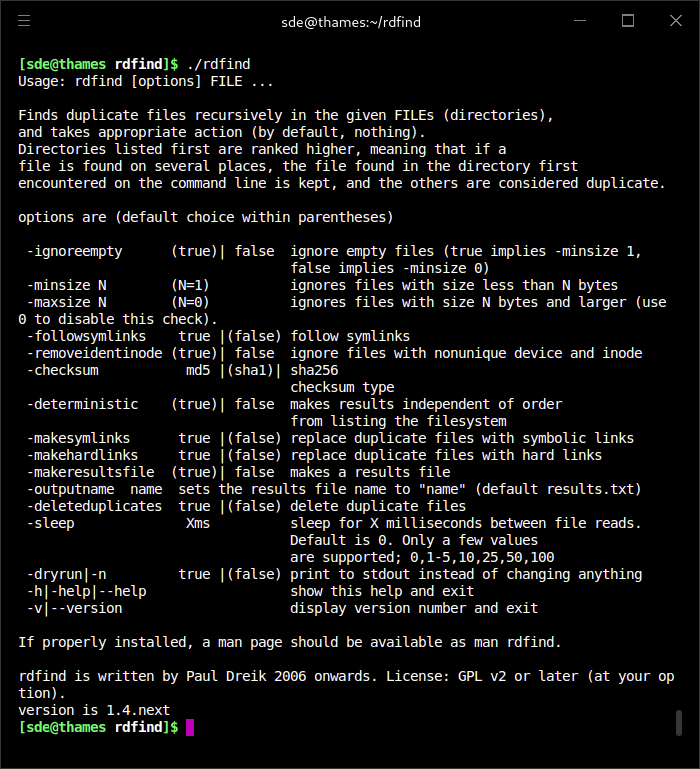
- If flag -removeidentinode true: Remove items from the list which already are added, based on the combination of inode and device number. A group of files that are hardlinked to the same file are collapsed to one entry. Also see the comment on hardlinks under ”caveats below”!
- Sort files on size. Remove files from the list, which have unique sizes.
- Sort on device and inode(speeds up file reading). Read a few bytes from the beginning of each file (first bytes).
- Remove files from list that have the same size but different first bytes.
- Sort on device and inode(speeds up file reading). Read a few bytes from the end of each file (last bytes).
- Remove files from list that have the same size but different last bytes.
- Sort on device and inode(speeds up file reading). Perform a checksum calculation for each file.
- Only keep files on the list with the same size and checksum. These are duplicates.
- Sort list on size, priority number, and depth. The first file for every set of duplicates is considered to be the original.
- If flag ”-makeresultsfile true”, then print results file (default).
- If flag ”-deleteduplicates true”, then delete (unlink) duplicate files. Exit.
- If flag ”-makesymlinks true”, then replace duplicates with a symbolic link to the original. Exit.
- If flag ”-makehardlinks true”, then replace duplicates with a hard link to the original. Exit.
Website: rdfind.pauldreik.se
Support: GitHub Code Repository
Developer: Paul Dreik
License: GNU General Public Licence version 2 or, at your option, a later version
rdfind is written in C++. Learn C++ with our recommended free books and free tutorials.
Related Software
| Find and Delete Duplicate Files with these CLI Tools | |
|---|---|
| Czkawka | Find duplicate files, big files, empty files, similar images, and much more |
| fdupes | Great CLI tool that's written in C |
| fclones | Efficient duplicate file finder and remover |
| rmlint | Fast tool to remove duplicates and other lint |
| jdupes | Powerful CLI duplicate file finder and 'enhanced' fork of fdupes |
| smash | Find duplicate files super fast |
| rdfind | CLI redundant data find tool written in C++ |
| duff | Command-line utility for finding duplicate files |
| rmdupes | Option to use a reference directory |
| Periscope | Organize storage and safely remove redundant files |
| Go Find Duplicates | Scans directories for duplicate files and directories |
| dskDitto | Parallel duplicate-file detector with interactive menus |
| samanlainen | Delete duplicate files with SHA512 hashing |
| FSlint | Python based CLI and GUI tool |
| sdupes | Fast duplicate file detection utility. |
| dupefi | Duplicate file finder designed with Linux philosophy |
| Dupster | Duplicate file finder |
| duple | Find and remove duplicate files |
| ddh | Directory Differential hTool |
| backdown | Safely and ergonomically remove duplicate files |
Read our verdict in the software roundup.
 Explore our comprehensive directory of recommended free and open source software. Our carefully curated collection spans every major software category. Explore our comprehensive directory of recommended free and open source software. Our carefully curated collection spans every major software category.This directory is part of our ongoing series of informative articles for Linux enthusiasts. It features hundreds of detailed reviews, along with open source alternatives to proprietary solutions from major corporations such as Google, Microsoft, Apple, Adobe, IBM, Cisco, Oracle, and Autodesk. You’ll also find interesting projects to try, hardware coverage, free programming books and tutorials, and much more. Discovered a useful open source Linux program that we haven’t covered yet? Let us know by completing this form. |
Please read our Comment Policy before commenting.