

rmlint is a command-line utility for identifying duplicate files and other forms of unnecessary filesystem data. It can detect identical file contents, empty directories, broken symbolic links and several additional problems that occupy disk space or complicate file management.
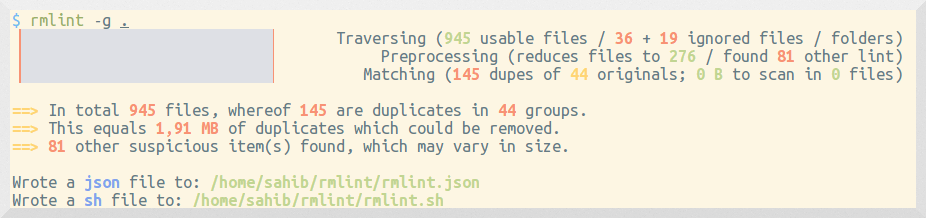
The application separates scanning from cleanup. Rather than automatically deleting matching files, it generates reports and cleanup scripts that can be inspected before execution. This approach gives users control over which files are preserved and how redundant data is handled.
rmlint is designed to process large directory trees efficiently. It supports configurable hashing algorithms, file-selection rules and output formats, making it suitable for both interactive maintenance and automated storage analysis.
This is free and open source software.
Key Features
- Finds duplicate files and directories by comparing their contents.
- Identifies empty files and directories.
- Detects broken symbolic links and files with invalid ownership information.
- Finds executable files containing unnecessary symbol information.
- Supports multiple hashing algorithms for duplicate detection.
- Provides an exact byte-by-byte comparison mode.
- Uses multithreaded processing to analyse large file collections.
- Supports incremental scanning to avoid rechecking previously examined files.
- Offers configurable rules for determining which duplicate copy is considered the original.
- Filters files by size, filename, directory and other attributes.
- Produces detailed reports in multiple formats, including JSON.
- Generates shell scripts for reviewing and performing cleanup operations.
- Supports replacing redundant copies with hard links or symbolic links through generated cleanup actions.
- Reports potential storage savings from duplicate removal.
- Provides progress information during lengthy scans.
Website: github.com/sahib/rmlint
Support:
Developer: Chris Pahl and contributors
License: GNU General Public License v3.0
rmlint is written in C and Python. Learn C with our recommended free books and free tutorials. Learn Python with our recommended free books and free tutorials.
Related Software
| Find and Delete Duplicate Files with these CLI Tools | |
|---|---|
| Czkawka | Find duplicate files, big files, empty files, similar images, and much more |
| fdupes | Great CLI tool that's written in C |
| fclones | Efficient duplicate file finder and remover |
| rmlint | Fast tool to remove duplicates and other lint |
| jdupes | Powerful CLI duplicate file finder and 'enhanced' fork of fdupes |
| smash | Find duplicate files super fast |
| rdfind | CLI redundant data find tool written in C++ |
| duff | Command-line utility for finding duplicate files |
| rmdupes | Option to use a reference directory |
| Periscope | Organize storage and safely remove redundant files |
| Go Find Duplicates | Scans directories for duplicate files and directories |
| dskDitto | Parallel duplicate-file detector with interactive menus |
| samanlainen | Delete duplicate files with SHA512 hashing |
| FSlint | Python based CLI and GUI tool |
| sdupes | Fast duplicate file detection utility. |
| dupefi | Duplicate file finder designed with Linux philosophy |
| Dupster | Duplicate file finder |
| duple | Find and remove duplicate files |
| ddh | Directory Differential hTool |
| backdown | Safely and ergonomically remove duplicate files |
Read our verdict in the software roundup.
 LinuxLinks helps you discover the best free and open source software for Linux. Explore our extensive collection of recommended applications, including alternatives to popular proprietary software. We also publish software reviews, Linux tutorials, hardware reviews, free programming books and articles covering the wider open source community. Browse our Linux resources to discover more. Know a useful free and open source Linux application we haven't covered? Suggest a program for inclusion. Has your software been featured on LinuxLinks? Display one of our Featured on LinuxLinks badges on your website or GitHub README. |
Please read our Comment Policy before commenting.