

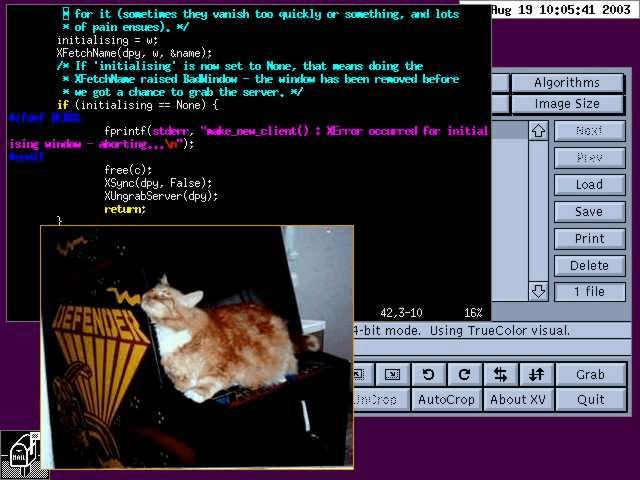
evilwm is a minimalist window manager for the X Window System. It manages overlapping application windows without conventional title bars, application icons or elaborate desktop decorations.
Its interface places a narrow border around each window, leaving most of the available screen space for applications. Window management is controlled primarily through configurable keyboard shortcuts and mouse actions.
evilwm supports virtual desktops and multiple monitors, allowing users to organise applications without introducing a larger desktop interface. Its small collection of configuration options covers window appearance, placement, focus and keyboard behaviour.
Configuration can be supplied through command-line options or a user configuration file. The window manager can also reload its configuration while running.
This is free and open source software.
Key Features
- Minimal window decorations with configurable border width and colours.
- Keyboard shortcuts for moving, resizing, lowering and maximising windows.
- Customisable mouse bindings for controlling application windows.
- Multiple virtual desktops with configurable layout and navigation.
- Multi-monitor support with monitor-aware window placement.
- Window snapping to nearby screen borders.
- Application-specific rules for initial geometry and virtual desktop assignment.
- Configurable window focus and raising behaviour.
- Support for dock-type windows and compatible desktop utilities.
- Horizontal, vertical and full-window maximisation.
- Optional outline-based window movement and resizing.
- Extended Window Manager Hints support.
- Configuration through the .evilwmrc file.
- Runtime configuration reload using SIGHUP.
- Adjustable keyboard modifier combinations and window management commands.
Website: www.6809.org.uk/evilwm
Support:
Developer: Ciaran Anscomb
License: AEWM License
evilwm is written in C. Learn C with our recommended free books and free tutorials.
Related Software
| Stacking Window Managers | |
|---|---|
| Openbox | Standards compliant, fast, light-weight, extensible window manager |
| KWin | Window manager for the KDE Plasma Desktop |
| Mutter | Wayland display server and X11 window manager and compositor library |
| FVWM | Powerful ICCCM-compliant multiple virtual desktop window manager |
| berry | Healthy, bite-sized window manager |
| xfwm | Part of the Xfce desktop environment |
| Window Maker | NeXTSTEP-like window manager |
| JWM | Joe’s Window Manager |
| Gala | Designed by elementary for use with Pantheon |
| Fluxbox | Highly configurable and low resource |
| evilwm | Maximises screen real estate and provides good keyboard control |
| Worm | Tiny, dynamic, tag-based window manager |
| Blackbox | Similar to the NeXT interface and Window Maker |
| Enlightenment | Focuses on pushing the limits of existing technologies |
| PekWM | Originally based on the aewm++ window manager |
| Marco | MATE default window manager |
| 2bwm | Offers 2 borders, and written over the XCB library |
| cwm | OpenBSD fork of calmwn, a clean and lightweight window manager |
| IceWM | Win95-OS/2-Motif-like window manager |
| Sawfish | Extensible window manager using an Emacs Lisp-like scripting language |
| Moksha | Modern iteration of the Enlightenment window manager |
| Magpie | X11 window manager and compositor library |
| EMWM | Fork of the Motif Window Manager |
| sowm | Itsy bitsy floating window manager |
| CTWM | X11 window manager derived from twm |
| Compiz | OpenGL window and compositing manager |
Read our verdict in the software roundup.
 LinuxLinks helps you discover the best free and open source software for Linux. Explore our extensive collection of recommended applications, including alternatives to popular proprietary software. We also publish software reviews, Linux tutorials, hardware reviews, free programming books and articles covering the wider open source community. Browse our Linux resources to discover more. Know a useful free and open source Linux application we haven't covered? Suggest a program for inclusion. Has your software been featured on LinuxLinks? Display one of our Featured on LinuxLinks badges on your website or GitHub README. |
Please read our Comment Policy before commenting.