
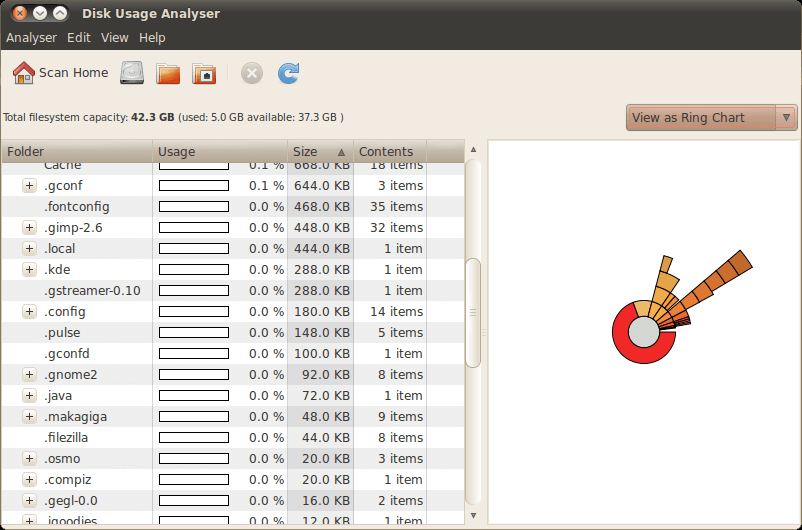
Disk Usage Analyzer, also known as Baobab, is a graphical utility for examining disk usage and folder structures. It is developed as part of the GNOME desktop environment.
The application helps users understand how available storage is being consumed. It can scan individual folders, local storage devices and accessible remote locations, displaying the results in a form that makes large directories easy to identify.
Disk Usage Analyzer combines a directory tree with a graphical representation of storage consumption. This makes it possible to examine a directory numerically while also seeing how its files and subdirectories contribute to the total size.
The application is useful when a disk is approaching capacity and the cause is not immediately obvious. It provides a straightforward way to investigate the filesystem without requiring familiarity with command-line disk usage utilities.
Its integration with the GNOME desktop makes it a natural choice for users who prefer applications that follow GNOME’s interface conventions.
This is free and open source software.
Key Features
- Scan individual folders or entire storage volumes.
- Analyse local storage devices and accessible remote locations.
- Display disk usage using graphical charts and a directory tree.
- View the size of individual directories and their contents.
- Compare the relative space occupied by different branches of the filesystem.
- Automatically detect available storage devices and mounted locations.
- Navigate the filesystem hierarchy to identify directories consuming substantial storage.
- Inspect storage usage on locations accessible through GNOME’s file access infrastructure.
- Graphical interface designed to integrate with GNOME.
Website: www.marzocca.net/linux/baobab
Support:
Developer: GNOME Project
License: GNU General Public License v2.0
Disk Usage Analyser is written in Vala. Learn Vala with our recommended free books and free tutorials.
Related Software
| Disk Usage Utilities | |
|---|---|
| QDirStat | Excellent Qt-based directory statistics |
| Filelight | Creates an interactive map to visualise disk usage |
| Baobab | Also known as Disk Usage Analyser |
| agedu | Utility for tracking down wasted disk space |
| SquirrelDisk | Bills itself as "the easiest app you will ever use to detect huge files" |
| K4DirStat | KDE Directory Statistics sums up disk usage for directory trees |
| Krusader | File manager with built-in disk usage functionality |
| SpaceMan | Treemap disk usage analyzer |
| xdiskusage | Light and frugal utility |
| MX Cleanup | GUI for system cleanup and maintenance |
| crossdirstat | File and directory statistics written using Electron |
Read our verdict in the software roundup.
 LinuxLinks helps you discover the best free and open source software for Linux. Explore our extensive collection of recommended applications, including alternatives to popular proprietary software. We also publish software reviews, Linux tutorials, hardware reviews, free programming books and articles covering the wider open source community. Browse our Linux resources to discover more. Know a useful free and open source Linux application we haven't covered? Suggest a program for inclusion. Has your software been featured on LinuxLinks? Display one of our Featured on LinuxLinks badges on your website or GitHub README. |
Please read our Comment Policy before commenting.