

CSVI is a terminal-based CSV editor for UNIX-like systems and Windows.
This is free and open source software.
Features include:
- Minimal changes on save:
- CSVI keeps the original formatting for every unmodified cell: quotes, line endings (LF/CRLF), BOM, encoding, and field/record separators.
- Only actual edits are saved—making it ideal for clean diffs and safe edits to production data.
- vi-style and Emacs-style keybindings – move the cursor like in vi, and edit cells like in Emacs.
- Reads from both file and standard input – pipe CSV data into CSVI or open a file directly.
- Fast startup and background loading – opens large files quickly without blocking the interface.
- Visual feedback for edits – modified cells are underlined.
- Shows original format details – the bottom line of the screen shows technical info: quoting, encoding, field separators, and more—just as they appeared in the original file.
- Flexible encoding support:
- UTF-8 (default).
- UTF-16.
- Current Windows code page (auto-detected).
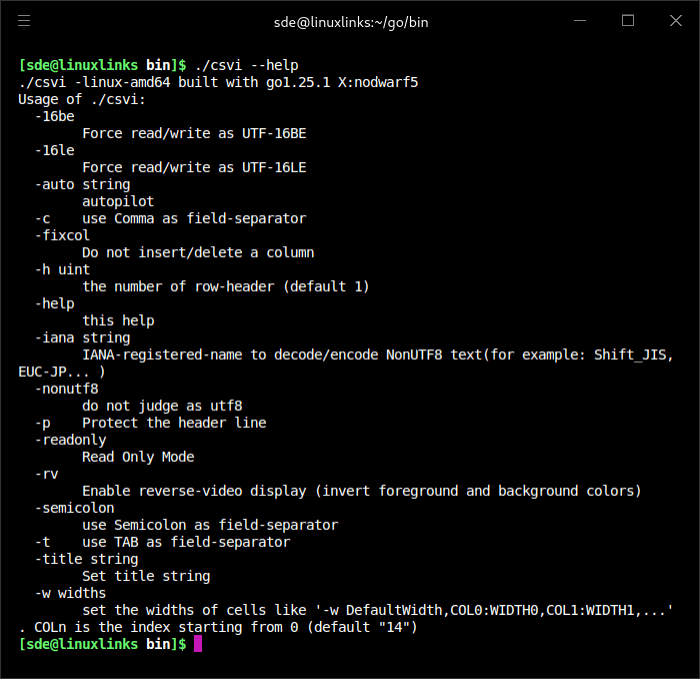
- Any encoding from the IANA registry using -iana NAME.
- Color scheme options:
- Default colors assume a dark background.
- Use -rv for light backgrounds, or set NO_COLOR to disable color output.
Website: github.com/hymkor/csvi
Support:
Developer: zetamatta
License: MIT License
csvi is written in Go. Learn Go with our recommended free books and free tutorials.
| Explore Linux | |
|---|---|
 | Best Free and Open Source Software - A huge collection of recommended free and open source software covering every major category. |
 | In-depth Linux Software Reviews - Detailed assessments of Linux software covering features, usability and overall quality. |
 | The Big List of Active Linux Distros - An extensive collection of actively developed Linux distributions. |
 | Open Source Alternatives - Alternatives to software and services from Google, Microsoft, Apple, Adobe, IBM, Autodesk, Oracle and others. |
 | Essential Linux System Tools - Indispensable utilities for monitoring, maintaining and managing Linux systems. |
 | Linux Productivity Tools - Useful utilities for improving productivity and streamlining everyday tasks. |
 | Alternatives to Popular CLI Tools - Modern alternatives to familiar command-line utilities supplied with Linux systems. |
 | Awesome Free Linux Game Tools - Tools, utilities and companion software that improve gaming on Linux. |
 | Machine Learning on Linux - Machine learning and deep learning software, self-hosted applications and practical tools. |
 | Saving Money with Linux - Practical ways to reduce electricity consumption and lower computing costs with Linux. |
 | Linux Candy - Fun, entertaining and sometimes delightfully quirky software from the lighter side of Linux. |
Please read our Comment Policy before commenting.