

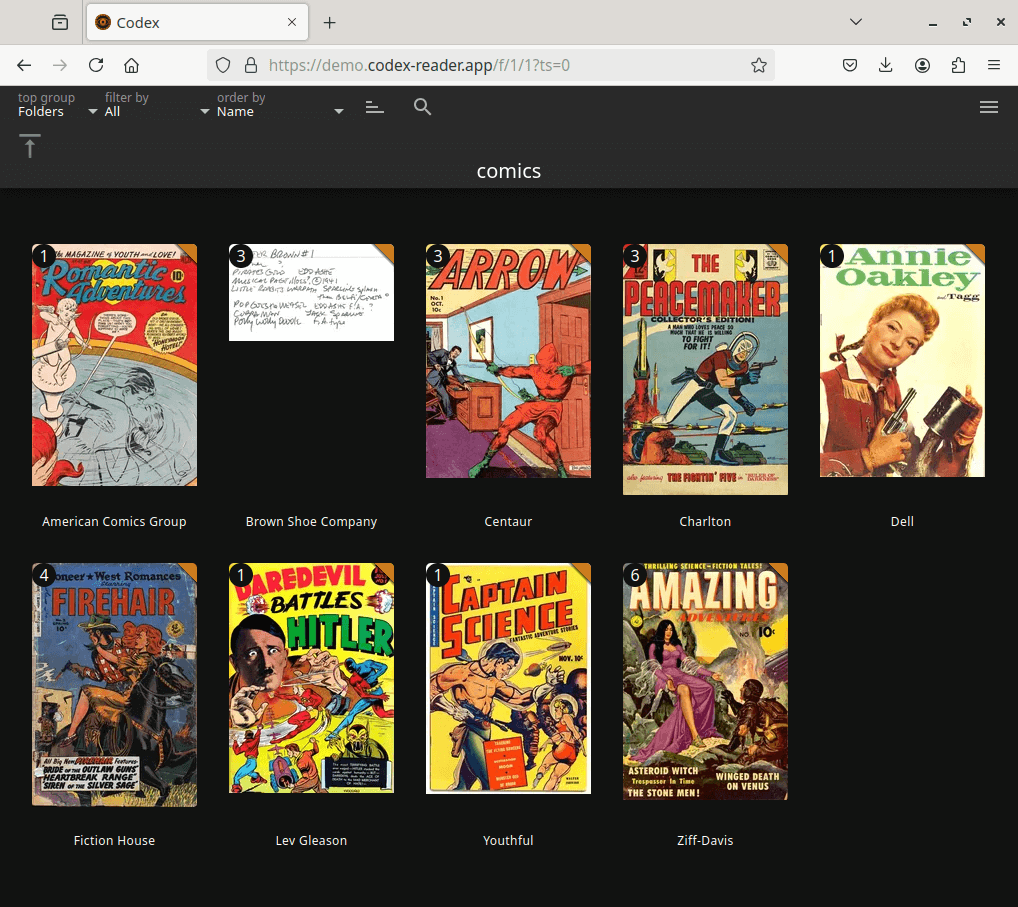
Codex is a web-based comic archive browser and reader designed for managing substantial collections of digital comics. It combines automatic library indexing with detailed metadata organisation, allowing readers to locate comics by publisher, series, volume, story arc or their existing filesystem hierarchy.
Unlike a simple directory-based reader, Codex places considerable emphasis on searching and filtering comic metadata. Readers can create views based on different combinations of information, including publication dates, characters, story arcs and unread status. These facilities are useful when a collection contains thousands of issues or when comics belonging to the same reading sequence are spread across several series.
The application also provides administrative tools for improving the quality of stored metadata. Information can be edited directly through the browser or retrieved from supported online sources. A multiuser system allows library administrators to control access while individual readers maintain their own bookmarks, preferences and favourites.
This is free and open source software.
Key Features
- Read CBZ, CBR, CB7, CBT and PDF comic archives.
- Automatically detect and import new or modified comics from monitored directories.
- Browse comics by publisher, imprint, series, volume, folder or story arc.
- Perform full-text searches across comic metadata and bookmarks.
- Filter and sort comics using metadata fields and individual unread status.
- Provide a sortable metadata table for examining large collections.
- Save and reload named searches and filtered library views.
- Mark favourite publishers, series, volumes, folders, story arcs and individual issues.
- Edit metadata for individual comics or multiple selected files directly in the browser.
- Retrieve metadata from supported online sources with interactive matching.
- Rename comic files using information obtained from their metadata.
- Assign custom covers to folders, publishers, imprints, series and story arcs.
- Offer multiple reading directions, aspect ratios and screen layouts.
- Remember individual reading positions, bookmarks and display preferences.
- Allow anonymous browsing or require registered user accounts.
- Restrict private libraries to selected user groups.
- Support optional age restrictions for appropriately tagged comics.
- Provide OPDS 1 and OPDS 2 catalogues with authentication, search and streaming.
- Support OpenID Connect and reverse-proxy single sign-on.
- Provide facilities for backing up and restoring user accounts, bookmarks and preferences.
Website: github.com/ajslater/codex
Support:
Developer: AJ Slater
License: GNU General Public License v3.0
Codex is written in Python. Learn Python with our recommended free books and free tutorials.
Related Software
| Self-Hosted Comics and Manga Servers | |
|---|---|
| Suwayomi | Extensible reading server powered by source plugins |
| Stump | Modern Rust-powered library manager with slick readers |
| Komga | Polished media library with web reading and OPDS support |
| Gopherbook | Simple Go-based archive viewer for CBZ and CBT files |
| Issued | Lightweight personal collection server with clean browsing |
| Tanoshi | Streamlined online reader with tracking and sync features |
| Codex | Web archive browser with smart organisation tools |
| ComiGo | Browser-based reader focused on speed and simplicity |
Read our verdict in the software roundup.
 LinuxLinks helps you discover the best free and open source software for Linux. Explore our extensive collection of recommended applications, including alternatives to popular proprietary software. We also publish software reviews, Linux tutorials, hardware reviews, free programming books and articles covering the wider open source community. Browse our Linux resources to discover more. Know a useful free and open source Linux application we haven't covered? Suggest a program for inclusion. Has your software been featured on LinuxLinks? Display one of our Featured on LinuxLinks badges on your website or GitHub README. |
Please read our Comment Policy before commenting.
I recently installed this via Docker after getting my homelab set up earlier this year and I absolutely love Codex. It’s nice to not have to manage different apps on different platforms (i.e. ComicRack on Windows, Perfect Reader on Android, etc.) and just have my reading progress synced on whatever device I’m on.
Really easy to set up and does most everything I could want from just a reader. Strongly recommend if you’re interested in anywhere-access to comic files.