

In Operation
Start BoxBuddy.
If you’ve not setup a distrobox before, you’ll first want to create a new distrobox. Enter the name for your distrobox and select an image from the dropdown box. In the example below, we’re setting up a distrobox for Slackware.
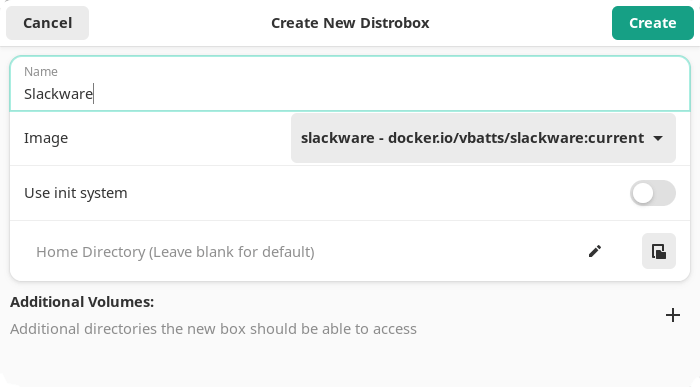
Then click the Create button and the box is set up.
The image below shows BoxBuddy’s UI. The software will show all non-rootful containers on your system. All our containers on our test system are shown.
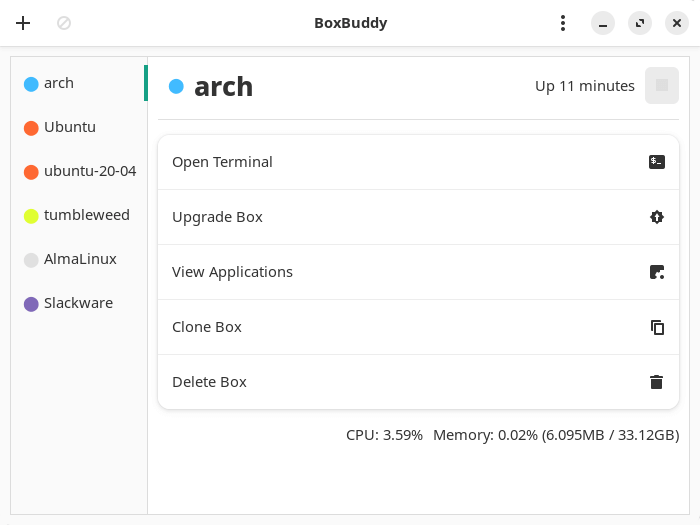
As the above image shows,for each box, we can open it in a terminal, upgrade the box, view the applications installed in the box, clone the box, delete the box, and stop the box. The UI lets you select your preferred terminal with a good range of terminals supported.
For Ubuntu / Fedora based distros, there’s also the ability to install a .deb or .rpm file.
The interface also provides a stats line showing CPU and memory being used.
Summary
BoxBuddy offers a simple UI for Distrobox which lets you control your boxes without needing to revert to the command-line. It’s under active development.
The software has limitations. For example, the View applications option is designed to run applications and add them to your menu. However, this functionality is largely broken. Most apps don’t run. The developer of BoxBuddy says this is an issue upstream (i.e with Distrobox itself).
There’s no option to customize the image from BoxBuddy. You can only use images available from the dropdown.
Website: github.com/Dvlv/BoxBuddyRS
Support:
Developer: DvLv, VortexAcherontic
License: MIT License
BoxBuddy is written in Rust. Learn Rust with our recommended free books and free tutorials
Pages in this article:
Page 1 – Introduction and Installation
Page 2 – In Operation and Summary
Related Software
| Distrobox GUI Tools | |
|---|---|
| Atoms | Manage Linux Chroot(s) and Containers |
| DistroShelf | GTK Client for Distrobox |
| BoxBuddy | Graphical manager for Distrobox |
| Kontainer | User-friendly way to manage Distrobox containers built with KDE Kirigami |
| DistroRack | Qt/QML-based GUI for Distrobox containers |
Read our verdict in the software roundup.
 Explore our comprehensive directory of recommended free and open source software. Our carefully curated collection spans every major software category. Explore our comprehensive directory of recommended free and open source software. Our carefully curated collection spans every major software category.This directory is part of our ongoing series of informative articles for Linux enthusiasts. It features hundreds of detailed reviews, along with open source alternatives to proprietary solutions from major corporations such as Google, Microsoft, Apple, Adobe, IBM, Cisco, Oracle, and Autodesk. You’ll also find interesting projects to try, hardware coverage, free programming books and tutorials, and much more. Discovered a useful open source Linux program that we haven’t covered yet? Let us know by completing this form. |
Please read our Comment Policy before commenting.