
Biwin is a storage and memory manufacturer whose consumer range includes SSDs, DRAM modules, portable SSDs, USB flash drives, and memory cards.
Here, I’m looking at the Biwin RS200 DDR5 SODIMM, a mainstream memory upgrade aimed at laptops, mini PCs, and compact workstations. I tested a pair of 16GB modules, giving me 32GB of DDR5 memory in dual-channel mode. The modules are rated at 5600 MT/s with CL46 timings and operate at 1.1V.
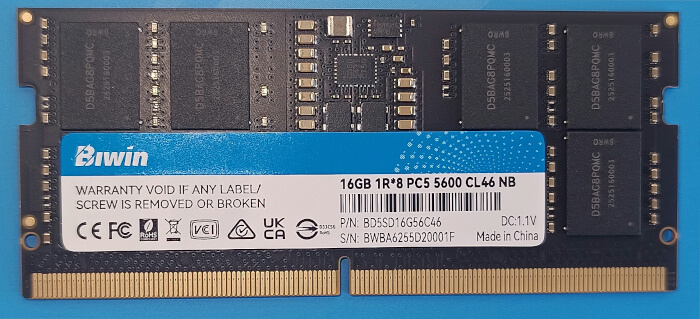
This isn’t flashy gaming memory with heat spreaders, RGB lighting, or enthusiast tuning profiles. It’s plain, low-profile SODIMM memory intended for laptops, mini PCs, NUC-style systems, and compact workstations. That’s exactly the right design for this class of product. In most mini PCs, the memory sits hidden inside the chassis, and compatibility matters far more than appearance.
The modules support on-die ECC, which is part of DDR5’s internal error correction mechanism. This shouldn’t be confused with full platform ECC memory, which reports and corrects errors at the system level. For most consumer laptops and mini PCs, on-die ECC is still useful, but it doesn’t turn the system into an ECC workstation.
I tested the Biwin modules in an ASRock Industrial NUC BOX-255H with an Intel Core Ultra 7 255H processor. For comparison, I used results from the same machine fitted with a pair of Crucial 16GB DDR5-5600 SODIMMs.
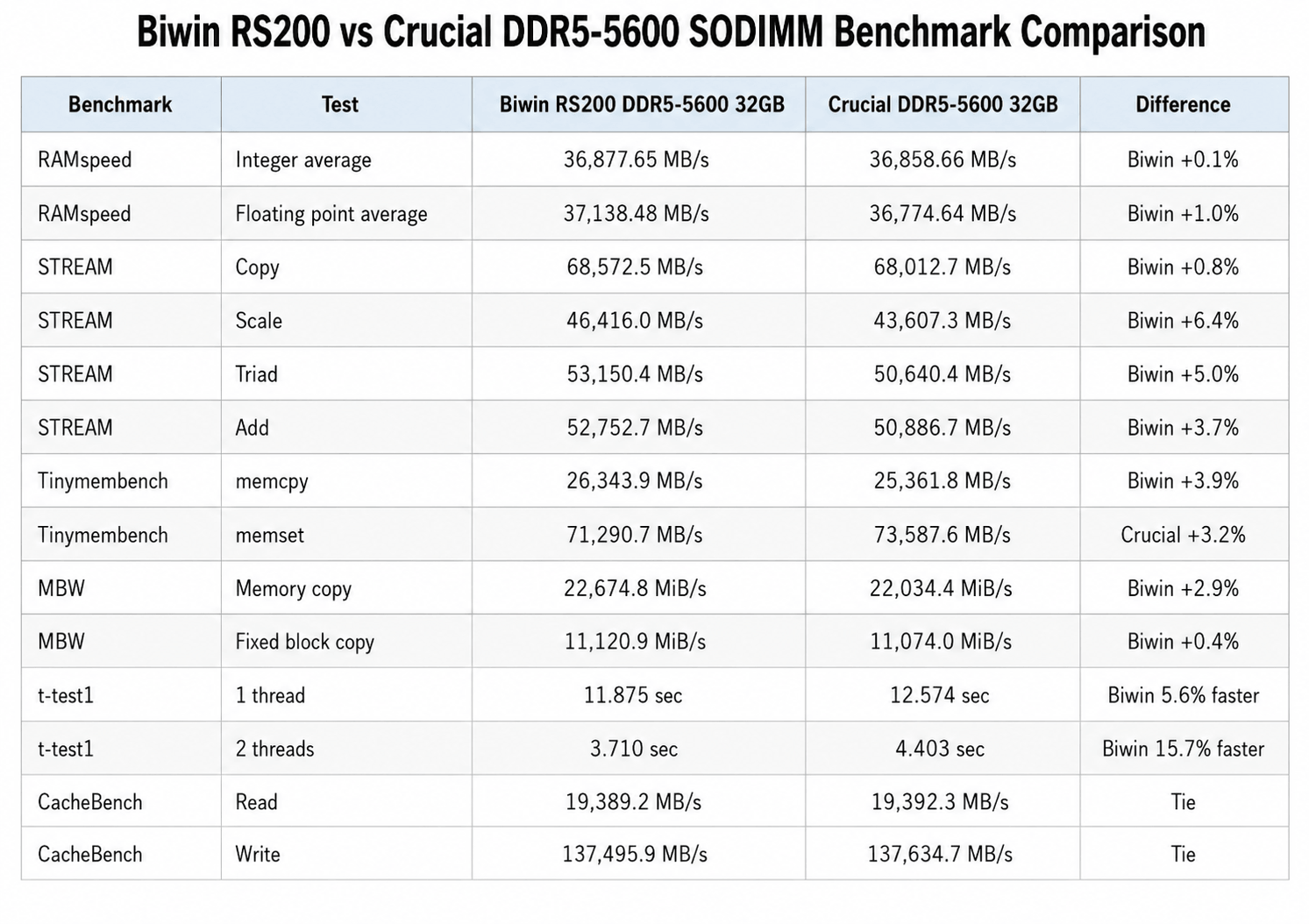
The RAMspeed results are effectively tied. Biwin edges ahead in the integer and floating point averages, but the differences are tiny. In individual subtests, Crucial wins some and Biwin wins others. That’s exactly what we’d expect from two DDR5-5600 CL46 SODIMM kits running on the same memory controller.
STREAM is more favourable to Biwin. Its Scale, Triad, and Add results are between 3.7% and 6.4% ahead of Crucial. Copy is almost identical. STREAM is useful because it measures sustained memory bandwidth.
Tinymembench gives a mixed picture. Biwin is 3.9% faster in standard memcpy, while Crucial is 3.2% faster in standard memset. Again, this is a narrow split rather than a decisive win for either kit.
MBW favours Biwin, but only modestly. The regular memory copy test is 2.9% faster, while the fixed block test is virtually identical. CacheBench is also a dead heat, with read and write results differing by less than a tenth of a percent.
The t-test1 results show the largest Biwin advantage, particularly in the two-thread run. Even here, the result should be viewed as part of the wider pattern rather than a decisive lead on its own.
Linux experience
There’s nothing special to configure under Linux. The modules are standard DDR5 SODIMMs and were detected correctly by the system. No vendor driver, utility, or Windows-only software is required. This is exactly what we want from laptop and mini PC memory.
For Linux users, the main benefit of moving to 32GB is not headline benchmark performance. It’s the extra breathing room. A modern desktop environment, web browser, development tools, virtual machines, containers, image editing software, and local AI tools can all consume memory quickly. With 32GB installed, the system has much more space before it starts leaning on swap.
That matters more than a few percent in synthetic bandwidth tests. The Biwin modules don’t transform the Core Ultra 7 255H platform, but they let it operate as a more capable compact workstation.
Verdict
The Biwin RS200 DDR5 SODIMM modules are a solid upgrade for compatible laptops and mini PCs. In my tests, a 32GB pair performed very close to a comparable Crucial DDR5-5600 kit, with Biwin taking small wins in STREAM, MBW, memcpy, and the t-test1 runs, while Crucial remained slightly ahead in some RAMspeed subtests and memset.
The differences are generally modest. That’s not a criticism. With DDR5-5600 CL46 SODIMMs, the best outcome is stable plug-and-play behaviour and performance that matches established brands. Biwin achieves that.
For Linux users upgrading a mini PC or laptop from 16GB to 32GB, this pair of modules makes sense. The modules are standard, low-power, driverless, and performed reliably in my tests. The benchmark comparison doesn’t show a dramatic advantage over Crucial, but it does show that Biwin is competitive. If pricing is attractive, the RS200 is an easy memory upgrade to recommend.
This review uses two 16GB SODIMMs, not a single 32GB module. A single 32GB SODIMM may be cheaper, and it leaves the second slot free for a future upgrade, but it also means the system runs in single-channel mode. That reduces available memory bandwidth substantially compared with a matched 2 x 16GB configuration.
This doesn’t just affect synthetic memory benchmarks. It can show up in real-world workloads too. Integrated graphics are particularly sensitive because the GPU uses system memory as video memory. With only one memory channel available, gaming frame rates, frame pacing, and GPU-heavy desktop workloads can all suffer. Parallel CPU workloads can also be affected. Compiling large projects, compression, scientific workloads, and other tasks that keep many CPU cores busy can hit memory bandwidth limits more easily.
The size of the difference depends on the workload. Light desktop use may feel similar, but a compact Core Ultra system with a capable iGPU and many CPU cores benefits from feeding the memory controller properly. For a 32GB upgrade, 2 x 16GB is therefore the better performance choice. A single 32GB SODIMM only makes sense if future expansion to 64GB is more important than getting the best performance today.
The Biwin RS200 DDR5 SODIMM memory is available from Amazon US and Amazon UK. At the time of writing, the US price was $189.99 for a single 16GB SODIMM. These are not affiliate links.
Please read our Comment Policy before commenting.