

Vim is a highly configurable, powerful, console-based, open source text editor. It’s efficient, letting users edit files with a minimum of keystrokes. Vim offers word completion, undo, shortcuts, abbreviations, keyboard customization, macros, and scripts. You can turn this into your editor for your environment.
There are projects that seek to move Vim in a different direction. One of these projects is Neovim. Its aim is to refactor Vim source code to:
- Simplify maintenance to improve the speed that bug fixes and features get merged.
- Split the work among multiple developers.
- Enable the implementation of new/modern user interfaces without any modifications to the core source.
- Improve the extensibility power with a new plugin architecture based on coprocesses. Plugins will be written in any programming language without any explicit support from the editor.
Neovim offers a lot of advantages such as its RPC based plugin system. These are coprocesses that have a direct communication channel (via |RPC|) with the Nvim process.
To use Neovim, you can use the program in a terminal emulator. Alternatively, there’s the option of using a third party GUI designed for Neovim. Neither Vim nor Neovim were built for beauty. However, many users prefer a graphical interface combined with the power of Neo(vim). One interesting aspect of Neovim’s RPC support is that developers can create new front-ends for Neovim that are outside of the terminal.
This article seems to highlight the best free and open source front-ends for Neovim. We make the following recommendations captured in a legendary LinuxLinks-style chart. The vast majority of the software featured in this article is cross-platform.
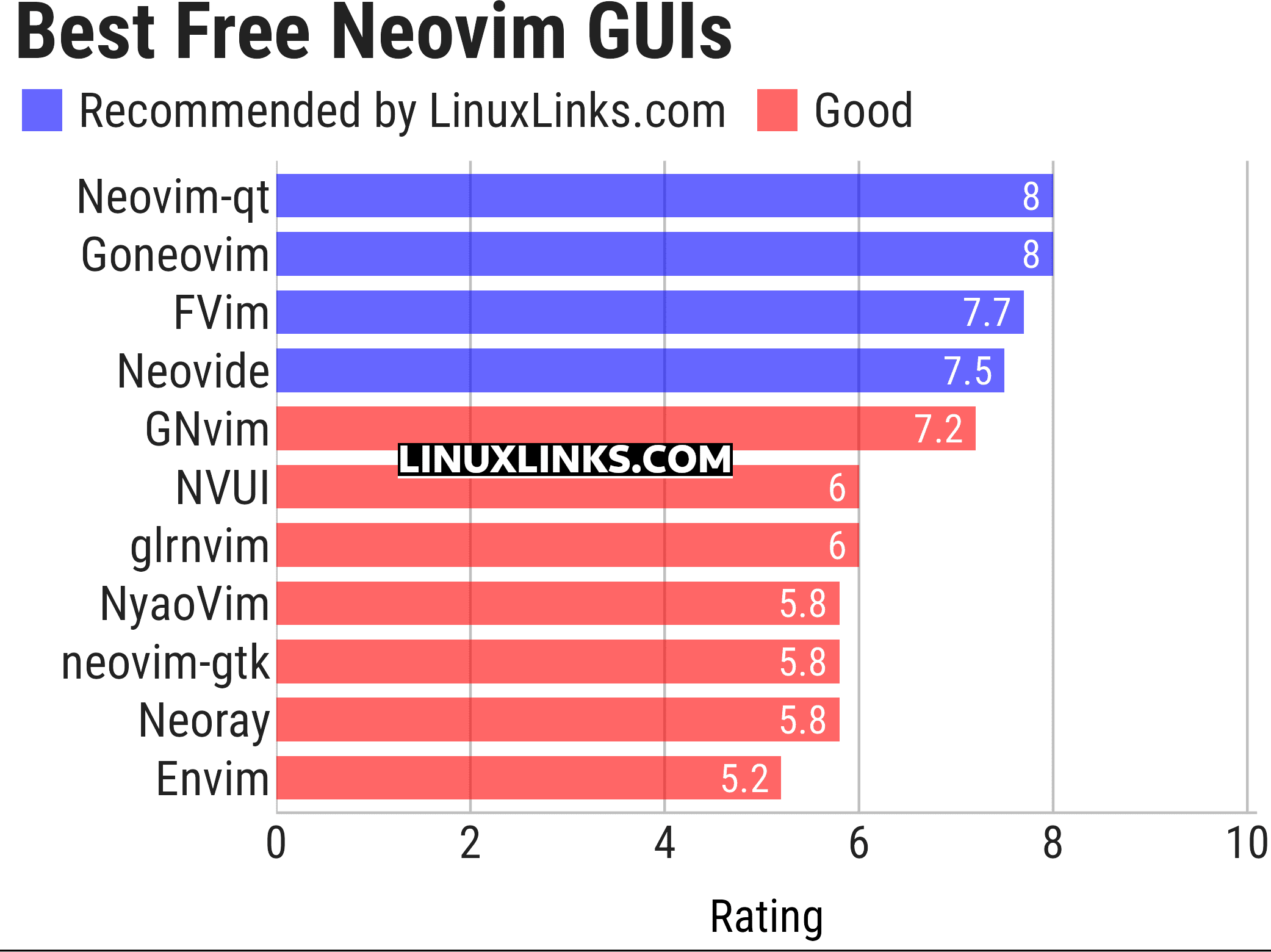
Let’s explore the 10 Neovim GUIs in more detail. Click the links in the table below to learn about each GUI.
| Neovim GUIs | Language | |
|---|---|---|
| Neovim-qt | Neovim client library and GUI using Qt5 | C++ |
| GoNeovim | Forked from Gonvim. Uses Qt binding | Go |
| FVim | Uses the Avalonia XAML-based UI framework | F# |
| Neovide | No nonsense client | Rust |
| GNvim | Rich GUI without any web bloat | Rust |
| NVUI | Modern frontend | C++ |
| glrnvim | GPU-accelerated Neovim GUI | Rust |
| NyaoVim | Web-enhanced extensible Neovim frontend | TypeScript |
| neovim-gtk | Uses gtk-rs bindings | Rust |
| Neoray | Uses GLFW and OpenGL bindings | Go |
| Envim | Electron-based frontend for Neovim | TypeScript |
This article has been updated to reflect the changes outlined in our recent announcement.
 Explore our carefully curated directory of recommended free and open source software, covering every major software category. Explore our carefully curated directory of recommended free and open source software, covering every major software category.The directory forms part of our extensive collection of articles for Linux enthusiasts. It includes hundreds of detailed reviews, together with free and open source alternatives to proprietary software from companies such as Google, Microsoft, Apple, Adobe, IBM, Cisco, Oracle, and Autodesk. LinuxLinks also covers interesting projects worth exploring, Linux-compatible hardware, free programming books and tutorials, and much more. Know a useful free and open source Linux application that we haven’t covered? Tell us about it using our submission form. |
Please read our Comment Policy before commenting.
This roundup has been updated.
Neovim is so much better than Vim although I can manage without a GUI, but each to their own. Thanks for your guidance.
Screenshots would make this article 10x better 🙂
There are already screenshots for each GUI.