
Last Updated on July 14, 2023
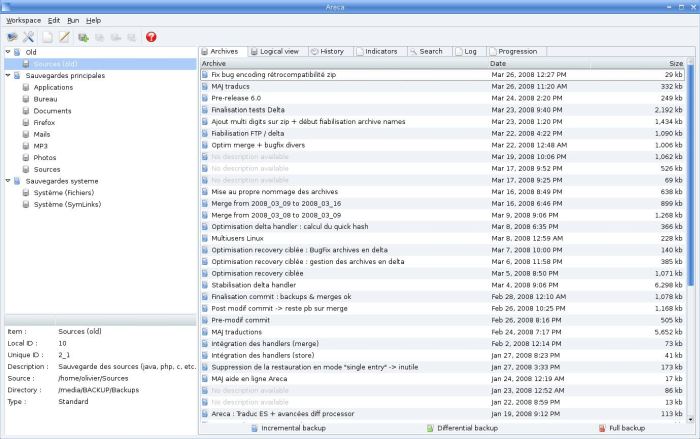
Areca Backup is a file backup software developed in Java. It includes a transaction mechanism which guarantees the integrity of a backup.
The software allows users to select files or directories to backup, filter, encrypt and compress their content, and store them on a backup location.
Areca supports incremental backups and generates backup reports, which can be stored on disk or sent by email.
This application is intended for personal documents backup.
Areca supports incremental, differential and full backups.
Areca allows you to define a set of target. Each target defines :
– Which file or directory will be saved.
– A set of file filters to apply during backup.
– How to store your archives (with or without compression and encryption).
– Whether your backups are incremental or not.
– What must be done after backup (send report by email, launch shell script, merge archives, store report on disk).
These targets can be run with a graphical user interface or a command-line interface (the latter is useful for backup automation).
Features include:
- Archives compression (Zip & Zip64 format).
- Archives encryption (AES128 & AES256 encryption algorithms).
- Storage on local hard drive, network drive, USB key, FTP / FTPs server (with implicit and explicit SSL / TLS).
- Source file filters (by extension, subdirectory, regular expression, size, date, status, with AND/OR operators).
- Incremental, differential and full backup support.
- Archives merges / deletion : Merge contiguous archives in one single archive or safely delete the latest archives.
- As of date recovery : Recover archives (or single files) as of a specific date.
- Transaction mechanism: All critical processes (such as backups or merges) support a transaction mechanism (with commit / rollback management) which guarantees backups’ integrity.
- Backup reports : Generate backup reports that can be stored on disk or sent by email.
- Post backup scripts : Launch shell scripts after backup.
- Files permissions and symbolic links backup.
- Support for delta backup (store only the modified parts of the files – not the whole files).
- Archives content explorer (including a ‘find file in archives’ feature).
- Archive description : A manifest is associated to each archive, which contains various information such as author, title, date, description, and some technical data.
- File history explorer : Keeps track of file’s history (creation / modifications / deletion) over archives.
- Backup simulation : useful to check whether a backup is necessary.
- User’s actions history : Areca keeps an history of all user’s actions (archives deletion, merges, backups, recoveries).
- Command-line interface which can be used for backup automation.
Website: Discontinued
Support:
Developer: Olivier Petrucci
License: GNU GPL v2
Areca Backup is written in Java. Learn Java with our recommended free books and free tutorials.
| Explore Linux | |
|---|---|
 | Best Free and Open Source Software - A huge collection of recommended free and open source software covering every major category. |
 | In-depth Linux Software Reviews - Detailed assessments of Linux software covering features, usability and overall quality. |
 | The Big List of Active Linux Distros - An extensive collection of actively developed Linux distributions. |
 | Open Source Alternatives - Alternatives to software and services from Google, Microsoft, Apple, Adobe, IBM, Autodesk, Oracle and others. |
 | Essential Linux System Tools - Indispensable utilities for monitoring, maintaining and managing Linux systems. |
 | Linux Productivity Tools - Useful utilities for improving productivity and streamlining everyday tasks. |
 | Alternatives to Popular CLI Tools - Modern alternatives to familiar command-line utilities supplied with Linux systems. |
 | Awesome Free Linux Game Tools - Tools, utilities and companion software that improve gaming on Linux. |
 | Machine Learning on Linux - Machine learning and deep learning software, self-hosted applications and practical tools. |
 | Saving Money with Linux - Practical ways to reduce electricity consumption and lower computing costs with Linux. |
 | Linux Candy - Fun, entertaining and sometimes delightfully quirky software from the lighter side of Linux. |
Please read our Comment Policy before commenting.