
Last Updated on July 10, 2021
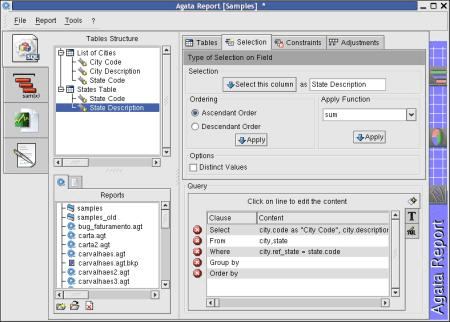
Agata Report is a cross-platform database reporting tool.
This software application provides graph generation and a query tool that allows users to obtain data from PostgreSQL, MySQL, SQLite, Oracle, DB2, MS-SQL, Informix, InterBase, Sybase, or FrontBase and export that data as plain text, HTML, XML, PDF, or spreadsheet (CSV) formats through its graphical interface.
You can also define levels, subtotals, and a grand total for the report, merge the data into a document, generate address labels, or even generate a complete ER-diagram from your database.
Features include:
- Export the report to many formats, like plain text, HTML, XML, CSV (spreadsheets like StarCalc or Excel), PDF and OpenOffice Writer.
- Generate the complete ER-diagram from your database in Dia format.
- Allows to cross report’s data with another database. (PostgreSQL, Oracle), for instance.
- Agata has a Function Repository. You may write any PHPfunction and apply it on the report.
- Through AgataAPI, execute reports through PHP scripts and make the report available on the Web.
- Through AgataCLI, execute the reports through the Linux shell.
- Define nicknames (aliases) for tables and fields (data description).
- Establish links among all tables and use this when making the report or generating the diagram.
- Define report levels and apply functions to each level (sum, max, min, count, avg) and the grand total.
- Through Graph tool, generate line and bars graphs from your report.
- Through Merge tool, merge a free-handed document with the data from a report and create letters dynamically, for example.
- Support for run-time parameters. Agata asks the user for values when the report runs.
- Standard Reports.
- Hierarchical groups summary, subtotals and Grand total.
- Headers and Footers.
- Nick Names for Tables and Fields.
- Mailing Labels.
- Form letters with subreport.
- Bar Code Generation.
- Cross Tab Reports.
- Open Office Report builder.
- Field Masks.
- Sub Reports.
- Data Explorer.
- Report Explorer.
- Preview Window.
- Run-time Parameters (client and web version).
- Conditional Formatting.
- Custom Functions (PHP scripts repository).
- Agata Report API.
- Command Line Report Generation.
- Linked Tables suggestion.
- Groups of Tables.
- Query Templates.
- Layout Templates.
- Field mapping between databases.
- Generation of linked ER-Diagram from Database.
- Lines and Columns graph support.
- External Viewer configuration.
- Fonts, Sizes and Colors configuration dialog.
- Client Interface.
- Web Interface to generate reports.
- Interface support for English, Portuguese, Spanish, Italian, French, German, and Swedish.
Website: sourceforge.net/projects/agata
Support:
Developer: Pablo Dall’Oglio
License: GNU GPL v2
Agata Report is written in PHP. Learn PHP with our recommended free books and free tutorials.
Return to Business Intelligence Software Home Page
| Explore Linux | |
|---|---|
 | Best Free and Open Source Software - A huge collection of recommended free and open source software covering every major category. |
 | In-depth Linux Software Reviews - Detailed assessments of Linux software covering features, usability and overall quality. |
 | The Big List of Active Linux Distros - An extensive collection of actively developed Linux distributions. |
 | Open Source Alternatives - Alternatives to software and services from Google, Microsoft, Apple, Adobe, IBM, Autodesk, Oracle and others. |
 | Essential Linux System Tools - Indispensable utilities for monitoring, maintaining and managing Linux systems. |
 | Linux Productivity Tools - Useful utilities for improving productivity and streamlining everyday tasks. |
 | Alternatives to Popular CLI Tools - Modern alternatives to familiar command-line utilities supplied with Linux systems. |
 | Awesome Free Linux Game Tools - Tools, utilities and companion software that improve gaming on Linux. |
 | Machine Learning on Linux - Machine learning and deep learning software, self-hosted applications and practical tools. |
 | Saving Money with Linux - Practical ways to reduce electricity consumption and lower computing costs with Linux. |
 | Linux Candy - Fun, entertaining and sometimes delightfully quirky software from the lighter side of Linux. |
Please read our Comment Policy before commenting.