

Being able to touch type is the ability of typing without looking at the keyboard. When touch-typing, the individual uses all fingers instead of just a few fingers. Consequently, typing speed increases dramatically.
It’s not only transcriptionists and secretaries that benefit from being able to type without looking at the keyboard. By concentrating on their thoughts and creative processes rather than the keyboard, all users will focus more on the content of the text, thereby increasing its quality. Moreover, touch-typing is less tiring, and less demanding on the brain. It also reduces the risk of Repetitive strain injury and Carpal tunnel syndrome.
Typing tutor software teaches fast and accurate typing through a system of informative lessons and progress tracking. We think it is important that learning should be fun, so we have included some typing games in this feature.
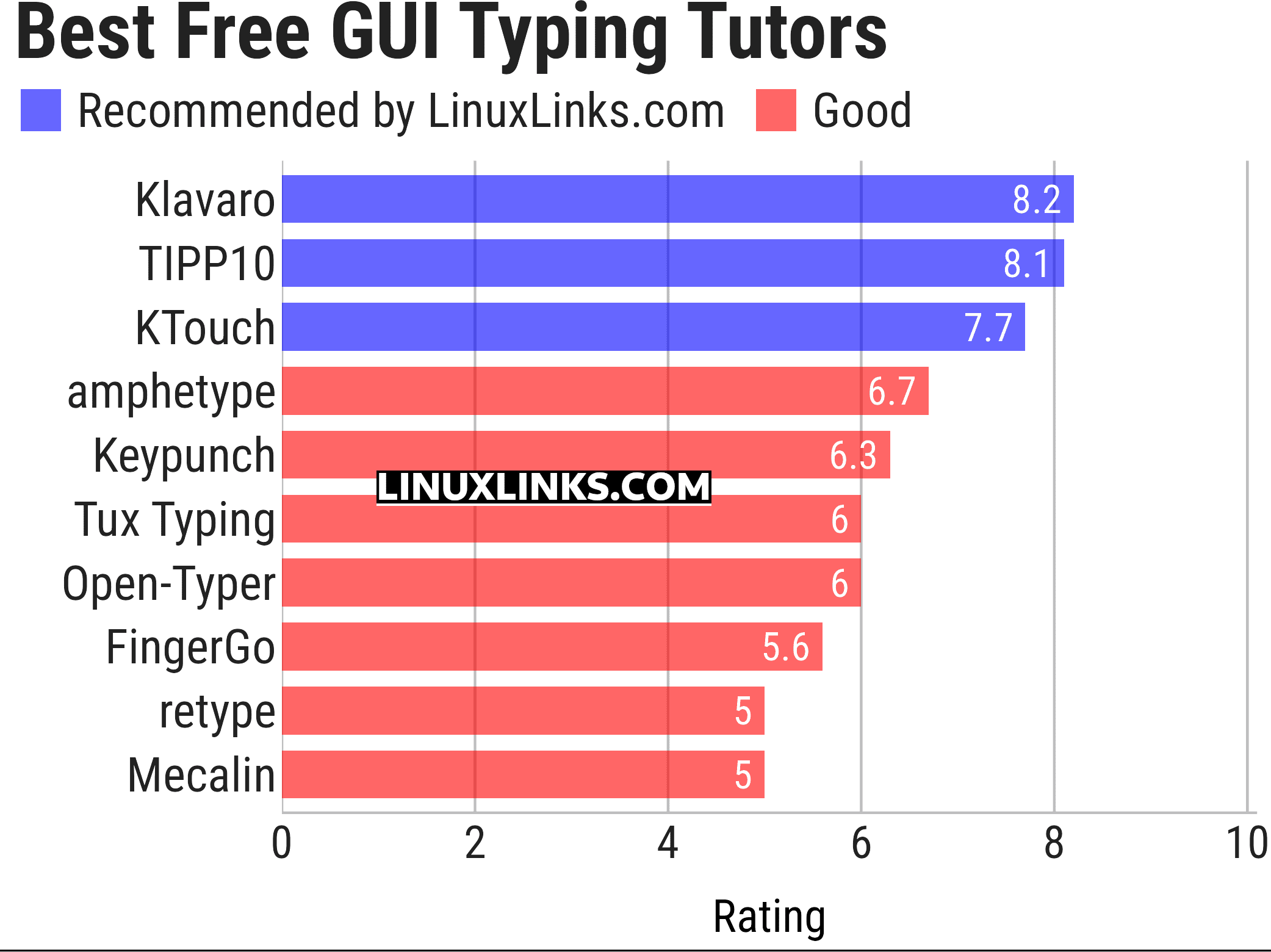
To provide an insight into the quality of software available, we have compiled a list of 10 useful GUI-based typing tutors. Hopefully there will be something of interest for anyone looking to improve their typing skills. Here’s our verdict on the software.
Terminal-based software is covered in this roundup.
Explore the 10 GUI typing tutors at hand. The table below has links to each program detailing their features with screenshots.
| GUI Typing Tutors | |
|---|---|
| Klavaro | Very flexible and efficient touch typing tutor |
| TIPP10 | 10-finger intelligent touch typing tutor with different keyboard layouts |
| KTouch | Touch typing tutor for KDE |
| amphetype | Advanced typing practice software |
| Keypunch | Practice your typing skills |
| Tux Typing | Educational typing tutor game starring Tux |
| Open-Typer | Supports multiple keyboard layouts and provides auto-generated lessons |
| retype | Typing practice application |
| Mecalin | Typing tutor application built with GTK4, Rust, and Adwaita |
| FingerGo | Cross-platform touch-typing trainer |
This article has been updated to reflect the changes outlined in our recent announcement.
Terminal-based tools are now found in this roundup.
 Explore our carefully curated directory of recommended free and open source software, covering every major software category. Explore our carefully curated directory of recommended free and open source software, covering every major software category.The directory forms part of our extensive collection of articles for Linux enthusiasts. It includes hundreds of detailed reviews, together with free and open source alternatives to proprietary software from companies such as Google, Microsoft, Apple, Adobe, IBM, Cisco, Oracle, and Autodesk. LinuxLinks also covers interesting projects worth exploring, Linux-compatible hardware, free programming books and tutorials, and much more. Know a useful free and open source Linux application that we haven’t covered? Tell us about it using our submission form. |
Please read our Comment Policy before commenting.
This article has been revamped in line with our recent announcement.
Previous comments have been retained.
Thanks for this list! I looked through the descriptions of the 5 programs, installed them and settled for GNU Typist. I am not sure I would have found this gem without you.
Yep. Same choice here =)
thanks sir but what you recommend for students
I would like to share that apparently TIPP10 is only for 32-bit and is missing a dependancy
I found Ktouch the most useful, but also some use in Klavaro. GNU typist (gtypist) did not work well on my system Kubuntu 20.04. Thanks for these pointers!