

Time tracking software is a type of computer software that records time spent on tasks. This category of software can enable users to run billing reports, and prepare invoices for clients.
The deployment of this software offers a new level of productivity to organizations, as it provides management with information on what time is spent by employees on different activities such as projects and tasks. This can help to measure productivity over time. This software is commonly used by professionals that charge clients by the hour such as accountants, solicitors, and freelancers. The generation of automatic invoices with minimal or no data entry removes the inconvenience of billing and invoicing clients, and improves efficiency.
A wide range of free Linux time tracking tools are available. This article identifies our favourite tools. We’ve restricted our selection to GUI software. There’s a separate roundup for terminal-based time tracking software.
Our verdict is captured in a legendary LinuxLinks-style ratings chart. Only free and open source software is eligible for inclusion here.
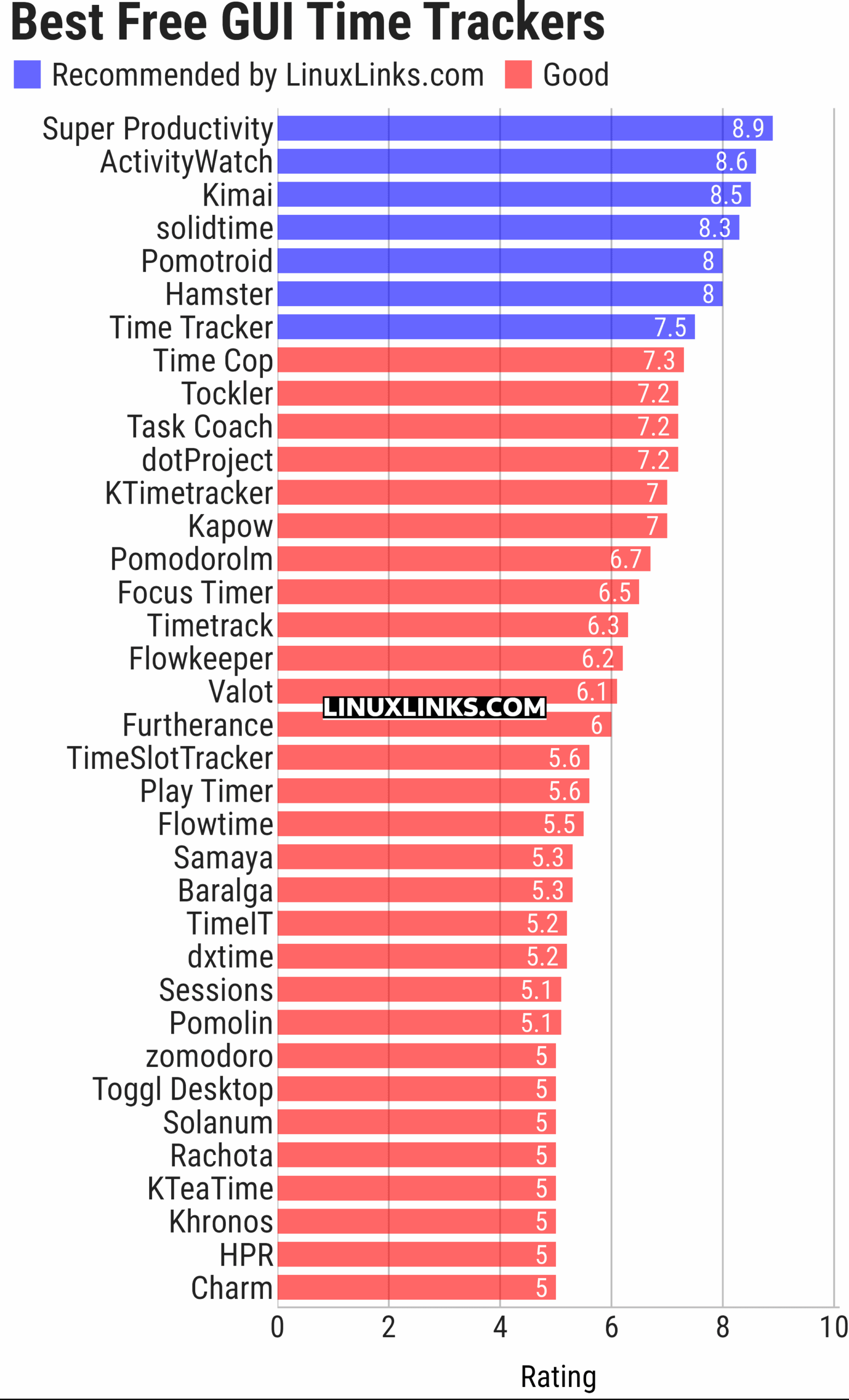
Let’s explore the 36 time tracking applications at hand. Click the links in the table below to learn all about each program.
| GUI Time Tracking | |
|---|---|
| Super Productivity | Todo app with timeboxing & time tracking capabilities |
| ActivityWatch | Automated time tracking application |
| Kimai | Web based software that tracks work time, and classifies it |
| solidtime | Modern time tracking with projects, tasks, and reporting |
| Pomotroid | Simple and visually-pleasing Pomodoro timer |
| Project Hamster | Time tracking applet for the GNOME desktop environment |
| Time Tracker | Simple time-tracker program for GNOME |
| Time Cop | Billed as a time tracking app that respects your privacy |
| Tockler | Tracks time by monitoring your active window title |
| Task Coach | Designed to deal with composite tasks |
| dotProject | Web-based, multi-user, multi-language project management application |
| KTimetracker | Todo management and time tracking application |
| Kapow | Punch clock program designed to track time |
| Pomodorolm | Simple, good looking and configurable pomodoro tracker with tray icon |
| Focus Timer | Pomodoro timer for structured focus and break sessions |
| Timetrack | Simple timetrack app for GNOME |
| Flowkeeper | Pomodoro Technique desktop timer |
| Valot | Modern time tracking application |
| Furtherance | Track your time |
| TimeSlotTracker | Java based time tracking tool |
| Play Timer | Native-feeling timers |
| Flowtime | Spend your time wisely |
| Samaya | Minimalist Pomodoro timer for your desktop |
| Baralga | Simple and lightweight time tracking |
| TimeIT | Unobtrusive time tracker |
| dxtime | Small program for time tracking using wxWidgets, wxSQLite, and SQLIte3 |
| Sessions | Focus with timed work intervals |
| Pomolin | Minimalist Pomodoro timer |
| zomodoro | Simple pomodoro made with Qt |
| Toggl Desktop | Toggl time tracking client |
| Solanum | Balance working time and break time |
| Rachota | Designed for personal timetracking of projects |
| KTeaTime | Timer for steeping tea |
| Khronos | Simple tool to let you track the time spent on a task |
| HPR | Automatically tracks offline computer activity |
| Charm | Cross-platform software for professionals |
This article has been updated to reflect the changes outlined in our recent announcement.
 LinuxLinks helps you discover the best free and open source software for Linux. Explore our extensive collection of recommended applications, including alternatives to popular proprietary software. LinuxLinks helps you discover the best free and open source software for Linux. Explore our extensive collection of recommended applications, including alternatives to popular proprietary software.We also publish software reviews, Linux tutorials, hardware reviews, free programming books and articles covering the wider open source community. Browse our Linux resources to discover more. Know a useful free and open source Linux application we haven't covered? Suggest a program for inclusion. Has your software been featured on LinuxLinks? Display one of our Featured on LinuxLinks badges on your website or GitHub README. |
Please read our Comment Policy before commenting.
Some time trackers (like KTimeTracker) have a very useful feature: virtual-desktop-related time-tracking. That way, you can use a virtual desktop for each group of tasks, and automatically track how much time you spend on each group of tasks :-).
For example, one good idea is having:
– One virtual desktop for working.
– One virtual desktop for reading the news.
– One virtual desktop for studying.
– One virtual desktop for leisure time.
That way, you can keep the time you spend working, or reading the news, etc. easily (without having to start/stop tasks throughout the whole day!).
For example, every virtual desktop can have its web browser, file manager, etc. so you can work without minding (all day long) if your web browser is on one page (or another) in order to track the time.
there is also tockler
Thanks, we’ll have a look at it. It’s Electron-based.
Maybe you can add Valot?
Yes, it’s in my list to add.