

lstr is a directory tree viewer offering both conventional command-line output and an interactive terminal interface. It is designed for exploring filesystem hierarchies, examining project layouts, and navigating directories without leaving the terminal.
The classic mode produces a tree listing with optional file metadata and Git status information. Interactive mode provides keyboard and mouse navigation, expandable directories, searching, and the ability to open files in an external editor.
Beyond terminal viewing, lstr can produce structured output for scripts and self-contained HTML directory indexes. These facilities make it useful for documenting file collections or sharing an overview of a project.
This is free and open source software.
Key Features
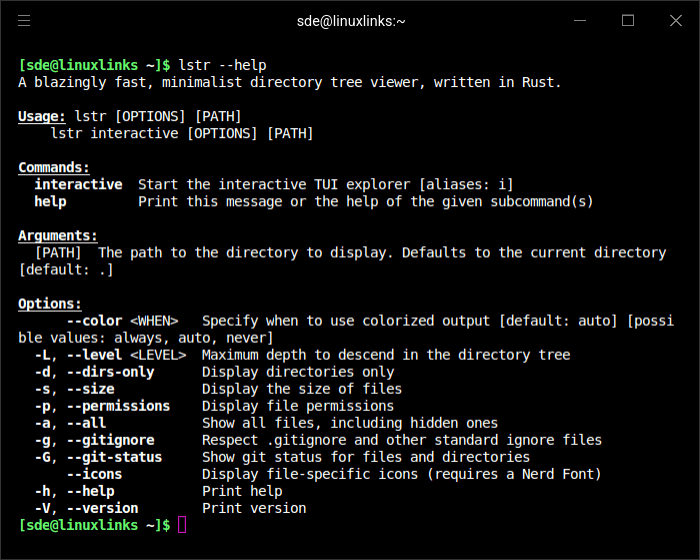
- Offers classic directory tree output and an interactive terminal interface.
- Supports keyboard and mouse navigation, filename searching, and expandable directories.
- Opens selected files using a configured editor, returning to the tree when editing finishes.
- Uses LS_COLORS to determine file and directory colours.
- Displays file-type icons when a compatible Nerd Font is available.
- Shows file sizes, cumulative directory sizes, and Unix file permissions.
- Displays Git status indicators for modified, added, and untracked files and directories.
- Respects .gitignore rules when requested.
- Sorts entries by name, size, modification time, or extension, with natural, reverse, and case-sensitive ordering.
- Limits recursion depth and summarizes files in deep or crowded directories.
- Supports directory-only listings, hidden files, and clickable terminal hyperlinks.
- Reads directory structures from existing path lists or standard input.
- Exports directory trees as JSON or self-contained HTML indexes with collapsible folders.
- Can return a selected path to the shell for integration with other commands.
- Cross-platform support – runs on Linux, macOS, and Windows.
Website: github.com/bgreenwell/lstr
Support:
Developer: Brandon Greenwell
License: MIT License
lstr is written in Rust. Learn Rust with our recommended free books and free tutorials.
Related Software
| TUI File Explorers | Language | License |
|---|---|---|
| NERDTree | VimL | WTFPL License |
| xplr | Rust | MIT License |
| nvim-tree | Lua | GNU General Public License v3.0 |
| Treemacs | Emacs Lisp | GNU General Public License v3.0 |
| browsr | Python | MIT License |
| termscp | Rust | MIT License |
| vim-fern | VimL | MIT License |
| tere | Rust | European Union Public License 1.2 |
| CHADTree | Python | GNU General Public License v3.0 |
| lstr | Rust | MIT License |
| FileSSH | Rust | MIT License |
| Rust-Traverse | Rust | MIT License |
| fex | Zig | GNU General Public License v3.0 |
| transgender | Rust | BSD 2-Clause “Simplified” License |
| rovr | Python | MIT License |
| StygianSift | Rust | GNU Affero General Public License v3.0 |
| Fortress | Fortran | MIT License |
| runa | Rust | MIT License |
| sdn | C++ | 0BSD License |
| wisu | Rust | Apache License 2.0 |
| twf | Go | Developer did not reply to license info request |
| kupo | Python | Developer did not reply to license info request |
| Hop | Python | MIT License |
| FTB | C++ | MIT License |
| faint | Shell | GNU General Public License v2.0 |
Read our verdict in the software roundup.
 LinuxLinks helps you discover the best free and open source software for Linux. Explore our extensive collection of recommended applications, including alternatives to popular proprietary software. We also publish software reviews, Linux tutorials, hardware reviews, free programming books and articles covering the wider open source community. Browse our Linux resources to discover more. Know a useful free and open source Linux application we haven't covered? Suggest a program for inclusion. Has your software been featured on LinuxLinks? Display one of our Featured on LinuxLinks badges on your website or GitHub README. |
Please read our Comment Policy before commenting.