
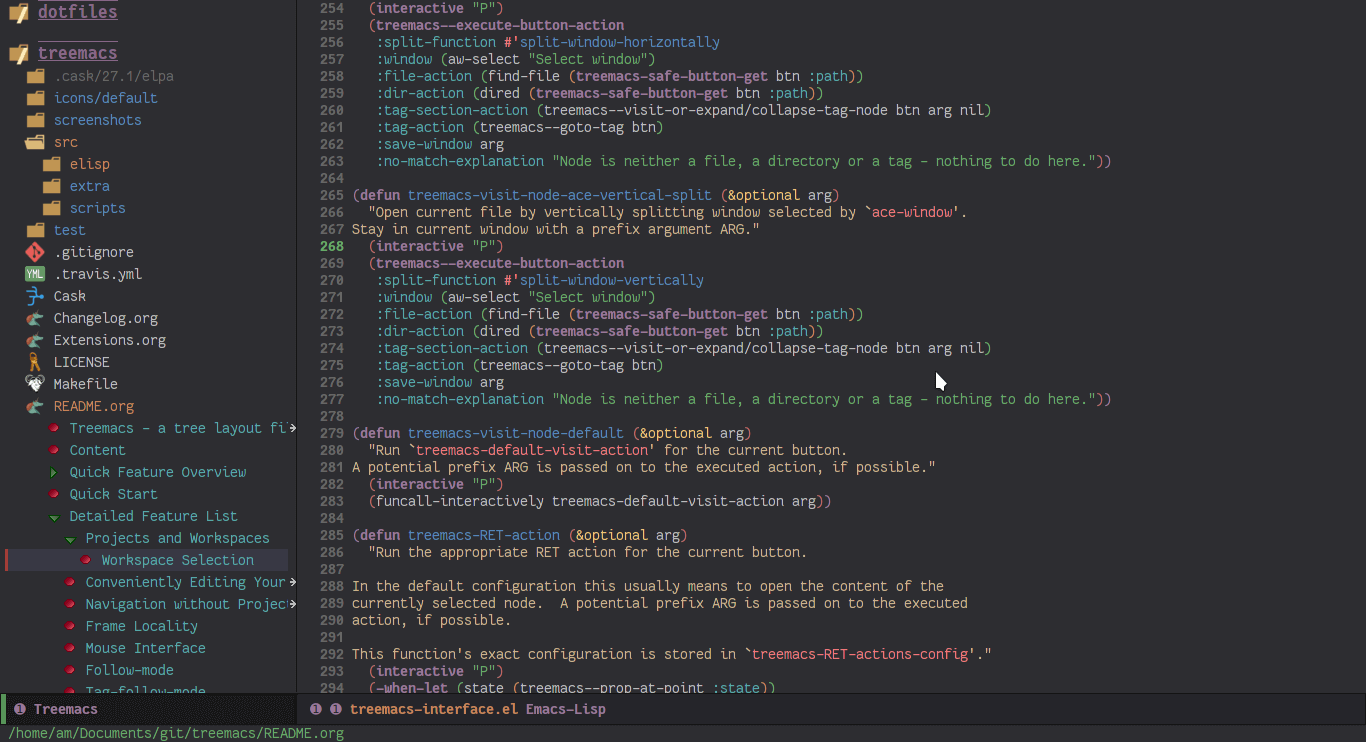
Treemacs is a file and project explorer similar to NeoTree or vim’s NerdTree, but largely inspired by the Project Explorer in Eclipse. It shows the file system outlines of your projects in a simple tree layout allowing quick navigation and exploration, while also possessing basic file management utilities.
Treemacs is included in Spacemacs (for now only on the dev branch).
This is free and open source software.
Key Features
- Project management – view multiple file trees – projects – at once and quickly add or remove them, and groups projects in workspaces.
- Easy navigation – quickly move between projects or use shortcuts to jump to parent or neighbouring nodes.
- Versatile file access – decide exactly how and where a file will be opened, including using ace-window to choose a window or launching an external application.
- Understanding of frames – every frame will receive its own treemacs buffer that will live and die with that frame.
- Finding of files and tags – ollow along and keep in focus the currently selected file or even the tag at point, either manually or automatically using either treemacs-follow-mode or treemacs-tag-follow-mode.
- Git Integration – use different faces for files and directories based on their git status. The git process is run asynchronously, minimizing its performance impact.
- Winum & ace-window compatibility – does not interfere with winum’s and ace-window’s usual layouts.
- Projectile/project.el integration – quickly add your projectile projects to the treemacs workspace. project.el compatibility is built-in.
- Simple mouse interface – left clicks will work the same as you’re used to from with graphical applications
- Session persistence – automatically saves and restores your workspaces.
- Dashing good looks – uses (optionally resizable) PNG images in HD 22×22 resolution for its icons. When run in a terminal a simple fallback is used.
- Tag view – display files’ tags. All file types that Emacs can generate a (semantic) imenu index for are supported.
- Visual feedback – when it would otherwise be difficult to see the message in the minibuffer success/failure is indicated with pulse.el.
- Theming support – supports using multiple icon themes that can be changed at will.
- Ease of use – offers many configuration options, but comes with a set of (what hopefully should be) sane defaults.
- Bookmark integration – running bookmark-set on a Treemacs item will store a bookmark to Treemacs buffer for that item.
Website: github.com/Alexander-Miller/treemacs
Support:
Developer: Alexander Miller
License: GNU General Public License v3.0
Treemacs is written in Emacs Lisp. Learn Lisp with our recommended free books and free tutorials.
Related Software
| TUI File Explorers | Language | License |
|---|---|---|
| NERDTree | VimL | WTFPL License |
| xplr | Rust | MIT License |
| nvim-tree | Lua | GNU General Public License v3.0 |
| Treemacs | Emacs Lisp | GNU General Public License v3.0 |
| browsr | Python | MIT License |
| termscp | Rust | MIT License |
| vim-fern | VimL | MIT License |
| tere | Rust | European Union Public License 1.2 |
| CHADTree | Python | GNU General Public License v3.0 |
| lstr | Rust | MIT License |
| FileSSH | Rust | MIT License |
| Rust-Traverse | Rust | MIT License |
| fex | Zig | GNU General Public License v3.0 |
| transgender | Rust | BSD 2-Clause “Simplified” License |
| rovr | Python | MIT License |
| StygianSift | Rust | GNU Affero General Public License v3.0 |
| Fortress | Fortran | MIT License |
| runa | Rust | MIT License |
| sdn | C++ | 0BSD License |
| wisu | Rust | Apache License 2.0 |
| twf | Go | Developer did not reply to license info request |
| kupo | Python | Developer did not reply to license info request |
| Hop | Python | MIT License |
| FTB | C++ | MIT License |
| faint | Shell | GNU General Public License v2.0 |
Read our verdict in the software roundup.
 LinuxLinks helps you discover the best free and open source software for Linux. Explore our extensive collection of recommended applications, including alternatives to popular proprietary software. LinuxLinks helps you discover the best free and open source software for Linux. Explore our extensive collection of recommended applications, including alternatives to popular proprietary software.We also publish software reviews, Linux tutorials, hardware reviews, free programming books and articles covering the wider open source community. Browse our Linux resources to discover more. Know a useful free and open source Linux application we haven't covered? Suggest a program for inclusion. Has your software been featured on LinuxLinks? Display one of our Featured on LinuxLinks badges on your website or GitHub README. |
Please read our Comment Policy before commenting.