

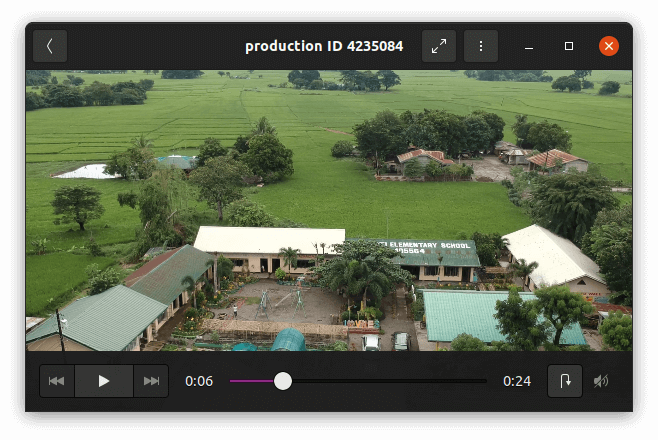
GNOME Videos is the official movie player of the GNOME desktop environment.
It features a playlist, a full-screen mode, seek and volume controls, as well as keyboard navigation.
GNOME Videos is pre-installed with many Linux distributions.
Key Features
- Video thumbnailer for the file manager.
- Nautilus properties tab.
- Mozilla (Firefox) plugin to view movies inside your browser (in development).
- Webcam utility (in development).
- Play any xine or GStreamer supported file.
- LIRC support.
- Shoutcast, m3u, asx, SMIL and ra playlists support (also usable from a shipped LGPL library).
- DVD (with menus), VCD playback, disc-type automatically detected.
- TV-Out configuration with optional resolution switching.
- 4.0, 4.1, 5.0, 5.1, stereo and AC3 Passthrough audio output.
- Full-screen mode (move your mouse and you get nice controls) with Xinerama, dual-head and Viewport support.
- Remote operation mode to control a running Totem.
- Seek and Volume controls.
- Aspect ratio changing, Scaling based on the video’s original size.
- Full keyboard control.
- Playlist with Repeat and Shuffle modes, with saving feature and drag’n’drop reordering.
- GNOME and Nautilus integration (Totem registers the file-types, adds a menu item, uses the proxy configuration, saves sessions, and registers pnm, mms, uvox and rtsp schemes, removes playlist items from a disc that’s getting ejected).
- Properties window (information about the current movie).
- Drag’n’drop and mousewheel actions.
- Screenshot feature.
- Brightness, Contrast, Hue and Saturation control.
- Visualisation plugin when playing audio-only files.
- Telestrator mode using Gromit.
- Video thumbnailer.
- YouTube support.
- Nautilus properties page.
- Works on remote displays.
- Automatic external subtitle load, or manual (only on the command-line, use like: totem file:///file.avi#subtitle:file.srt).
- DVD, VCD and OGG/OGM subtitles and languages support.
- Dialog for more accurate seeking.
- Authentication dialogs when location requires it.
- Online help (in English and other languages).
Website: gitlab.gnome.org/GNOME/totem
Support:
Developer: The GNOME Project
License: GNU General Public License v2.0
GNOME Videos is written in C. Learn C with our recommended free books and free tutorials.
Related Software
| Media Players | |
|---|---|
| VLC | Cross-platform multimedia player and framework |
| mpv | Media player for the command line. libmpv is used by many front-ends |
| QMPlay2 | Qt based video and audio player |
| MPlayer | Movie player which runs on many systems |
| SMPlayer | Qt based MPlayer front-end |
| GridPlayer | Play multiple videos simultaneously |
| Parole | Modern simple media player based on the GStreamer framework |
| MPC-QT | Clone of Media Player Classic |
| clapper | GNOME media player built using GJS with GTK4 toolkit |
| Totem | Movie player for the GNOME desktop based on GStreamer |
| Dragon Player | Multimedia player with a focus on simplicity rather than features |
| xine | Video player for playing CDs, DVDs, BluRays and VCDs. |
| Showtime | GNOME media player |
| Glide | Simple and minimalistic media player |
| Phantom Player | Simple video player |
| Daikhan | Media player for the modern desktop |
| QtAV | Cross-platform multimedia framework based on Qt and FFmpeg |
| SparkPlayer | Terminal-based media player for local music and video collections |
| Rage | Simple video and audio player |
| Kaffeine | Simple, easy to use, full featured media player |
Read our verdict in the software roundup.
 Explore our carefully curated directory of recommended free and open source software, covering every major software category. Explore our carefully curated directory of recommended free and open source software, covering every major software category.The directory forms part of our extensive collection of articles for Linux enthusiasts. It includes hundreds of detailed reviews, together with free and open source alternatives to proprietary software from companies such as Google, Microsoft, Apple, Adobe, IBM, Cisco, Oracle, and Autodesk. LinuxLinks also covers interesting projects worth exploring, Linux-compatible hardware, free programming books and tutorials, and much more. Know a useful free and open source Linux application that we haven’t covered? Tell us about it using our submission form. |
Please read our Comment Policy before commenting.