

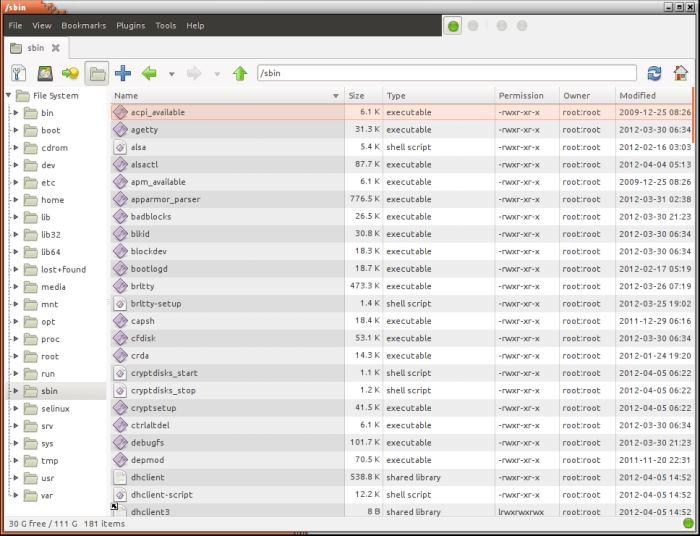
SpaceFM is a multi-panel tabbed file manager for Linux with built-in VFS, udev-based device manager, customizable menu system, and bash integration.
Features include:
- Lightweight and responsive with built-in vfs.
- Flexible – appear very simple or very complex depending on configuration.
- Multiple Windows – a single instance opens multiple windows.
- Multiple Panels – each window contains up to four independently configured and interactive browser panels plus a task manager pane.
- Tabbed – each browser panel supports multiple folder tabs.
- Side Panes – any browser panel can show Devices, Bookmarks, and Directory Tree side panes.
- Desktop Manager – includes a built-in, lightweight DM mode with custom commands.
- Device Manager – built-in udev support for manual and automatic device management, plus easily format, backup and restore partitions and Master Boot Records.
- Task Manager – Control or eliminate popup dialogs with multi-tasking abilities – no waiting to move on to your next task.
- MIME – Manages MIME file types and default actions.
- Custom Menus and Toolbars – its unique Design Mode allows you to quickly change any menu or toolbar item name, shortcut key, or icon, and insert your own commands or submenus anywhere.
- Plugins – install, copy, and export custom commands as plugins.
- Bash Integration – built-in bash scripting support for custom commands, with file manager data exported as bash variables.
- Output Control – monitor the stdout/stderr output of built-in and custom commands, with error detection and popup control, or run commands in a terminal.
- Fonts & Icons – easily configure custom fonts and icons in each panel or pane for a unique look.
- Styles – show files as icons or in lists with customized columns.
- Find-As-You-Type – file list allows users to quickly locate a file with a case-insensitive substring search of filenames – just type a few letters.
- File Search – flexibly search for file names, sizes, content, etc. with no daemons.
- System Management – safely perform quick commands as root or run a root instance.
- File Management – extensive move, copy, link, drag-n-drop, and clipboard control.
- Archives – single-click, built-in archive creation and extraction, or use external apps.
- Daemon Mode – run in the background to automount devices and autorun apps, and quickly open browser windows.
- Alternate Builds – deprecated support for hal (replaces udev) and fam/gamin (replaces inotify).
Website: ignorantguru.github.io/spacefm
Support: Blog
Developer: IgnorantGuru
License: GNU General Public License v2.0
SpaceFM is written in C. Learn C with our recommended free books and free tutorials.
| Explore Linux | |
|---|---|
 | Best Free and Open Source Software - A huge collection of recommended free and open source software covering every major category. |
 | In-depth Linux Software Reviews - Detailed assessments of Linux software covering features, usability and overall quality. |
 | The Big List of Active Linux Distros - An extensive collection of actively developed Linux distributions. |
 | Open Source Alternatives - Alternatives to software and services from Google, Microsoft, Apple, Adobe, IBM, Autodesk, Oracle and others. |
 | Essential Linux System Tools - Indispensable utilities for monitoring, maintaining and managing Linux systems. |
 | Linux Productivity Tools - Useful utilities for improving productivity and streamlining everyday tasks. |
 | Alternatives to Popular CLI Tools - Modern alternatives to familiar command-line utilities supplied with Linux systems. |
 | Awesome Free Linux Game Tools - Tools, utilities and companion software that improve gaming on Linux. |
 | Machine Learning on Linux - Machine learning and deep learning software, self-hosted applications and practical tools. |
 | Saving Money with Linux - Practical ways to reduce electricity consumption and lower computing costs with Linux. |
 | Linux Candy - Fun, entertaining and sometimes delightfully quirky software from the lighter side of Linux. |
Please read our Comment Policy before commenting.