
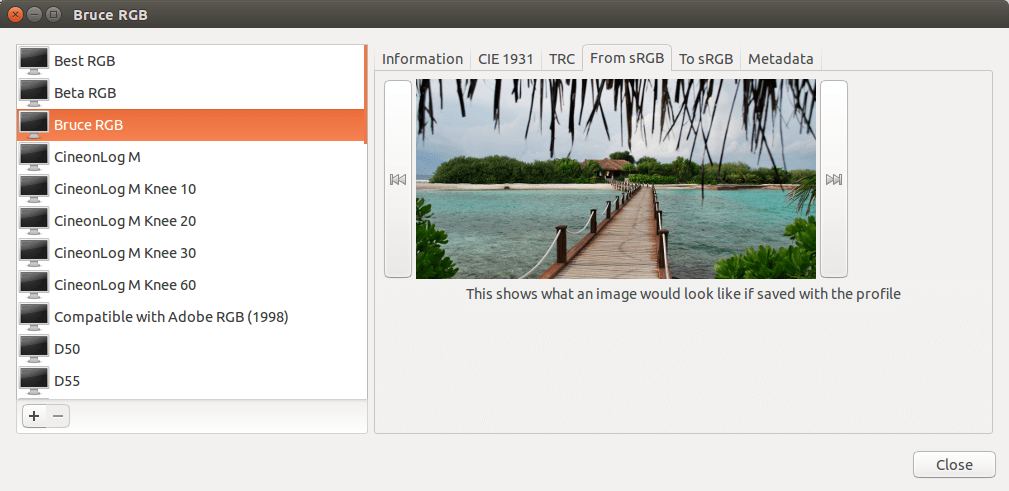
GNOME Color Manager is a session framework that makes it easy to manage, install and generate color profiles in the GNOME desktop.
With the help of ArgyllCMS, it can create and apply display ICC color profiles.
This gives a consistent color to an image or document, wherever it is output.
Key Features
- Setting output gamma tables (with local brightness and adjustments) to any Xrandr output (falling back to the per-screen methods for drivers that do not yet support Xrandr 1.3).
- Setting of settings at session start, and when monitors are hotplugged.
- Easy install of vendor supplied ICC or ICM files, just by double clicking on the file.
- Easy display calibration using an external calibration device, and scanner calibration using a inexpensive IT 8.7 target. For calibration, the ArgyllCMS package is required.
- Integration X11 by setting the per-screen and per-output _ICC_PROFILE atom, which makes applications such as the GIMP use a color managed output.
- Easy to use DBus interface for applications to query what ICC profiles should be used for a specific device or device type. This is session activated and is only started when it is needed, and quits after a small period of idleness.
Website: gitlab.gnome.org/GNOME/gnome-color-manager
Support:
Developer: The GNOME Project
License: GNU General Public License v2.0
GNOME Color Manager is written in C. Learn C with our recommended free books and free tutorials.
Related Software
| Calibrate your Monitor with these Open Source Tools | |
|---|---|
| DisplayCAL-py3 | A fork of DisplayCAL with Python 3 support |
| ArgyllCMS | ICC compatible color management system |
| DisplayCAL | Display calibration and profiling |
| Gnome Color Manager | Utilities for color management to be used in the GNOME desktop |
| LPROF | Color profiler that creates ICC compliant profiles |
| ddcui | Graphical user interface for ddcutil |
| lcms2 | Small-footprint color management engine |
| colord | Manage, install and generate colour profiles |
Read our verdict in the software roundup.
 Explore our carefully curated directory of recommended free and open source software, covering every major software category. Explore our carefully curated directory of recommended free and open source software, covering every major software category.The directory forms part of our extensive collection of articles for Linux enthusiasts. It includes hundreds of detailed reviews, together with free and open source alternatives to proprietary software from companies such as Google, Microsoft, Apple, Adobe, IBM, Cisco, Oracle, and Autodesk. LinuxLinks also covers interesting projects worth exploring, Linux-compatible hardware, free programming books and tutorials, and much more. Know a useful free and open source Linux application that we haven’t covered? Tell us about it using our submission form. |
Please read our Comment Policy before commenting.
what does this do
all it does is view profiles
how do you select them?