

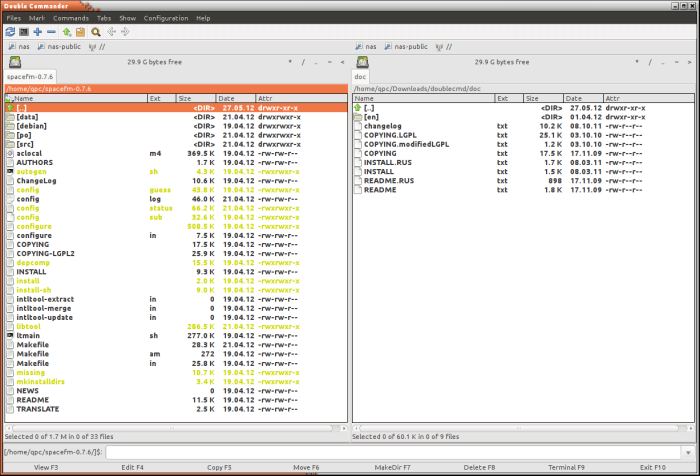
Double Commander is an open source cross platform open source file manager with two panels side by side. This file manager is inspired by Total Commander (a shareware file manager for Windows) and features some new ideas.
Double Commander can be run on several platforms and operating systems including Linux and Windows. It supports 32-bit and 64-bit processors. Double Commander is written in Free Pascal/Lazarus.
The goal of Double Commander is to create a program close to Total Commander in operation and with maximum compatibility via the plugins and configuration files. However, Double Commander has some important advantages: it’s free to use, works with different operating systems, and is open source.
Key Features
- All operations work in the background with threading operations support.
- Tabbed panels interface with full drag & drop support.
- Custom toolbar with buttons to launch external programs or internal menu commands.
- Copy/Move files and folders via clipboard.
- File colouring by search templates.
- Custom columns.
- Built in file viewer (F3) to view files in hex, binary or text format, views GIFs.
- Internal text editor (F4) with syntax highlighting.
- Archives are handled like subdirectories. You can easily copy files to and from archives. Supported archive types: ZIP, TAR GZ, TGZ, LZMA and also BZ2, RPM, CPIO, DEB, RAR
- Test archives command – calculate/verify checksum.
- Extended search function with full text search in any files.
- Quick filter.
- Natural sorting mode.
- Configurable button bar to start external programs or internal menu commands.
- Supports WCX, WLX, WDX and WFX plugins from Total Commander (also supports own DSX plugin format).
- FTP support (via standard plugin).
- Network support (Windows built-in, Linux via standard plugin).
- Compare by Contents shows a window with two panels with the files to compare (usually text).
- File operations logging.
- File operations queue.
- Auto update mount disk list.
- Embedded console.
- Multi-rename tool which allows renaming any files by defined mask.
- Unicode support.
- Highly customizable.
Website: doublecmd.sourceforge.io
Support: Forums
Developer: Alexander Koblov, Przemyslaw Nagay and many contributors
License: GNU General Public License v2.0
Double Commander is written in Object Pascal. Learn Pascal with our recommended free books and free tutorials.
Related Software
| Orthodox File Managers | |
|---|---|
| Krusader | Advanced twin panel (commander style) file manager for KDE |
| Midnight Commander | User-friendly yet powerful text-mode file manager and visual shell |
| Double Commander | Inspired by Total Commander |
| Ranger | File manager with an ncurses frontend written in Python |
| GNOME Commander | Built on the GTK-toolkit and GnomeVFS |
| Xfe | Very similar to Windows Explorer but with twin panes |
| muCommander | Lightweight, cross-platform file manager |
| far2l | AR Manager fork bringing panels, plugins and archives to Linux |
| Vifm | Vim-style two-pane navigator with modal keyboard control |
| File Commander | Total Commander-like orthodox file manager |
| Sunflower | Small and highly customizable twin-panel file manager |
| trolCommander | Fork of muCommander |
| FileRunner | Simple and efficient file manager written in Tcl |
| F2 Commander | Lean text-mode commander for browsing and batch operations |
| Tux Commander | Uses the old GTK2 windowing toolkit |
| Midday Commander | Dual-pane console navigator with Midnight Commander-style flow |
| Worker | In the style of the Amiga's DirOpus |
| Waydir | Wayland-native desktop browser focused on speed and simplicity |
| WCMCommander | Mimicking the look-n-feel of Far Manager |
| gentoo | Two-pane file manager |
| emelFM2 | Orthodox file manager using GTK+ 2 |
Read our verdict in the software roundup.
| Qt File Managers | |
|---|---|
| Krusader | Advanced, twin-panel (commander-style) file manager |
| Dolphin | Simple to use and dedicated file manager |
| Double Commander | Inspired by Total Commander |
| PCManFM-Qt | Started as the Qt port of PCManFM |
| Konqueror | File manager, web browser, and universal viewer |
| CoreFM | Simple, lightweight, and easy to use file manager |
| File Commander | Total Commander-like orthodox (dual-panel) file manager |
| Deepin FM | File manager for deepin desktop environment |
| Index | Qt-based file manager that's part of the Maui ecosystem |
| SplitCommander | Dual-pane KDE tool for efficient copying moving and organisation |
| Rootlink | Native Wayland browser offering a clean focused desktop experience |
| HyprFM | Modern Qt 6 and QML browser designed for Wayland desktops |
| Dentry | Keyboard-driven TUI for fast browsing and filesystem navigation |
| Cutefish File Manager | Another simple file manager |
Read our verdict in the software roundup.
 Explore our carefully curated directory of recommended free and open source software, covering every major software category. Explore our carefully curated directory of recommended free and open source software, covering every major software category.The directory forms part of our extensive collection of articles for Linux enthusiasts. It includes hundreds of detailed reviews, together with free and open source alternatives to proprietary software from companies such as Google, Microsoft, Apple, Adobe, IBM, Cisco, Oracle, and Autodesk. LinuxLinks also covers interesting projects worth exploring, Linux-compatible hardware, free programming books and tutorials, and much more. Know a useful free and open source Linux application that we haven’t covered? Tell us about it using our submission form. |
Please read our Comment Policy before commenting.
I love Double Commander and use it daily in addition to my main file manager [Caja].
I used Double Commander for a few years but recently moved over to HiFile. It’s not open source software but for Linux at least it’s no charge.
Hi Jake. The fact that HiFile is closed-source is a dealbreaker for me.
I am a big gamer and the NVIDIA proprietary drivers are still better than their open source counterparts. Given my gaming community uses Discord, I don’t have a problem using the odd additional proprietary application. And HiFile is better than any open source file manager I’ve tried.
We have reviewed HiFile and sung its praises. And it does make us smile that Windows and macOS users have to pay for the program, although the developer’s reason for offering Linux users a free binary is only for the reason he thinks Linux users wouldn’t pay for it, rather than for any affinity to Linux.
I use an AMD GPU with FLOSS drivers. I’ll only use proprietary stuff unless there’s absolutely no other choice.
I’m the same except I don’t have an AMD GPU. Maybe AMD will help out one day 🙂