

BackupPC is a free backup software suite with a web-based frontend. It is a high-performance, enterprise-grade system for backing up Linux, Windows and Macs and laptops to a server’s disk.
Features include clever pooling of identical files, no client-side software, and a powerful Apache/CGI user interface. It is an entirely disk-based backup and recovery system. BackupPC incorporates a Server Message Block (SMB) client that can be used to back up network shares of computers running Windows. It also supports DHCP clients as long as the client is registered with a name service such as DNS, Active Directory, or LDAP.
BackupPC is highly configurable and easy to install and maintain.
The software can be configured to do a full backup at a regular interval. BackupPC can be configured to keep a certain number of full backups. Exponential expiry is also supported, allowing full backups with various vintages to be kept (for example, a settable number of most recent weekly fulls, plus a settable number of older fulls that are 2, 4, 8, or 16 weeks apart). BackupPC also supports multi-level incremental backups.
BackupPC is written in Perl and extracts backup data via SMB using Samba, tar over ssh/rsh/nfs, or rsync. It is robust, reliable, well documented and freely available as Open Source.
Key Features
- Pooling scheme minimizes disk storage and disk I/O.
- Optional compression support further reducing disk storage. Since only new files (not already pooled) need to be compressed, there is only a modest impact on CPU time
- No client-side software is needed. tar over ssh/rsh/nfs is used to backup the data. With version 2.0.0, rsync is also supported on any client that has rsync or rysncd
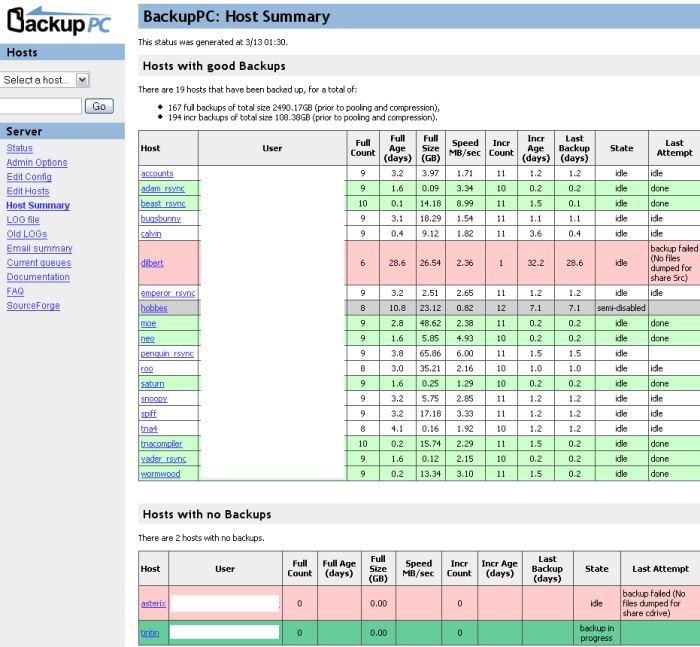
- A powerful web (http/cgi) user interface allows administrators to view log files, configuration, current status and allows users to initiate and cancel backups and browse and restore files from backups.
- A full set of restore options is supported, including direct restore (via smbclient, tar, or rsync/rsyncd) or downloading a zip or tar file.
- Supports mobile environments where laptops are only intermittently connected to the network and have dynamic IP addresses (DHCP).
- Flexible configuration parameters allow multiple backups to be performed in parallel, specification of which shares to backup, which directories to backup or not backup, various schedules for full and incremental backups, schedules for email reminders to users and so on. Configuration parameters can be set system-wide or also on a per-PC basis.
- Users are sent periodic email reminders if their PC has not recently been backed up. Email content, timing and policies are configurable.
- Detailed documentation.
Website: backuppc.github.io/backuppc
Support: Documentation, GitHub Code Repository
Developer: Craig Barratt and contributors
License: GNU General Public License v3.0
BackupPC is written in Perl. Learn Perl with our recommended free books and free tutorials.
Related Software
| Backup Tools | |
|---|---|
| restic | Fast, efficient and secure backup software |
| Borg | Deduplicating backup software |
| Duplicity | Encrypted bandwidth-efficient backup |
| TimeShift | Takes regular incremental snapshots of the filesystem |
| Duplicati | Store encrypted backups online |
| bup | Backup a system based on the git packfile format |
| Déjà Dup | Hides the complexity of doing backups the Right Way |
| Bacula | Network backup, recovery and verification |
| Kopia | Secure backup/restore tool that allows you to create encrypted snapshots |
| Clonezilla | Offers similar functionality to Symantec Ghost |
| Bareos | Backup Archiving Recovery Open Sourced |
| rsync | Fast remote file copy program |
| BackupPC | High-performance, enterprise-grade system for backing up PCs |
| Vorta | Desktop client for Borg Backup |
| Backrest | Web UI and orchestrator for restic backup |
| Back in Time | Equivalent of OS X's Time Machine |
| UrBackup | Easy to setup open source client/server backup system |
| Rescuezilla | Easy backup, recovery & bare metal restore |
| Mondo Rescue | A powerful disaster recovery suite |
| KBackup | Backup program targeted at non-computer experts |
| rsnapshot | Local and remote filesystem snapshot utility |
| Amanda | Advanced Maryland Automatic Network Disk Archiver |
| FOG | Cloning / imaging solution / rescue suite |
| Partclone | Provides utilities to save and restore used blocks on a partition |
| XtraBackup | Backup tool for InnoDB and XtraDB databases |
| Plakar | Scalable backup solution |
| kup | Backup scheduler for the Plasma desktop |
| BURP | Uses librsync to save network traffic and space |
| Btrbk | Backup tool for btrfs subvolumes |
| Pika Backup | App focused on backups of personal data |
| PING | Also offers similar functionality to Symantec Ghost |
| dar | Full featured archiver with support for differential backups |
| tar | Tar archiving utility |
| Cedar Backup | Local and remote backups to CD or DVD media |
| shallow-backup | Git-integrated backup tool |
| ArchiveKeep | Keeps your files archived in multiple places |
| ZnapZend | ZFS centric backup tool |
| Vykar | Fast, encrypted, deduplicated backups in Rust |
Read our verdict in the software roundup.
| DeDuplicating Encryption Tools | |
|---|---|
| restic | Fast, efficient and secure backup software |
| Borg | Deduplicating archiver with compression and encryption |
| Duplicity | Incrementally backs up files and directory by encrypting tar-format volumes |
| Duplicati | Store encrypted backups online |
| bup | Provides an efficient way to backup a system based on the git packfile format |
| Kopia | Secure backup/restore tool that allows you to create encrypted snapshots |
| BackupPC | High-performance, enterprise-grade system for backup |
| Vorta | Desktop client for Borg Backup |
| UrBackup | Client/server backup system |
| Vykar | Fast, encrypted, deduplicated backups in Rust |
Read our verdict in the software roundup.
 Explore our comprehensive directory of recommended free and open source software. Our carefully curated collection spans every major software category. Explore our comprehensive directory of recommended free and open source software. Our carefully curated collection spans every major software category.This directory is part of our ongoing series of informative articles for Linux enthusiasts. It features hundreds of detailed reviews, along with open source alternatives to proprietary solutions from major corporations such as Google, Microsoft, Apple, Adobe, IBM, Cisco, Oracle, and Autodesk. You’ll also find interesting projects to try, hardware coverage, free programming books and tutorials, and much more. Discovered a useful open source Linux program that we haven’t covered yet? Let us know by completing this form. |