

Xnec2c is a high-performance multi-threaded electromagnetic simulation package to model antenna near- and far-field radiation patterns for Linux and UNIX operating systems.
The original FORTRAN version of NEC2 was ported to C by Neoklis Kyriazis, 5B4AZ and released as nec2c. Later he wrote xnec2c, a graphical interface for ease of use with many more features.
Xnec2c now has a built-in editor for NEC2 input files which can be used to edit geometry or command “card” data. This basic editor displays comment, geometry and command cards in tree views where individual rows, each representing a card, can have their cells edited directly for “raw” entry of data. More useful are pop-up “editor” windows that open when appropriate buttons are clicked or when a selected row is right-clicked with the mouse. These editors allow easier, more convenient entry and editing of individual rows, with no need for detailed knowledge of “card” formats. When editing is completed, the contents of the nec2 editor can be saved in a NEC2-compatible input file which can then be re-loaded by xnec2c for execution.
This is free and open source software.
Features include:
- Multi-threading operation on SMP machines: xnec2c can run multi-threaded (by forking) on SMP machines, when executing a frequency loop. Multi-threading is enabled by using the -j option, where n is the number of processors in a SMP machine. xnec2c will spawn n child processes, to which it will delegate calculation of frequency-dependent data for each frequency step. Thus data related to n frequency steps will be calculated concurrently and passed on the the parent process by pipes, to be further processed for graphical display. Child processes are spawned before GTK is initialized and started so that only the parent process is tied to the GUI interface.
- On-demand Calculation: Since xnec2c collects data to be displayed in buffers directly from the functions that produce them, there is no need to produce and parse an output file and no need to re-run the program when certain input data (currently the frequency) is changed or when different output data (gain, near-fields, input impedance etc) is required. The frequency can be changed either from spin buttons in the Main and Radiation Pattern windows or by clicking on the Frequency Data window’s graph drawing area. The frequency corresponding to the pointer position will then be used to re-calculate whatever data is on display.
- Built-in NEC2 input file editor: Xnec2c has a built-in editor for NEC2 input files. Data in NEC2 “cards” can be entered or edited either directly in the main editor window (tree view) or in more convenient dedicated editors for each type of card. Edited data can be saved to a NEC2 input file and reloaded for execution so that the edit-execute-display cycle is quicker and more convenient.
- Accelerated Linear Algebra Support – Support for accelerated libraries was added in version 4.3. Accelerated math libraries such as ATLAS, OpenBLAS and Intel MKL can speed up xnec2c EM simulations if available on your platform. Library detection details are available in the terminal. See File->Math Libraries->Help for more information. Accelerated operation is optional, it will fall back to the original NEC2 algorithms if necessary. Accelerated library support has been tested on Ubuntu , Debian, CentOS/RHEL, and VOID Linux. Generally speaking, if you can install the requisite libraries, it will be detected. If libraries are not detected on your OS then please open a bug report.
- Interactive Operation: Xnec2c is interactive in its operation, e.g. when started it just shows its Main window in a “blank” state, indicating that no valid input data has been read in yet. The NEC2-type input file can be specified at start-up in the command line optionally with the -i option or it can be opened from the file selection dialog that appears via the File->Open menu of the Main window. Once a valid input file is opened, all the normal widgets in the Main window appear so as to allow proper operation. The NEC2 “commands” in the input file are read in but not executed, until a request is issued by the user via buttons or menus in the appropriate windows.
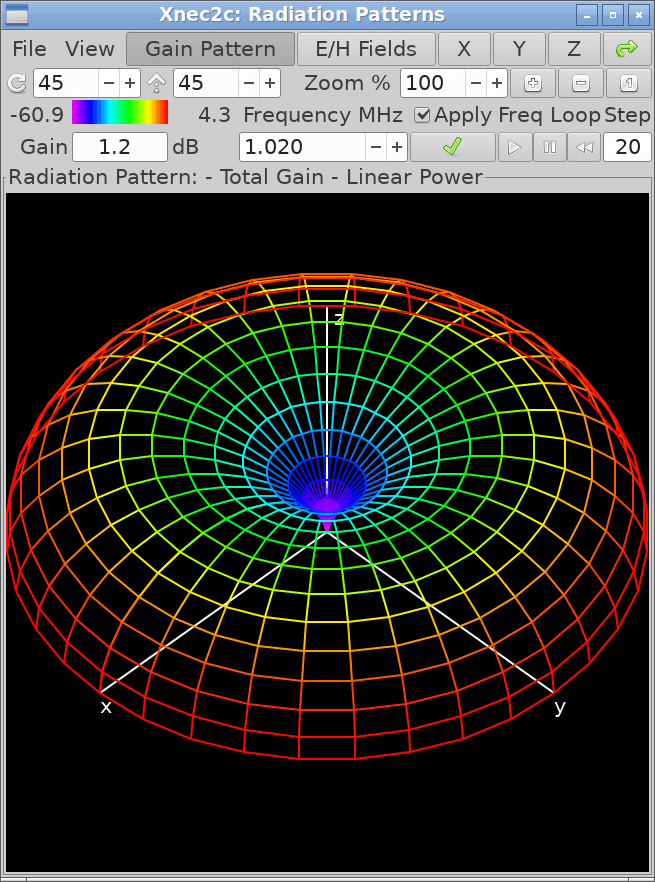
- User Interface: In its current form, xnec2c has three windows for the graphical display of output data: When started without an input file specified optionally by the -i option, the Main window opens with most of the button and menu widgets hidden. When a valid input file is opened, all the hidden widgets are shown and the structure is drawn in the Main window’s drawing area widget. From the View menu, the Radiation Pattern and Frequency Related data display windows can be opened, to draw either the Gain pattern or the Near E/H fields or Frequency-related Data like Input Impedance, VSWR, Max gain, F/B Ratio, Gain in the Viewer’s direction etc. Both the Main window and the Radiation Pattern window have buttons to select fixed viewing angles of the structure or the radiation pattern, as well as spin buttons to input specific viewing angles.
- Color Coding: Xnec2c uses color coding to visualize the Current or Charge distribution in the Structure’s segments or patches as well as the Gain pattern or the Near E/H field pattern. Color coding is also used to clarify the Graphs of Frequency-related data. A color code strip is shown in the Main and Radiation Pattern windows.
Website: www.xnec2c.org
Support: GitHub Code Repository
Developer: Neoklis Kyriazis
License: GNU General Public License v2.0
Xnec2c is written in C. Learn C with our recommended free books and free tutorials.
| Explore Linux | |
|---|---|
 | Best Free and Open Source Software - A huge collection of recommended free and open source software covering every major category. |
 | In-depth Linux Software Reviews - Detailed assessments of Linux software covering features, usability and overall quality. |
 | The Big List of Active Linux Distros - An extensive collection of actively developed Linux distributions. |
 | Open Source Alternatives - Alternatives to software and services from Google, Microsoft, Apple, Adobe, IBM, Autodesk, Oracle and others. |
 | Essential Linux System Tools - Indispensable utilities for monitoring, maintaining and managing Linux systems. |
 | Linux Productivity Tools - Useful utilities for improving productivity and streamlining everyday tasks. |
 | Alternatives to Popular CLI Tools - Modern alternatives to familiar command-line utilities supplied with Linux systems. |
 | Awesome Free Linux Game Tools - Tools, utilities and companion software that improve gaming on Linux. |
 | Machine Learning on Linux - Machine learning and deep learning software, self-hosted applications and practical tools. |
 | Saving Money with Linux - Practical ways to reduce electricity consumption and lower computing costs with Linux. |
 | Linux Candy - Fun, entertaining and sometimes delightfully quirky software from the lighter side of Linux. |
Please read our Comment Policy before commenting.