

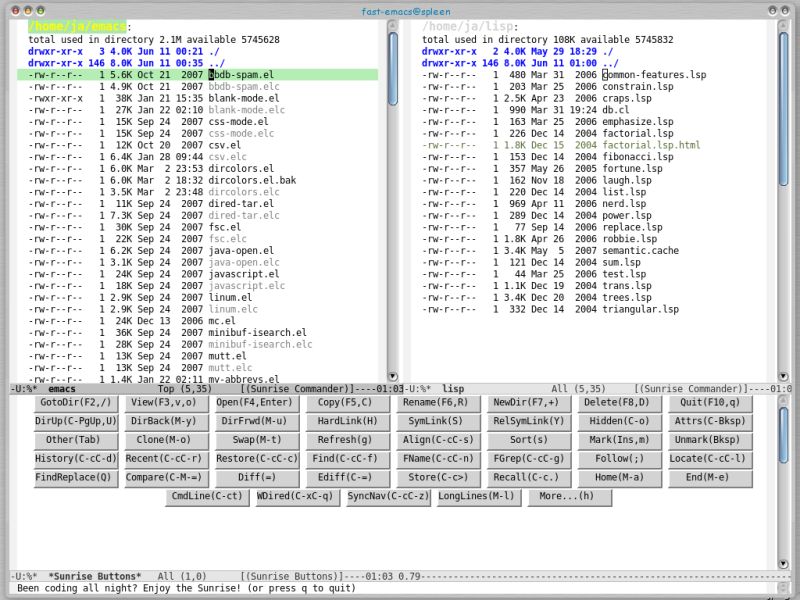
Sunrise Commander is a portable file manager for the Emacs text editor. It’s built atop of Dired and takes advantage of all its power, but also provides many handy features of its own.
Sunrise is implemented as a derived major mode confined inside the pane buffers, so its buffers and Dired ones can live together without easymenu or viper to avoid key binding collisions.
In Sunrise Commanders you press TAB to switch between the panes, and open files and directories by pressing the ENTER key. Users can select a file or directory by navigating using the directional keys, or more quickly by hitting C-s.
It automatically closes unused buffers and tries to never keep open more than the one or two used to display the panes.
The software is released under an open source license.
Features include:
- Implemented as an independent major mode derived from Dired, what allows to have a rich feature set (key bindings, colors, functions, killing automatically unused buffers, etc.) without interfering with normal Dired stuff.
- Transparent navigation inside compressed files/archives: zip, tar, tgz, rar, jar, war, ear, sar, … (using AVFS)
- Virtual directories with the results of “locate”, “find”, “grep” commands (or whatever other command that produces a list of files/directories) that can be used as regular panes with copying, removing, renaming, following…
- List of most recently visited files, also fully functional as a virtual directory.
- An independent history ring for each of the panes that can be navigated forwards and backwards and also displayed in its own pane as a virtual directory.
- Sorting directory contents by file names either alphabetically or numerically (e.g. file9.txt placed before file10.txt) or by date, size, extension; all in ascending and descending order.
- Comparing directories by file names, sizes and thoroughly (using MD5 sums).
- Comparing files using diff (for fast checking) or ediff (for more details and merging).
- Synchronized navigation for comparing and merging whole directory trees.
- Terminal integration: integrates well with any external shell that works in term-mode or with the emacs shell (eshell):
- Terminal navigation: allows to use the active pane from the terminal window without actually switching to it.
- Command line macro expansion: replaces automatically e.g. “%f” with the currently selected file, “%m” with all marked files, etc. without leaving the command line (while in line mode).
- More “natural” functions for copying and renaming recursively files and directories. The default dired functions for these operations are somewhat “weird” compared to the ones one finds usually on OFMs.
- Remembering the current locations of the panes.
- Making a backup copy of selected or marked files with just one keystroke.
- Many other small functions (swap panes, go to parent dir, follow file, show/hide hidden fields, change display of data, file coloring based on extension etc.) found usually on more mature OFMs.
Website: www.emacswiki.org/emacs/Sunrise_Commander
Support: GitHub code repository
Developer: José Alfredo Romero Latouche, Štěpán Němec
License: GNU General Public License v3.0
Sunrise Commander is written in Emacs Lisp. Learn Lisp with our recommended free books and free tutorials.
Return to Survey: Console Based File Managers
| Explore Linux | |
|---|---|
 | Best Free and Open Source Software - A huge collection of recommended free and open source software covering every major category. |
 | In-depth Linux Software Reviews - Detailed assessments of Linux software covering features, usability and overall quality. |
 | The Big List of Active Linux Distros - An extensive collection of actively developed Linux distributions. |
 | Open Source Alternatives - Alternatives to software and services from Google, Microsoft, Apple, Adobe, IBM, Autodesk, Oracle and others. |
 | Essential Linux System Tools - Indispensable utilities for monitoring, maintaining and managing Linux systems. |
 | Linux Productivity Tools - Useful utilities for improving productivity and streamlining everyday tasks. |
 | Alternatives to Popular CLI Tools - Modern alternatives to familiar command-line utilities supplied with Linux systems. |
 | Awesome Free Linux Game Tools - Tools, utilities and companion software that improve gaming on Linux. |
 | Machine Learning on Linux - Machine learning and deep learning software, self-hosted applications and practical tools. |
 | Saving Money with Linux - Practical ways to reduce electricity consumption and lower computing costs with Linux. |
 | Linux Candy - Fun, entertaining and sometimes delightfully quirky software from the lighter side of Linux. |
Please read our Comment Policy before commenting.