

Having a solid data backup strategy is imperative in keeping your data safe. Your storage drives won’t last forever. Also, hardware failure is just one way you can lose data. Even though Linux is less at risk of nasties like ransomware attacks than other operating systems, it offers no protection from things like natural disasters.
Probably one of the most important software applications, but often neglected, is the backup program. The best Linux backup software will keep you covered when you accidentally delete files, or when a disk bites the dust. Backup software protects a variety of file types, including documents, databases, photos, music, and videos. Backup software provides an automated solution for creating, managing, and restoring data from backups.
There are different types of backup software including full backup software, incremental backup software, and image backup software.
rustic is command-line backup software that creates encrypted and deduplicated backups. It reads and writes the restic repository format and can therefore access repositories created with restic. rustic aims to offer faster development, extensive configuration and features that are not available in restic.
Installation
I evaluated rustic with CachyOS, a popular Arch-based Linux distribution.
Pre-built binaries are available from the project’s GitHub releases page. Alternatively, rustic can be installed from crates.io. This requires a recent version of Rust.
$ cargo install --locked rustic-rs
The executable is named rustic.
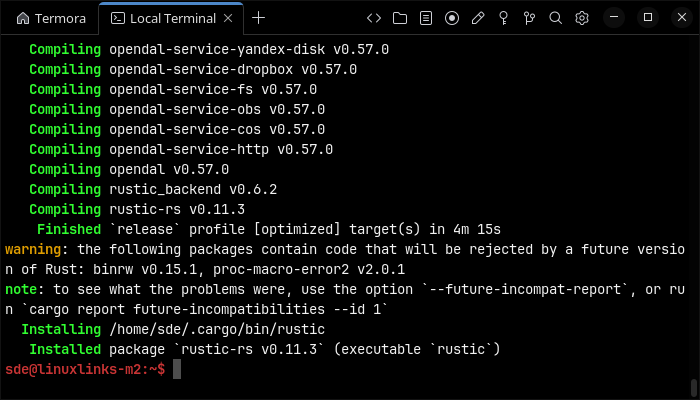
Another option is cargo-binstall, which downloads and installs a pre-built binary rather than compiling the software locally.
$ cargo binstall rustic-rs
There are also installation methods for macOS and Windows, together with an official container image.
In Operation
User interface and ease of use
Backup software should be easy to use. A clear and intuitive user interface will particularly be useful for non-technical users.
rustic is command-line software, although it includes an interactive terminal mode. It is therefore aimed primarily at users who are comfortable working in a terminal.
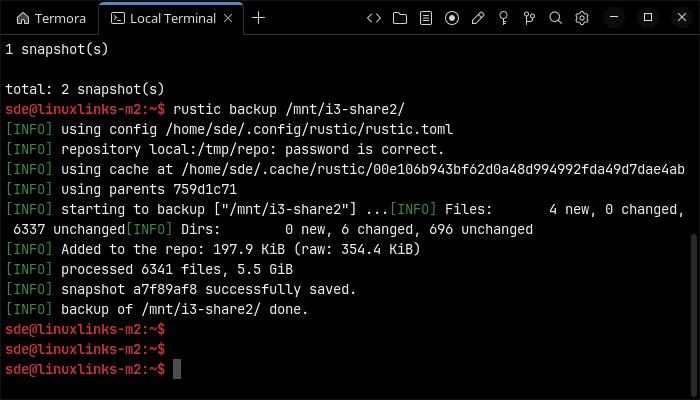
The basic workflow is straightforward. Define a repository and password in a TOML configuration file, initialise the repository with rustic init, and create a snapshot with rustic backup. The rustic snapshots command lists the available snapshots, while rustic restore recovers files.
The command output is clear, with progress indicators and useful summaries showing the number of new, changed and unchanged files. However, newcomers will face a steeper learning curve than with graphical backup software.
Automation and Scheduling
Performing backups manually is prone to mistakes, omissions, and delays. Good backup software should automate the backup process. Scheduling backups offers a level of consistency that helps keep the backup process reliable.
rustic does not include its own scheduler. Backups need to be automated with an external facility such as a systemd timer or cron.
Configuration profiles make scheduled jobs easier to manage. Repository details, backup sources, exclusions, retention settings and other options can be stored in TOML files instead of being supplied on every invocation.
Hooks can run commands at various points in the backup process. This is useful for tasks such as stopping a service before backing up its data, creating a database dump or sending a notification when an operation finishes.
Storing backups
Efficiency comes from avoiding duplication of file storage. File compression is also an important factor. Encryption ensures security of your files to protect from unauthorized access. Even if backup files are stolen, the actual data cannot be deciphered without a decryption key.
Data stored by rustic is encrypted, compressed and deduplicated. Subsequent backups process changed files while still presenting each backup as a complete snapshot.
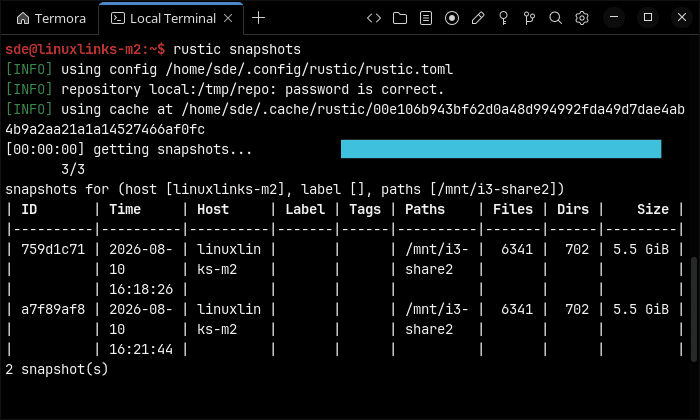
Snapshots can be organised by hostname, paths, labels and tags. They also retain metadata such as the command used, a description and summary information.
Retention policies are highly configurable. The forget command removes snapshots according to rules such as keeping a specified number of hourly, daily, weekly, monthly or yearly backups. Unreferenced repository data can subsequently be removed with the prune command.
rustic uses lock-free repository operations and two-phase pruning. Multiple clients can therefore access the same repository concurrently. Backups are append-only by default, and interrupted operations are designed to be safely resumed.
Reporting and Testing
Regularly testing your data backup strategy is essential for ensuring that backups are functioning as expected and that any configuration changes don’t cause any unexpected errors. It also allows you to identify and address any backup issues.
The check command verifies the repository and can limit checks to specified snapshots. rustic can also use an existing cache while checking data, which helps reduce unnecessary transfers when working with remote repositories.
There are commands for comparing snapshots, examining repository contents, finding files and displaying repository information. JSON output is available for scripting, while logging can be written to a file.
rustic also offers Prometheus and OpenTelemetry integration for backup operations. This is useful when incorporating backups into a wider monitoring system.
Customization
Backup software should allow you to customize your backups based on your requirements.
Customization is one of rustic’s major strengths. Most everyday options can be stored in configuration profiles, and profiles can refer to other profiles. This makes it possible to share common settings across several backup jobs.
There are extensive filtering options, including standard glob patterns, ignore files, .gitignore files and jq-style expressions. Snapshots can be filtered by host, label, paths, tags, date, size and other attributes.
Advanced users can adjust compression, chunk sizes, pack sizes and repository behaviour. rustic also supports backing up multiple sources in one run, command output and block devices.
The number of options can initially feel daunting, but the defaults are sensible and simple configurations remain short.
Cloud support
Local backups won’t protect you from burglary or natural disasters.
This is another strength.
Besides local storage, rustic supports SFTP, REST servers, S3-compatible services, OpenStack Swift, Backblaze B2, Microsoft Azure and Google Cloud Storage.
Additional built-in backends include Dropbox, FTP, Google Drive, OneDrive, WebDAV and pCloud. Other services can be accessed through OpenDAL or rclone. rustic can also read from remote sources and offers dedicated support for cold-storage repositories, including warming up required data before an operation.
Documentation
Good backup software will provide clear documentation that explains how to use the software.
The documentation is comprehensive. There is a useful getting-started guide, detailed command reference, configuration examples and explanations of repository options and storage backends.
A particularly helpful section compares rustic with restic feature by feature. There is also an FAQ, together with support through GitHub Discussions, the issue tracker and Discord.
The documentation occasionally assumes familiarity with restic concepts, but there is enough material to configure and operate rustic without consulting the restic manual.
Summary
rustic is an impressive command-line backup program. It combines restic repository compatibility with extensive configuration, lock-free operation, remote backup sources, cold-storage support and a broader selection of built-in storage backends.
Its configuration profiles are particularly useful. They keep complex backup commands manageable and make rustic well suited to unattended jobs driven by systemd timers or cron. Backup and restore operations produce clear output, while the interactive terminal mode offers a friendlier way to explore repositories.
rustic is less mature than restic and its faster-moving development model may not appeal to everyone. Users looking for a point-and-click experience should also look elsewhere. But for experienced Linux users who want a flexible, efficient and actively developed backup tool, rustic is an excellent choice.
Website: github.com/rustic-rs/rustic
Support:
Developer: rustic-rs team
License: Apache License 2.0 or MIT License
 This software is evaluated using Toshiba Enterprise HDDs.
rustic is written in Rust. Learn Rust with our recommended free books and free tutorials.
Please read our Comment Policy before commenting.