

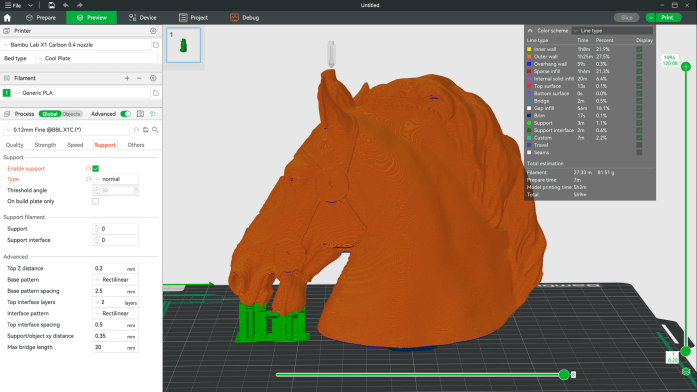
Bambu Studio is a slicing application developed by Bambu Lab for preparing models for 3D printing. It converts three-dimensional designs into printer instructions and provides facilities for arranging objects, selecting materials and controlling how individual parts are printed. Although closely integrated with Bambu Lab printers, its slicing functionality also supports other compatible machines.
The application uses a project-based workflow in which multiple build plates and their settings can be managed together. It includes extensive support for multi-colour and multi-material printing, with painting tools for assigning materials to selected model regions. Users can also change the orientation of objects, add support structures and inspect the generated toolpaths before printing. Bambu Studio is derived from PrusaSlicer and retains many of that project’s slicing capabilities while incorporating additional facilities for Bambu Lab hardware and printing workflows.
This is free and open source software.
Key Features
- Converts 3D models into G-code with detailed toolpath previews.
- Multiple build plates within a single project.
- Automatic object arrangement and orientation.
- Multi-colour and multi-material printing with model painting tools.
- Hybrid, tree and conventional support generation with customisable supports.
- Global, object-level and part-level slicing parameters.
- Variable layer heights and adjustable print-quality settings.
- Cooling logic that controls fan speeds and printing speeds.
- Automatic brim generation based on model geometry.
- Support for G2/G3 arc commands in generated toolpaths.
- Import of STEP models for preparing CAD designs.
- Assembly and exploded views for working with multi-part models.
- Options to purge transition filament into infill or other objects during material changes.
- Remote printer monitoring and management with compatible Bambu Lab networking functionality.
- Cross-platform support – runs on Linux, macOS, and Windows.
Website: github.com/bambulab/BambuStudio
Support:
Developer: Bambu Lab
License: GNU Affero General Public License v3.0
Bambu Studio is written in C++. Learn C++ with our recommended free books and free tutorials.
Related Software
| 3D Printer Tools | |
|---|---|
| Orca Slicer | Forked from BambuStudio, itself a fork of PrusaSlicer, itself a fork of Slic3r |
| PrusaSlicer | Takes 3D models (STL, OBJ, AMF) and converts them into G-code instruction |
| Cura | State-of-the-art slicer app to prepare your 3D models for your 3D printer |
| SuperSlicer | G-code generator for 3D printers |
| Slic3r | Toolpath generator for 3D printers |
| BambuStudio | Bills itself as a cutting-edge, feature-rich slicing program |
| Printrun | Suite of hosts for 3D printers and other CNC machines |
| MatterControl | Track, preview, and print your 3D parts |
| mslicer | Currently only ELEGOO .goo files can be generated |
| OctoPrint | Snappy web interface for controlling consumer 3D printers |
| Creality Print | 3D slicer for Creality printers |
| ElegooSlicer | Slicer compatible with most FDM printers |
| preFlight | Building on the Slic3r legacy as a spiritual successor to PrusaSlicer |
| QIDIStudio | Professional 3D printer slicing software based on BambuStudio |
| Mainsail | Web interface for managing 3D printers |
| Fluidd | Web interface for managing Klipper-powered 3D printers |
Read more in the software roundup.
 LinuxLinks helps you discover the best free and open source software for Linux. Explore our extensive collection of recommended applications, including alternatives to popular proprietary software. We also publish software reviews, Linux tutorials, hardware reviews, free programming books and articles covering the wider open source community. Browse our Linux resources to discover more. Know a useful free and open source Linux application we haven't covered? Suggest a program for inclusion. Has your software been featured on LinuxLinks? Display one of our Featured on LinuxLinks badges on your website or GitHub README. |
Please read our Comment Policy before commenting.