
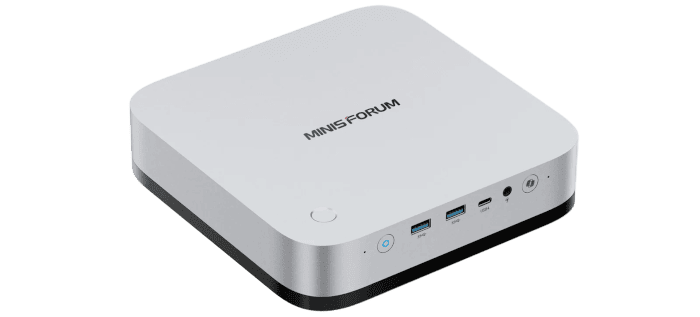
Interrogation of the System
With CachyOS installed, I’ll use a selection of Linux commands to take a closer look at the M2 Pro’s hardware and see how the system recognises it. Most of the information comes from inxi, which provides a useful overview of the processor, graphics, memory, storage, and other components, together with the drivers in use. I’ll also use lscpu to examine the processor’s layout and sensors to check temperatures.
CPU
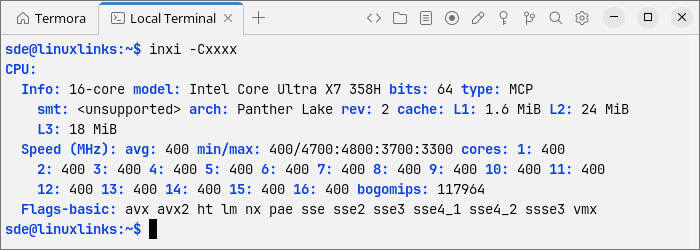
inxi identifies the processor as an Intel Core Ultra X7 358H, a 16-core Panther Lake chip. It combines four performance cores, eight efficiency cores, and four low-power efficiency cores. With no Hyper-Threading, there are 16 threads in total.
The performance cores can boost to 4.8GHz, while the efficiency and low-power efficiency cores top out at 3.7GHz and 3.3GHz respectively. There’s also 18MB of L3 cache. At the time of the screenshot, inxi reported all 16 cores at just 400MHz, consistent with the system being idle.
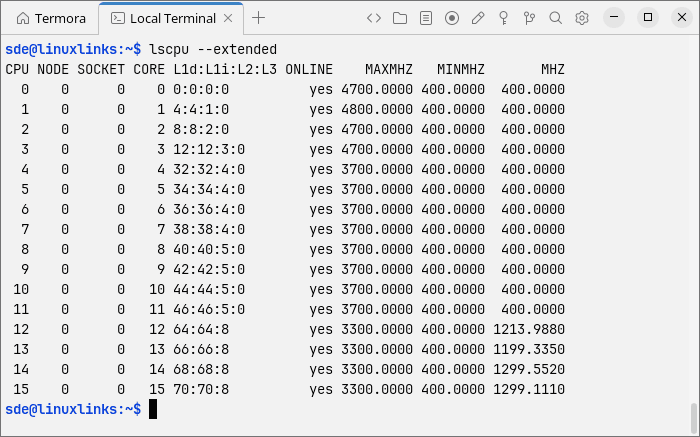
The extended lscpu output provides a closer look at the processor’s hybrid layout. CPUs 0-3 are performance cores, CPUs 4-11 are efficiency cores, and CPUs 12-15 are low-power efficiency cores. Interestingly, only one performance core has a reported maximum frequency of 4.8GHz; the other three are listed at 4.7GHz.
Graphics
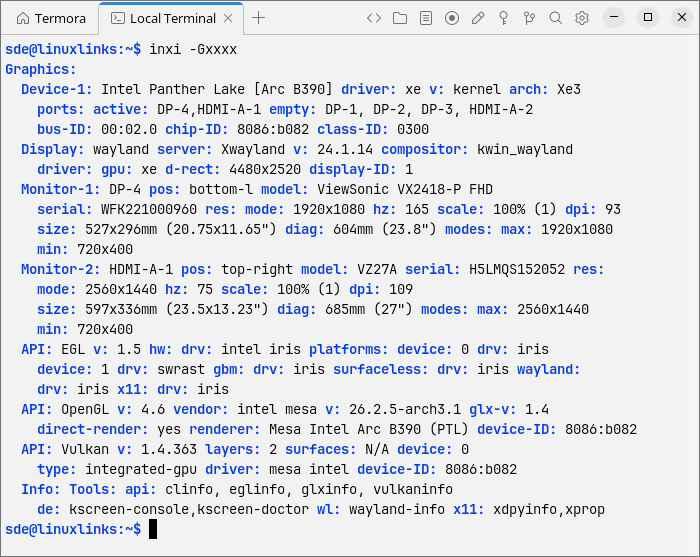
The Arc B390 is identified as part of Intel’s Panther Lake family, using the Xe3 graphics architecture. CachyOS is using Intel’s newer xe kernel driver rather than the older i915 driver. KDE Plasma is running on Wayland with KWin as the compositor.
Hardware-accelerated OpenGL 4.6 is available through Mesa 26.2.5, with direct rendering enabled. inxi also reports Vulkan 1.4.363 and Mesa’s Intel Vulkan driver. The graphics stack is in place for the gaming and GPU-accelerated workloads planned later in the series.
Memory
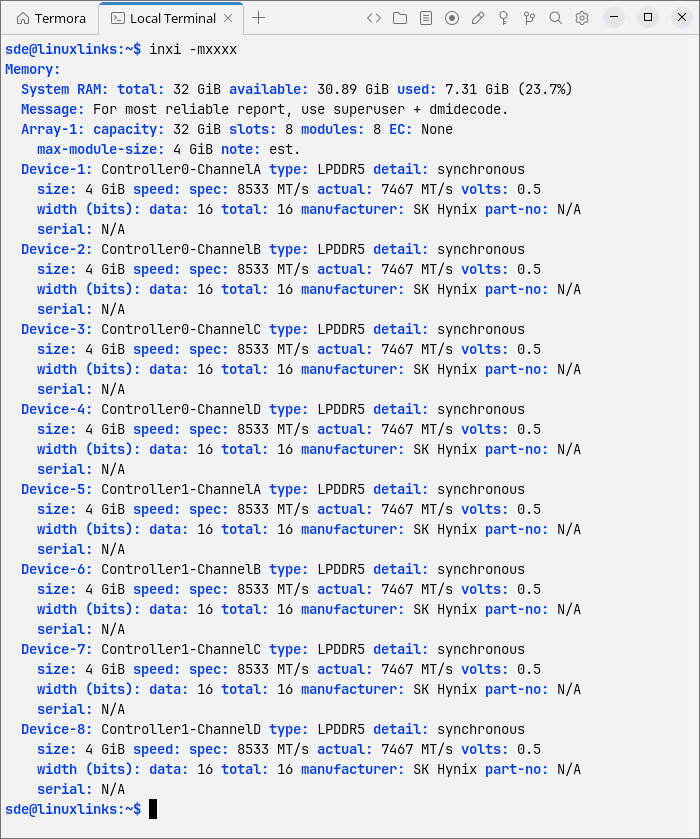
The M2 Pro has 32GB of SK Hynix LPDDR5X memory. inxi lists eight 4GB devices across two memory arrays, with a rated speed of 8533 MT/s and a configured speed of 7467 MT/s.
That’s faster than the memory in every mini PC I’ve reviewed previously. It’ll be interesting to see how much of a performance advantage this brings, particularly in gaming and local AI workloads where memory bandwidth is important. The Arc B390 shares system memory, so it stands to benefit from the additional bandwidth. Of course, improvements in the GPU architecture will also contribute to any performance gains.
The memory is soldered, so there’s no option to increase the capacity. That’s worth bearing in mind for larger local AI models, where 32GB can become a limitation.
Storage
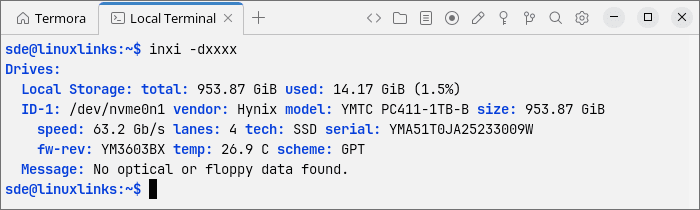
The M2 Pro comes with a 1TB YMTC PC411 NVMe SSD. At the time of writing, this is the only storage configuration listed by Minisforum in the UK, with no barebones option or alternative SSD capacity offered.
There are three M.2 2280 NVMe slots, although they don’t all offer the same performance. Two use PCIe 4.0 x4, while the third is limited to PCIe 4.0 x1. In practical terms, the first two slots are better suited to fast SSDs, particularly when transferring large files or running storage-intensive applications. The third provides a slower connection, but it’s still useful for expanding storage, keeping a games library, or holding local AI models. It can take longer to load large models from this slot, but the connection shouldn’t affect inference speed once a model is fully loaded into memory.
The supplied SSD uses one of the faster PCIe 4.0 x4 connections. Its reported temperature was 26.9°C, although sustained testing will give a better indication of its thermal behaviour. I’ll examine the drive’s actual performance in the next article in the series.
Networking
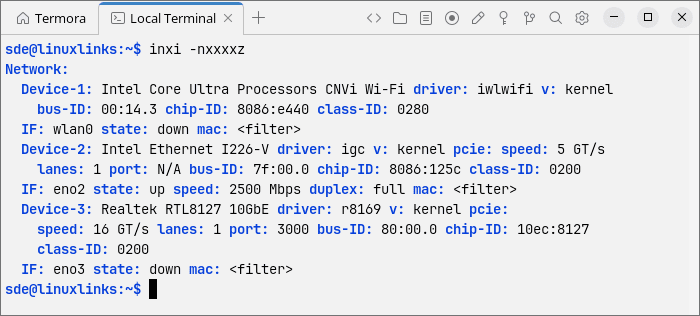
The M2 Pro has three network controllers: Intel Wi-Fi, Intel I226-V 2.5GbE Ethernet, and Realtek RTL8127 10GbE Ethernet. All three were recognised by Linux, using the iwlwifi, igc, and r8169 kernel drivers respectively.
For testing, I connected the M2 Pro via Ethernet to a Netgear satellite on my home network, rather than directly to the main router. The Intel 2.5GbE interface (eno2) negotiated a 2,500 Mbps full-duplex connection without any manual configuration or additional driver installation.
The Wi-Fi and 10GbE interfaces were inactive when I captured the screenshot. I’ll examine network performance separately, but the initial signs of Linux hardware compatibility are encouraging.
Bluetooth
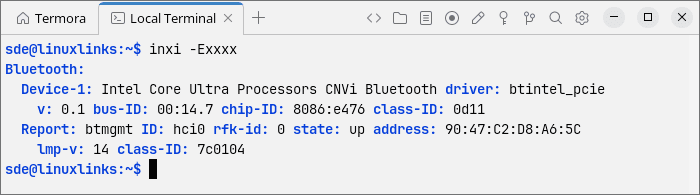
The M2 Pro’s Bluetooth controller was also recognised without issue. inxi identifies an Intel CNVi Bluetooth controller (device ID 8086:e476), using the Linux kernel’s btintel_pcie driver.
The adapter was detected and enabled automatically, without requiring any additional drivers or configuration. I successfully paired a variety of Bluetooth speakers and headphones, with no compatibility issues encountered during testing.
Audio
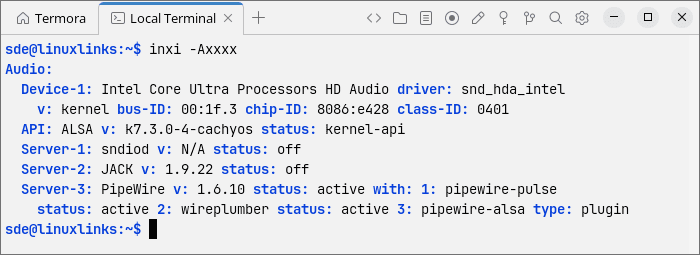
The M2 Pro’s Intel HD Audio controller was recognised by Linux, using the snd_hda_intel kernel driver. Audio is managed by PipeWire 1.6.10, with WirePlumber handling session management. The output also lists ALSA 1.3.0. PipeWire provides compatibility for applications that use PulseAudio, so a separate PulseAudio server isn’t needed. Neither a standalone PulseAudio server nor a JACK server was running when I captured the screenshot.
Temperatures
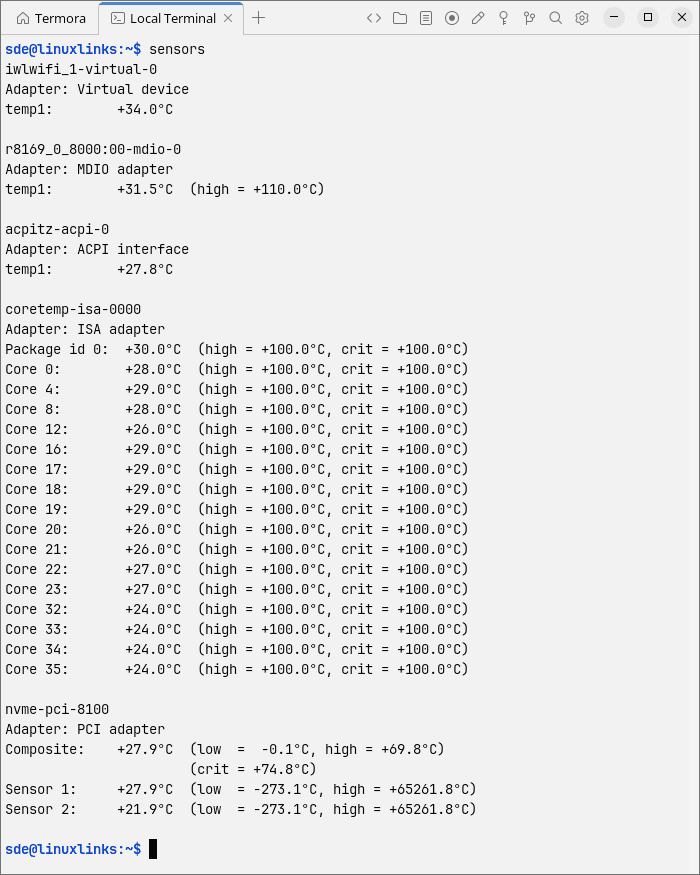
With the BIOS set to Performance mode, the M2 Pro reported low idle temperatures. The CPU package was at 30°C, with individual cores between 24°C and 29°C. The NVMe SSD registered 27.9°C, while the Wi-Fi and 10GbE controllers reported 34°C and 31.5°C respectively. These readings are encouraging, although ambient temperature and sustained load testing will be needed to put the cooling system’s performance into context.
The next article in the series will focus on benchmarking. I’ll measure how the M2 Pro performs under Linux and compare the results with other mini PCs I’ve reviewed.
Pages in this article:
Page 1 – Introduction and Design
Page 2 – First Impressions of Running Linux
Page 3 – Interrogation of the System
Complete list of articles in this series:
| MINISFORUM M2 Pro-358H | |
|---|---|
| Introduction | Introduction to the series and interrogation of the machine |
Please read our Comment Policy before commenting.